
1. Introduction
The EARTEC HUB7SMXD system provides full-duplex wireless communication for up to 7 users, designed for crews needing hands-free communication. The system includes a wearable Hub Mini Duplex Base Station, UltraLITE Single Headsets, and a Max4G Double Headset, ensuring seamless and efficient team collaboration.

Figure 1: The EARTEC HUB Mini Duplex Base Station, a compact transceiver that can be belt-worn or placed strategically for extended range.
2. What's in the Box
Your EARTEC HUB7SMXD system includes the following components:
- 1x Eartec HUB Mini Duplex Base Station
- 6x UltraLITE Single Remote Headsets
- 1x Max4G Double Headset
- 7x LX600LI Lithium Batteries
- 1x 8-Port Charger with Adapter
- 1x Large Soft-Side Case

Figure 2: The large soft-side case, designed to store and transport the entire 7-person headset system and its accessories.
3. Setup
3.1. Charging the Batteries
The system operates on rechargeable Lithium-ion batteries. Before first use, ensure all batteries are fully charged using the included 8-port charger. A full charge provides approximately 6 hours of continuous operation.
3.2. Initial Pairing and Operation
The EARTEC HUB7SMXD system is designed for immediate use right out of the box, with no FCC licensing required. Headsets are pre-paired at the factory. To begin communication:
- Insert a charged LX600LI Lithium battery into each headset and the Hub Mini Base Station.
- Power on all headsets and the Hub Mini Base Station. The system will automatically connect.
- The Hub Mini Duplex Base Station acts as a central point, expanding the capacity of UltraLITE headsets. It can be strategically placed or belt-worn for mobility.
Video 1: This video demonstrates the features and setup of the Eartec UL2S Ultralite Wireless Headset, which is part of the HUB7SMXD system. It highlights the ease of use and key functionalities.
4. Operating Instructions
4.1. Full Duplex Communication
The system provides full-duplex communication, allowing up to 7 users to talk simultaneously without pressing buttons. This is ideal for tasks requiring continuous, hands-free communication.
4.2. Range and Channels
The system offers a 1/4 mile range in all directions, utilizing 2 channels of communication for clear and reliable audio transmission.
4.3. Headset Features
- UltraLITE Single Headset: These headsets feature a self-contained, all-in-one design with the transceiver built directly into the ear cup, eliminating wires and belt-worn radios.
- Max4G Double Headset: Provides enhanced audio isolation and comfort for users in louder environments.
- Pivoting Microphone: The microphone can be pivoted for left or right wear. It automatically mutes when pivoted upward, offering convenient control over your audio input.
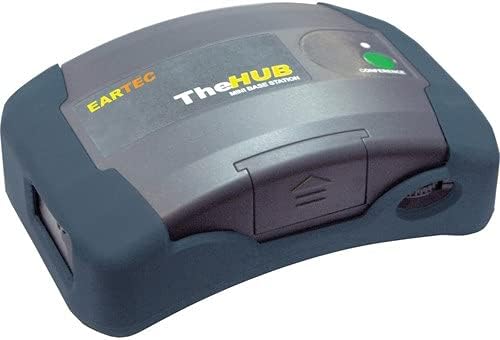
Figure 3: An EARTEC UltraLITE Single Headset, showcasing its integrated design and microphone boom.
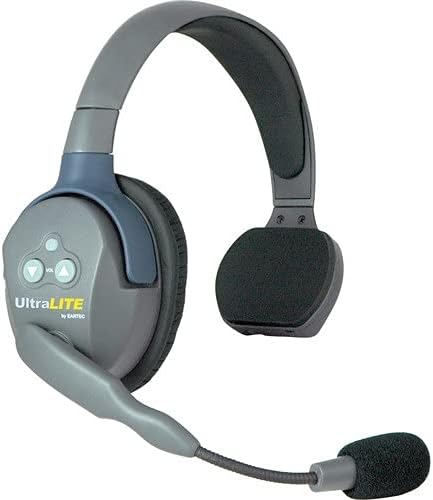
Figure 4: An EARTEC Max4G Double Headset, providing full ear coverage for improved noise isolation.
Video 2: This video provides an overview of the EARTEC UL4S UltraLITE-HD Wireless Intercom system, demonstrating its features and benefits for team communication.
5. Maintenance
5.1. Battery Care
To maximize battery life, always use the provided 8-port charger. Avoid overcharging or completely draining the batteries regularly. Store batteries in a cool, dry place when not in use.
5.2. Cleaning and Storage
Wipe headsets with a soft, dry cloth. Avoid using harsh chemicals or abrasive materials. Store the system in the provided soft-side case to protect it from dust and physical damage.
6. Troubleshooting
If you experience issues with your EARTEC system, consider the following:
- No Audio: Ensure all headsets and the Hub Mini Base Station are powered on and batteries are charged. Check that microphones are not muted (pivoted downwards for active use).
- Poor Range/Interference: Ensure the Hub Mini Base Station is centrally located and free from obstructions. Avoid operating near other 1.9 GHz DECT devices if interference occurs.
- Headset Not Connecting: Power cycle the headset and the Hub Mini Base Station. If issues persist, refer to the full user manual for re-pairing instructions.
7. Specifications
| Feature | Specification |
|---|---|
| Model Name | HUB7SMXD |
| Brand | EARTEC |
| Connectivity Technology | Wireless |
| Wireless Communication Technology | DECT 6.0 |
| Frequency | 1920-1930MHz |
| Channel Bandwidth | 1.728GHz |
| Battery Life | 6 Hours (continuous operation) |
| Item Weight | 0.01 Ounces (per headset) |
| Product Dimensions | 10 x 7 x 18 inches (packaging) |
| Material | Plastic, Silicone |
| Ear Placement | Over Ear |
| Special Feature | Microphone Included |
| Water Resistance Level | Not Water Resistant |
8. Warranty & Support
EARTEC provides a 1-year warranty for the UltraLITE Headsets and a 6-month warranty for the Max4G Double Headset. For technical support or warranty claims, please contact EARTEC customer service directly.
