
1. Introduction
Welcome to the user manual for your Sony WH-1000XM3 Wireless Noise-Cancelling Headphones. These headphones are designed to provide an exceptional audio experience with industry-leading noise cancellation, smart features, and superior comfort. This manual will guide you through the setup, operation, and maintenance of your device to ensure optimal performance.
2. What's in the Box
Upon unboxing your Sony WH-1000XM3 headphones, please ensure all the following items are present:
- Sony WH-1000XM3 Headphones
- Charging Cable (USB-C)
- Carry Pouch/Case
- 3.5mm AUX Cable (1.5m)

Image: Sony WH-1000XM3 headphones, charging cable, and 3.5mm AUX cable stored within the included carry case.
3. Setup
3.1. Charging the Headphones
Before initial use, fully charge your headphones. Use the provided USB-C cable to connect the headphones to a USB charging port (e.g., computer, USB wall adapter).
- A full charge takes approximately 3 hours.
- A 10-minute quick charge provides up to 5 hours of playback.
- The indicator light will show charging status.

Image: The left earcup of the Sony WH-1000XM3 headphones, highlighting the USB-C charging port.
3.2. Bluetooth Pairing
To connect your headphones to a device via Bluetooth:
- Ensure the headphones are charged and powered off.
- Press and hold the power button for approximately 7 seconds until the indicator light flashes blue rapidly, indicating pairing mode.
- On your device (smartphone, tablet, computer), go to Bluetooth settings and select "WH-1000XM3" from the list of available devices.
- Once connected, the indicator light will flash slowly.
NFC Pairing: For compatible devices, simply touch the NFC-enabled device to the N-Mark on the left earcup to initiate pairing.
4. Operating Instructions
4.1. Power On/Off
- Power On: Press and hold the power button for about 2 seconds.
- Power Off: Press and hold the power button for about 2 seconds.
4.2. Noise Cancellation and Ambient Sound Control
The WH-1000XM3 features advanced noise cancellation with the HD Noise Cancelling Processor QN1 and atmospheric pressure optimization, ideal for travel.
- Press the NC/AMBIENT button to cycle through Noise Cancelling, Ambient Sound Mode, and Off.
- Ambient Sound Mode: Allows you to hear surrounding sounds while listening to music.
- Quick Attention Mode: Place your hand over the right earcup to instantly lower music volume and allow ambient sound in. Remove your hand to resume normal playback.
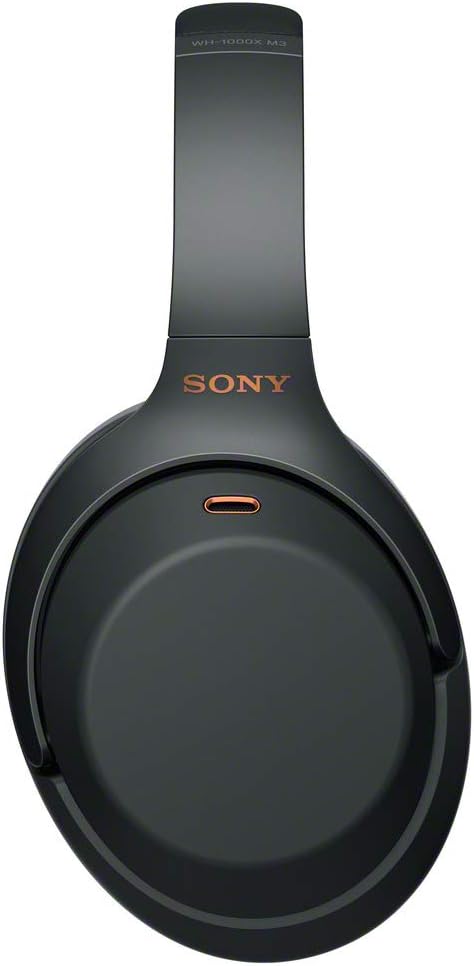
Image: The Sony WH-1000XM3 headphones worn on a mannequin head, illustrating their fit and design.
4.3. Touch Controls
The right earcup features a touch-sensitive panel for controlling playback and calls:
- Play/Pause: Double-tap the center of the panel.
- Next Track: Swipe forward.
- Previous Track: Swipe backward.
- Volume Up: Swipe up.
- Volume Down: Swipe down.
- Answer/End Call: Double-tap the center of the panel.
4.4. Sony Headphones Connect App
Enhance your experience by downloading the Sony Headphones Connect app. The app allows for:
- Adaptive Sound Control: Automatically adjusts ambient sound settings based on your activity (e.g., walking, traveling, waiting).
- Equalizer customization.
- Sound Position Control.
- Firmware updates.
4.5. Voice Assistant (Amazon Alexa / Google Assistant)
The headphones are compatible with Amazon Alexa and Google Assistant. Configure your preferred voice assistant through the Sony Headphones Connect app to access features like music playback, news, weather, smart home control, and more using your voice.
5. Maintenance
- Clean the headphones regularly with a soft, dry cloth.
- Avoid exposing the headphones to extreme temperatures, humidity, or direct sunlight.
- Do not attempt to disassemble or modify the headphones.
- Store the headphones in their protective case when not in use to prevent damage.
6. Troubleshooting
6.1. Bluetooth Connection Issues
If the Bluetooth connection is unstable, weak, or frequently interrupted:
- Ensure your device is within 10 meters (33 feet) of the headphones.
- Minimize obstacles (people, metal objects, walls) between the headphones and the connected device.
- Avoid areas with strong electromagnetic interference from devices like microwaves, Wi-Fi routers (802.11b/g/n), baby monitors, cordless phones, or RF remote controls.
- Try re-pairing the headphones with your device.
6.2. Volume Issues
If the headphone volume is too low or does not reach the desired level:
- Adjust the volume both on the headphones (via touch controls) and on your connected device. Volume synchronization may vary between devices.
- If using the Sony Headphones Connect app, ensure the volume is adjusted within the app as well.
- Verify that the earcups fit correctly and create a good seal around your ears. An improper fit can reduce perceived volume and noise cancellation effectiveness.
7. Specifications
| Feature | Specification |
|---|---|
| Model Name | WH1000XM3 |
| Brand | Sony |
| Wireless Technology | Bluetooth 4.2, NFC |
| Noise Cancellation | Active Noise Cancellation with HD Noise Cancelling Processor QN1 |
| Battery Life | Up to 30 hours (with NC) |
| Charging Time | Approx. 3 hours (full charge) |
| Quick Charge | 10 min charge for 5 hours playback |
| Frequency Response (Bluetooth) | 20 Hz – 20,000 Hz (44.1 kHz sampling) / 20 Hz – 40,000 Hz (96 kHz LDAC, 990 kbps) |
| Impedance | 47 Ohms |
| Weight | 9.17 Ounces (approx. 259g) |
| Control Type | Touch Control, Voice Control (Alexa/Google Assistant) |
| Cable Function | Detachable (3.5mm AUX) |
8. Product Overview Video
Video: An official Sony video showcasing the key features of the WH-1000XM3 headphones, including noise cancellation in various environments (like airplanes and buses), quick attention mode, touch controls, and the sleek design. The video highlights the powerful QN1 processor and the convenience of quick charging.
9. Warranty and Support
For warranty information and technical support, please refer to the official Sony website or contact Sony customer service in your region. Keep your proof of purchase for warranty claims.
- Software Updates: It is recommended to always install the latest software updates for optimal performance. Current software version: 4.5.2.
- Spare Parts Availability: Spare parts are available for 2 years.