
1. Introduction
Thank you for choosing the Numatic Henry Extra Vacuum Cleaner. This manual provides essential information for the safe and efficient operation, maintenance, and troubleshooting of your new vacuum cleaner. Please read this manual thoroughly before first use and retain it for future reference. The Henry Extra is a commercial-grade canister vacuum cleaner designed for effective cleaning of various floor types, featuring AutoSave Technology for energy efficiency.

Figure 1.1: The Numatic Henry Extra Vacuum Cleaner with its standard accessories, including the hose, wands, floor tool, and various nozzles.
2. Important Safety Information
Always follow basic safety precautions when using electrical appliances to reduce the risk of fire, electric shock, or injury.
- Read all instructions before using the appliance.
- Do not leave the appliance unattended when plugged in. Unplug from outlet when not in use and before servicing.
- Do not use outdoors or on wet surfaces.
- Do not allow to be used as a toy. Close attention is necessary when used by or near children.
- Use only as described in this manual. Use only manufacturer's recommended attachments.
- Do not use with damaged cord or plug. If appliance is not working as it should, has been dropped, damaged, left outdoors, or dropped into water, return it to a service center.
- Do not pull or carry by cord, use cord as a handle, close a door on cord, or pull cord around sharp edges or corners. Do not run appliance over cord. Keep cord away from heated surfaces.
- Do not unplug by pulling on cord. To unplug, grasp the plug, not the cord.
- Do not handle plug or appliance with wet hands.
- Do not put any object into openings. Do not use with any opening blocked; keep free of dust, lint, hair, and anything that may reduce air flow.
- Keep hair, loose clothing, fingers, and all parts of body away from openings and moving parts.
- Do not pick up anything that is burning or smoking, such as cigarettes, matches, or hot ashes.
- Do not use to pick up flammable or combustible liquids, such as gasoline, or use in areas where they may be present.
- Do not use without dust bag and/or filters in place.
- Turn off all controls before unplugging.
- Use extra care when cleaning on stairs.
3. Package Contents
Carefully unpack your Numatic Henry Extra and check that all items are present. If any items are missing or damaged, please contact your retailer.
- Numatic Henry Extra Vacuum Cleaner Unit
- Flexible Hose Assembly
- Stainless Steel Extension Wands (2)
- Combination Floor Tool
- Crevice Tool
- Dusting Brush
- Upholstery Nozzle
- AirBrush Floor Tool (if included with your model)
- Bonus Premium Microfiber Cleaner Bundle
- User Manual (this document)

Figure 3.1: Standard accessory kit for the Henry Extra, showing the hose, extension wands, and various cleaning tools.

Figure 3.2: Example of the bonus premium microfiber cleaner bundle included with the vacuum.
4. Setup and Assembly
4.1 Unpacking
Remove all packaging materials and ensure no components are left inside the box. Keep packaging for future storage or transport if needed.
4.2 Attaching the Hose
- Locate the hose inlet on the front of the Henry Extra unit.
- Insert the hose cuff firmly into the inlet until it clicks into place. Ensure it is securely fastened to prevent loss of suction.
4.3 Assembling the Wands and Floor Tool
- Connect the two stainless steel extension wands together by twisting them until they lock.
- Attach the assembled wands to the end of the hose handle.
- Select your desired floor tool (e.g., Combination Floor Tool or AirBrush) and attach it to the end of the wands.

Figure 4.1: The AirBrush floor tool, an optional accessory for enhanced carpet cleaning.
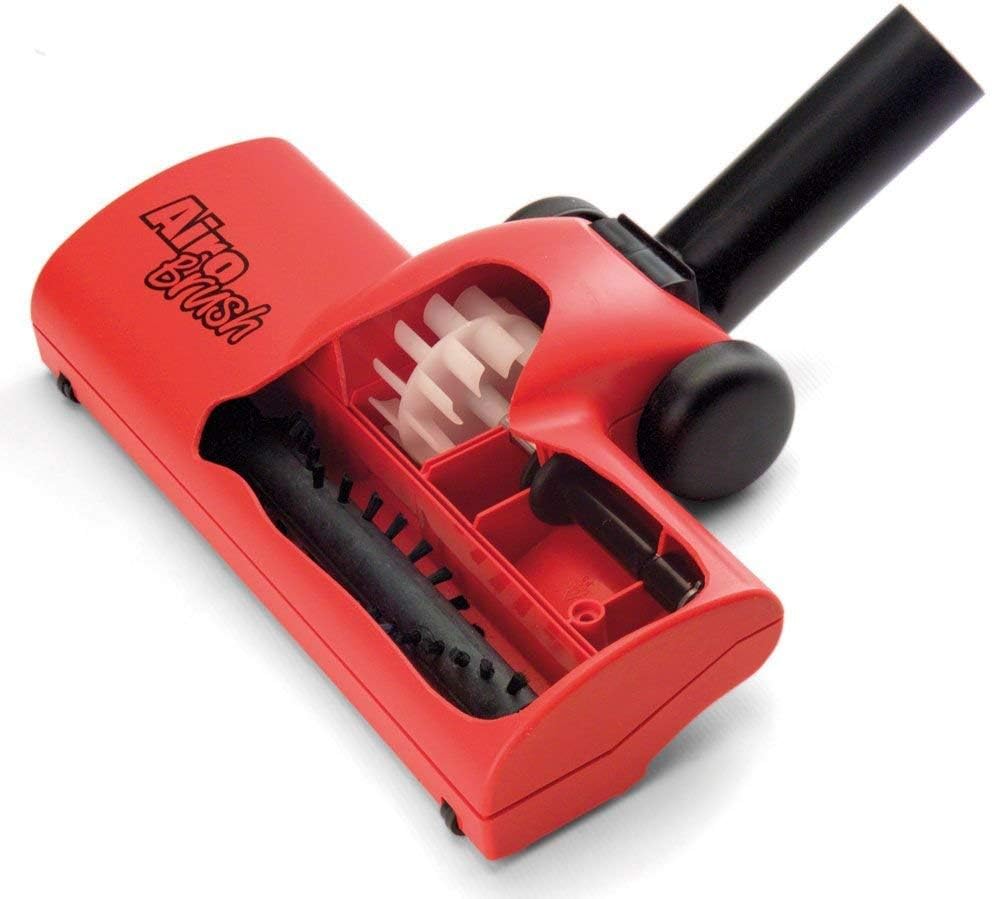
Figure 4.2: Internal components of the AirBrush tool, illustrating the rotating brush bar.
4.4 Checking the Dust Bag and Filter
Before first use, ensure a dust bag is correctly installed and the filter is clean and properly seated. Refer to the Maintenance section for details on checking and replacing these components.
5. Operating Instructions
5.1 Powering On/Off
- Unwind the power cord from the top of the unit.
- Plug the power cord into a suitable electrical outlet.
- Press the red "ON/OFF" button located on the top of the unit to start the vacuum.
- To turn off, press the "ON/OFF" button again.
5.2 AutoSave Technology
The Henry Extra features AutoSave Technology, which automatically optimizes power consumption for efficient cleaning. This system helps reduce energy usage without compromising cleaning performance. The vacuum will operate at an optimized power level upon startup.
5.3 Using Attachments
- Combination Floor Tool: Suitable for both carpets and hard floors. Adjust the brush setting using the foot pedal on the tool. Brushes down for hard floors, brushes up for carpets.
- AirBrush Floor Tool: Specifically designed for deep cleaning carpets. The air-driven brush bar agitates carpet fibers to lift embedded dirt and pet hair.
- Crevice Tool: Ideal for cleaning in tight spaces, corners, and along edges.
- Dusting Brush: Use for delicate surfaces, shelves, and upholstery.
- Upholstery Nozzle: Effective for cleaning fabric surfaces like sofas and curtains.
5.4 Cleaning Tips
- For best results, vacuum slowly to allow the airflow to pick up dirt effectively.
- Overlap passes slightly to ensure thorough cleaning.
- Regularly check the dust bag and empty it before it becomes completely full to maintain optimal suction.
6. Maintenance
Regular maintenance ensures the longevity and optimal performance of your Henry Extra vacuum cleaner. Always unplug the vacuum before performing any maintenance.
6.1 Emptying/Replacing the Dust Bag
- Unplug the vacuum cleaner from the power outlet.
- Unclip the two side clips on the vacuum head and lift the head off.
- Carefully remove the full dust bag from its holder.
- Dispose of the full bag responsibly.
- Insert a new Numatic HepaFlo dust bag, ensuring it is correctly seated in the holder and the collar is sealed around the inlet.
- Replace the vacuum head and secure the side clips.
6.2 Cleaning the Filter
The Henry Extra uses a cyclonic filter system. The main filter should be checked periodically for excessive dust build-up.
- With the vacuum head removed, gently tap the main filter to dislodge any accumulated dust.
- Do not wash the main filter unless specifically instructed by Numatic. If it becomes heavily soiled, it may need to be replaced.
6.3 Cleaning Attachments and Hose
- Wipe down all attachments and the exterior of the hose with a damp cloth.
- Check the AirBrush tool for tangled hair or debris around the brush bar and remove as necessary.
- Ensure the hose is free from blockages. If a blockage occurs, carefully remove it using a blunt object, avoiding sharp items that could damage the hose.
7. Troubleshooting
Before contacting customer support, please refer to the following common issues and their solutions.
| Problem | Possible Cause | Solution |
|---|---|---|
| Vacuum does not turn on. | No power supply. Power cord not fully plugged in. Thermal cut-out activated. | Check power outlet. Ensure plug is fully inserted. Unplug, allow to cool for 30 minutes, then restart. |
| Loss of suction. | Full dust bag. Blockage in hose or attachments. Dirty filter. Hose not securely attached. | Replace dust bag. Check and clear blockages. Clean or replace filter. Re-attach hose firmly. |
| Unusual noise. | Foreign object in fan/motor. Worn motor bearings. | Turn off and unplug. Inspect for and remove foreign objects. If noise persists, contact service. |
| Dust escaping from vacuum. | Dust bag not installed correctly. Damaged dust bag. Filter not seated properly. | Re-install dust bag. Replace dust bag. Re-seat filter. |
8. Specifications
| Feature | Detail |
|---|---|
| Brand | Numatic |
| Model Name | Henry Extra |
| Model Number | 838689 |
| Special Feature | AutoSave Technology |
| Filter Type | Cyclonic Filter |
| Included Components | Canister, Hose, Wands, Floor Tools, Accessories |
| Is Cordless? | No |
| Recommended Uses | Carpet, Hard Floor |
| Form Factor | Canister |
| Color | Red |
| Amperage | 4.83 Amps |
| Control Method | Push Button |
| Number of Wheels | 4 |
| Indoor/Outdoor Usage | Indoor |
| UPC | 768737454397 |
9. Warranty and Customer Support
9.1 Warranty Information
Your Numatic Henry Extra Vacuum Cleaner is covered by a manufacturer's warranty against defects in materials and workmanship. The specific terms and duration of your warranty may vary by region and retailer. Please retain your proof of purchase for warranty claims. For detailed warranty information, refer to the documentation provided with your purchase or visit the official Numatic website.
9.2 Customer Support
Should you encounter any issues not covered in the troubleshooting section, or require further assistance, please contact Numatic customer support or your authorized retailer.
- Online Support: Visit the official Numatic website for FAQs, product registration, and support resources.
- Telephone Support: Refer to your product packaging or the Numatic website for regional contact numbers.
- Service Centers: For repairs or servicing, locate an authorized Numatic service center through their official website.