
Introduction
This user manual provides comprehensive instructions for the installation, operation, maintenance, and troubleshooting of your Sargent & Greenleaf Spartan PivotBolt Model 1006-108 Electronic Safe Lock Kit. Designed for high-security applications, this electronic lock offers reliable protection with advanced features, including EMP resistance. Please read this manual thoroughly before attempting any installation or operation to ensure proper function and safety.
Safety Information
Always handle the lock components with care. Ensure that the safe door is open and the boltwork is disengaged before performing any installation or maintenance. Keep the lock away from excessive moisture and extreme temperatures. Do not attempt to force the lock or use unauthorized tools, as this may damage the unit and void the warranty. For critical security applications, consider professional installation.
Product Overview
The Sargent & Greenleaf Spartan PivotBolt Electronic Safe Lock Kit is engineered for dependable security and ease of use. It features a robust design and advanced electronic components to protect your valuables.
Key Features:
- Easy Retrofit: Designed to match the "magic module footprint" of most safe locks, simplifying installation and upgrades.
- PivotBolt Model: Automatically relocks when the boltwork is closed, enhancing security.
- Penalty Lockout Feature: Prevents random code attempts by temporarily locking out after multiple incorrect entries.
- EMP-Resistant: Tested to U.S. military standards for electromagnetic pulse (EMP) attacks, ensuring functionality in extreme conditions.
- All-Inclusive Kit: Comes complete with a bright chrome one-battery keypad, PivotBolt lock body, battery, and mounting hardware.
Components:
- Electronic Keypad (Bright Chrome)
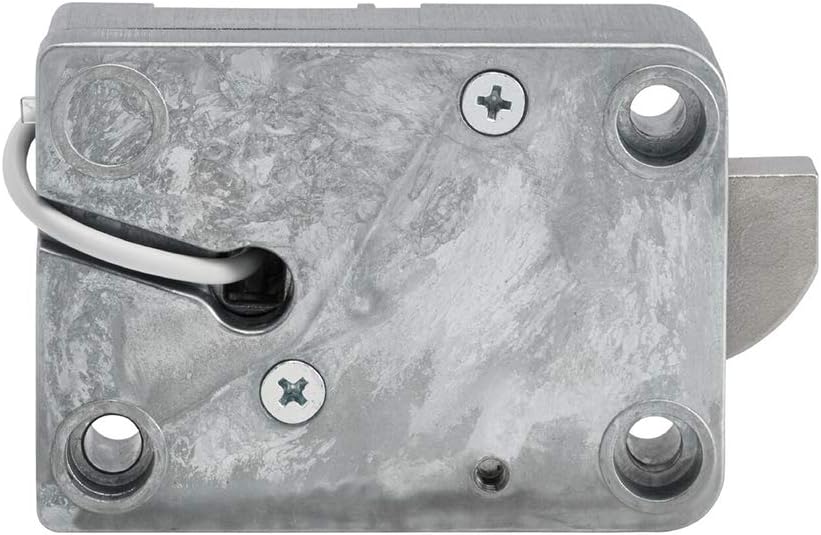
- PivotBolt Lock Body
- 9V Battery
- Mounting Hardware


Setup and Installation
The Spartan PivotBolt lock is designed for straightforward installation and is compatible with the standard S&G Magic Module footprint, making it an ideal retrofit for many existing safe locks. For detailed, step-by-step installation instructions, please refer to the official Installation Manual PDF provided by Sargent & Greenleaf.
Key Installation Considerations:
- Ensure the safe door is open and secured during installation.
- The lock is universally handed, allowing for left, right, up, or down mounting.
- Carefully connect the keypad cable to the lock body.
- Secure the lock body using the provided mounting hardware.
- Install the 9V battery into the keypad's battery compartment.
For the complete installation guide, download the PDF: Sargent & Greenleaf Installation Manual (PDF)
Operating Instructions
Your Spartan PivotBolt electronic lock is pre-programmed with a factory default code. It is highly recommended to change this code immediately after installation for enhanced security.
Opening the Lock:
- Enter your valid 6-digit code on the keypad.
- The lock will emit a series of beeps and the LED will flash, indicating a successful code entry.
- Within 4 seconds of successful code entry, turn the safe handle to retract the boltwork and open the door.
Closing and Locking:
Simply close the safe door and turn the handle to extend the boltwork. The PivotBolt mechanism will automatically relock the safe.
Changing Your Code:
Refer to the detailed instructions in the official User Manual PDF for changing the master code and adding/deleting user codes. This process typically involves entering the current code, followed by a specific sequence and the new code.
For the complete user guide, download the PDF: Sargent & Greenleaf User Manual (PDF)
Maintenance
The Sargent & Greenleaf Spartan PivotBolt lock is designed for minimal maintenance. The primary maintenance task is battery replacement.
Battery Replacement:
- The lock uses one 9V alkaline battery (included).
- When the battery is low, the keypad may emit a warning signal (e.g., multiple beeps or a flashing light) during operation.
- To replace the battery, locate the battery compartment on the keypad. This is typically a slide-out tray or a cover that can be removed.
- Carefully remove the old battery and insert a new 9V alkaline battery, ensuring correct polarity.
- Close the battery compartment securely.
- Test the lock operation with the new battery.
Note: Always use high-quality alkaline batteries for optimal performance and longevity.
Troubleshooting
If you encounter issues with your Spartan PivotBolt lock, refer to the following common troubleshooting steps:
| Problem | Possible Cause | Solution |
|---|---|---|
| Lock does not respond to keypad input. | Dead or low battery; loose cable connection. | Replace the 9V battery. Check that the keypad cable is securely connected to the lock body. |
| Lock beeps multiple times and does not open after code entry. | Incorrect code entered; penalty lockout activated. | Ensure the correct code is entered. If penalty lockout is active, wait for the lockout period to expire before re-attempting. |
| Lock opens but does not relock automatically. | Boltwork not fully extended; obstruction in safe door. | Ensure the safe door is fully closed and the handle is turned to extend the boltwork completely. Check for any obstructions preventing the boltwork from extending. |
| Keypad buttons are unresponsive or sticky. | Dirt or debris; physical damage. | Clean the keypad surface with a soft, dry cloth. If buttons are physically damaged, contact customer support. |
If the problem persists after attempting these solutions, please contact Sargent & Greenleaf customer support for further assistance.
Specifications
| Attribute | Detail |
|---|---|
| Brand | Sargent & Greenleaf |
| Model Name | Spartan PivotBolt |
| Model Number | 1006-108 |
| Lock Type | Electronic |
| Special Feature | Keyless, EMP Resistance |
| Material | Chrome |
| Color | Chrome |
| Item Dimensions (L x W x H) | 10 x 7.25 x 2.56 inches |
| Item Weight | 2 Pounds |
| Power Source | 1 x 9V Alkaline Battery (included) |
| Included Components | Keypad, Lock Body, Battery, Mounting Hardware |
| Recommended Uses | Securing guns, valuables, important documents |
Warranty and Support
Warranty: The Sargent & Greenleaf Spartan PivotBolt Electronic Safe Lock Kit comes with a Two Year Limited Warranty. Please retain your proof of purchase for warranty claims.
Customer Support: For technical assistance, warranty inquiries, or further questions regarding your product, please contact Sargent & Greenleaf customer support directly. Refer to the official Sargent & Greenleaf website for the most current contact information.
You can also find additional resources and information on the Sargent & Greenleaf Amazon store page: Sargent & Greenleaf Store


