
Introduction
Welcome to the USA Toyz AstroShot Gyro Rotating Shooting Game. This manual provides essential information for the safe and effective setup, operation, and maintenance of your new target game. Please read all instructions carefully before use.
What's in the Box
- 1 AstroShot Gyro Target Module
- 2 Foam Blaster Toy Guns
- 14 Plastic Gun Targets
- 24 Soft Foam Darts
- 2 Dart Holders
- 2 Rotating Obstacles
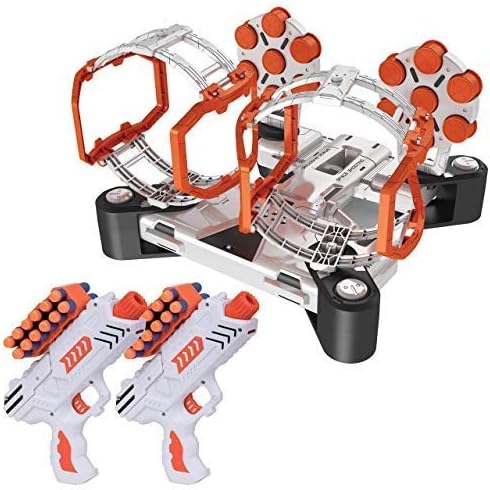
Image: The complete AstroShot Gyro Rotating Shooting Game kit, including the target module, two foam blasters, and various accessories.
Setup Instructions
- Install Batteries: The target module requires (3) AA batteries (not included). Open the battery compartment on the underside of the module and insert the batteries, ensuring correct polarity.
- Assemble Target Holders: Insert the rotating target holders into the designated slots on the main module. Ensure they are securely fastened.
- Place Targets: Load the 14 plastic gun targets onto the module. You can choose to use the levitating foam balls or the bullseye targets.
- Positioning: Place the target module on a stable, flat surface. The unit features 4 leg supports for stability.

Image: A diagram illustrating the dimensions of the AstroShot Gyro target module and its spinning obstacles.
Operating Instructions
- Power On: Locate the power switch on the target module and turn it to the 'ON' position.
- Music (Optional): The module may feature a galactic soundtrack. Use the music switch to turn it on or off according to preference.
- Load Blaster: Take one of the foam blaster toy guns. Load one soft foam dart at a time into the blaster.
- Cock Blaster: Pull back the cocking mechanism on the blaster to prepare it for firing.
- Aim and Shoot: Aim the blaster at the targets. The game features rotating obstacles that add a challenge. Shoot to knock down all gun targets from up to a 20ft shooting range. The blasters are compatible with Nerf darts.
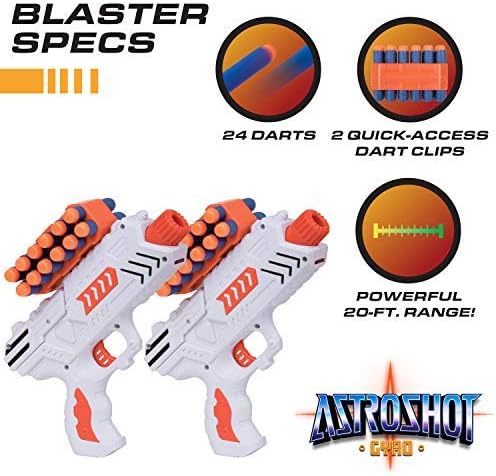
Image: A close-up view of the two foam blasters, showcasing their design, dart capacity, and quick-access dart clips.
Official Product Video: USA Toyz AstroShot Target Games
Video: An official product video from USA Toyz demonstrating the AstroShot Target Games in action, including setup and gameplay.
Official Product Video: Astroshot Gyro, ZeroG, ZeroGX, Gemini
Video: An official product video from USA Toyz showcasing various Astroshot models, including the Gyro, ZeroG, ZeroGX, and Gemini, highlighting their features and gameplay.
Maintenance
- Cleaning: Wipe down the target module and blasters with a dry or slightly damp cloth. Do not immerse in water.
- Storage: Store the game components in a cool, dry place away from direct sunlight when not in use.
- Battery Care: Remove batteries from the target module if the game will not be used for an extended period to prevent leakage.
Troubleshooting
- Targets Not Rotating/Floating: Ensure batteries are correctly installed and not depleted. Check that the power switch is in the 'ON' position.
- Darts Not Firing: Verify that darts are properly loaded and the blaster is fully cocked. Inspect darts for damage that might prevent proper firing.
- Sound Issues: Check the music switch on the target module.
Specifications
| Feature | Detail |
|---|---|
| Model Number | B3229 |
| Manufacturer | USA Toyz |
| Recommended Age | 8 - 8 years |
| Item Weight | 3.14 pounds |
| Package Dimensions | 12.64 x 11.93 x 5.28 inches |
Safety Information
- WARNING: CHOKING HAZARD – Small parts. Not for children under 3 years.
- Do not aim at eyes or face.
- Use only official darts provided with this product or compatible Nerf darts. Do not modify darts or blasters.
- Adult supervision is recommended during play.
Warranty and Support
For warranty information or customer support, please refer to the contact details provided on the product packaging or visit the official USA Toyz website. Your satisfaction is our priority.