
1. Introduction
The Adax Neo L is a modern, intelligent electric wall heater designed for efficient and comfortable heating. It features Wi-Fi connectivity, allowing control via a smartphone or tablet application. This heater complies with EcoDesign requirements, offering energy-saving functionalities such as 24-hour programming, open window detection, and adaptive start time adjustment. Its slim, Scandinavian design ensures it integrates seamlessly into any interior.
This manual provides essential information for the safe installation, operation, and maintenance of your Adax Neo L heater.
2. Safety Information
- Read all instructions carefully before installation and use.
- This appliance is intended for indoor use only.
- Do not cover the heater. Covering the heater can cause overheating and fire.
- Ensure the power supply voltage matches the rating label on the heater.
- Keep flammable materials at a safe distance from the heater.
- Do not operate the heater with a damaged cord or plug. Contact qualified service personnel for repairs.
- This appliance is not intended for use by persons (including children) with reduced physical, sensory or mental capabilities, or lack of experience and knowledge, unless they have been given supervision or instruction concerning use of the appliance by a person responsible for their safety.
- Children should be supervised to ensure that they do not play with the appliance.
- The heater must be installed horizontally.
3. Package Contents
Your Adax Neo L heater package includes:
- Adax Neo L Electric Wall Heater
- Wall mounting bracket
- 1.2m connection cable with plug
- Instruction Manual
Note: Optional floor stands are sold separately and are required if you choose not to wall-mount the heater.
4. Setup and Installation
4.1 Wall Mounting
The Adax Neo L heater is designed for wall mounting. The necessary mounting bracket is included in the package.
- Choose a suitable location on a wall, ensuring adequate clearance.
- Maintain a minimum clearance of 50 mm below the radiator and 150 mm above the radiator for proper air circulation.
- The heater must be installed horizontally.
- Securely attach the mounting bracket to the wall using appropriate fasteners for your wall type.
- Carefully hang the heater onto the installed bracket.


4.2 Optional Floor Mounting
If you prefer not to wall-mount the heater, optional floor stands (feet) can be purchased separately. Follow the instructions provided with the floor stands for proper attachment and placement.

5. Operating Instructions
5.1 Power On/Off
Locate the power switch on the right side of the heater to turn the unit on or off.
5.2 Wi-Fi Thermostat Control
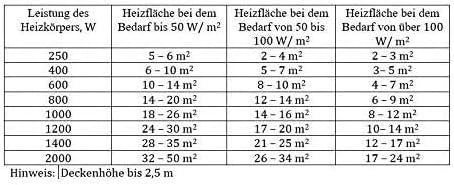
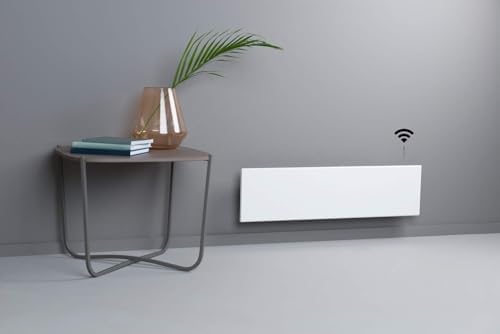
The Adax Neo L features a programmable Wi-Fi thermostat, allowing you to control your heating remotely via a smartphone or tablet application. The app can connect to the heater directly or through your home internet network.
- Download the official Adax app from your device's app store (iOS/Android).
- Follow the in-app instructions to connect your heater to your Wi-Fi network.
- Once connected, you can adjust temperature settings, create heating schedules, and monitor your heater's status from anywhere.
5.3 Manual Operation
When not connected to a mobile device or Wi-Fi, the heater's built-in thermostat functions as a standard electronic thermostat. You can manually set the desired continuous temperature directly on the unit's control panel.
5.4 Energy-Saving Features
- 24-Hour Programmable Thermostat: Set specific temperatures for different times of the day or week to optimize energy consumption.
- Open Window Detection: The heater automatically detects when a window or door is opened for ventilation. If the room temperature drops suddenly, the heater temporarily switches off to avoid wasting energy.
- Adaptive Start Time: This feature learns how long it takes to heat your room and adjusts the heater's start time to reach your desired temperature precisely when needed, preventing unnecessary heating.
6. Maintenance
To ensure optimal performance and longevity of your Adax Neo L heater, follow these simple maintenance guidelines:
- Always disconnect the heater from the power supply before cleaning.
- Allow the heater to cool down completely before cleaning.
- Wipe the exterior surfaces with a soft, damp cloth. Do not use abrasive cleaners, solvents, or harsh chemicals, as these can damage the finish.
- Do not allow water to enter the internal parts of the heater.
- Regularly check the power cord and plug for any signs of damage.
7. Troubleshooting
If you encounter issues with your Adax Neo L heater, refer to the following common troubleshooting steps:
- Heater not turning on:
- Ensure the heater is properly plugged into a working power outlet.
- Check if the power switch on the side of the heater is in the 'On' position.
- Verify that the circuit breaker has not tripped.
- No heat output:
- Check the thermostat setting; ensure it is set higher than the current room temperature.
- Confirm that the 'Open Window Detection' feature is not active (e.g., a window is not open).
- If using the app, ensure the heater is connected and the schedule is correctly set.
- Wi-Fi connectivity issues:
- Ensure your Wi-Fi router is working correctly and within range.
- Restart your Wi-Fi router and the heater.
- Follow the pairing instructions in the Adax app again.
- Unusual noises or smells:
- Turn off the heater immediately and unplug it.
- Contact customer support or a qualified electrician.
If these steps do not resolve the issue, please contact Adax customer support for further assistance.
8. Specifications
| Specification | Detail |
|---|---|
| Brand | ADAX |
| Model Number | 420046 |
| Color | White |
| Dimensions (L x W x H) | 186 x 8.7 x 21 cm |
| Weight | 6.9 Kilograms |
| Power | 1400 Watts |
| Voltage | 230 Volts |
| Heating Method | Convection |
| Special Features | Wi-Fi Control, EcoDesign Compliant, Open Window Detection, Adaptive Start Time |
| Installation Type | Wall Mount (optional floor stand) |
| Certifications | NEMCO Certified |
| Indoor/Outdoor Use | Indoor |
8.1 Recommended Heating Area
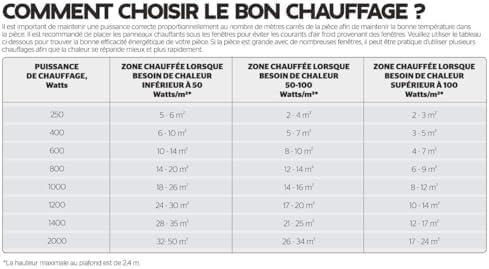
The following table provides guidance on the recommended heating area based on the heater's wattage and the heat demand of the room. This is based on a maximum ceiling height of 2.4 meters.
| Heating Power (Watts) | Heated Area (Heat Demand < 50 W/m²) | Heated Area (Heat Demand 50-100 W/m²) | Heated Area (Heat Demand > 100 W/m²) |
|---|---|---|---|
| 250 | 5 - 6 m² | 2 - 4 m² | 2 - 3 m² |
| 400 | 6 - 10 m² | 5 - 7 m² | 3 - 5 m² |
| 600 | 10 - 14 m² | 8 - 10 m² | 4 - 7 m² |
| 800 | 14 - 20 m² | 12 - 14 m² | 6 - 9 m² |
| 1000 | 18 - 26 m² | 14 - 16 m² | 8 - 12 m² |
| 1200 | 24 - 30 m² | 17 - 20 m² | 10 - 14 m² |
| 1400 | 28 - 35 m² | 21 - 25 m² | 12 - 17 m² |
| 2000 | 32 - 50 m² | 26 - 34 m² | 17 - 24 m² |
9. Warranty and Support
The Adax Neo L heater comes with a 5-year manufacturer's warranty. This warranty covers defects in materials and workmanship under normal use.
For warranty claims, technical support, or any questions not covered in this manual, please contact Adax customer service. Keep your proof of purchase for warranty validation.


