1. Introduction
The ZdalaMit XRT020 is a pre-programmed replacement remote control designed for various Vizio TV models. This remote offers a straightforward, ready-to-use solution without the need for complex programming or pairing procedures. Simply insert the batteries, and it is ready for operation.
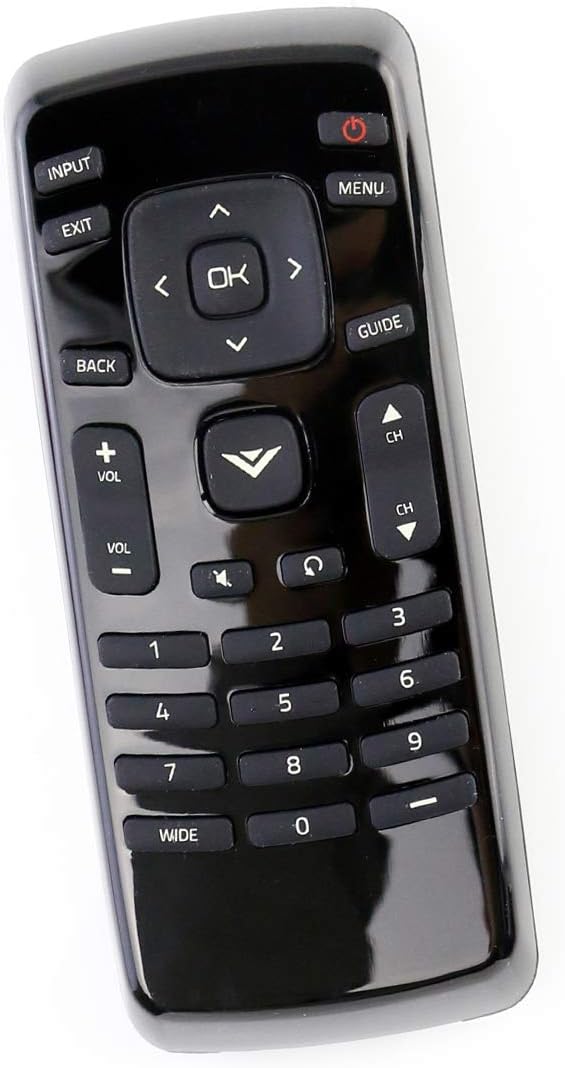
Figure 1: Front view of the XRT020 Remote Control.
Key Features:
- Pre-programmed: No setup required, ready to use out of the box.
- Durable Construction: Made from high-quality ABS material.
- Extended Range: Operates effectively up to 30 feet (10 meters).
- Responsive Buttons: Designed for quick response times (0.2 seconds) and long-lasting use (over 160,000 clicks).
2. Setup
Battery Installation:
- Locate the battery compartment on the back of the remote control.
- Slide open the battery compartment cover.
- Insert two (2) 1.5V AAA alkaline batteries, ensuring correct polarity (+ and -) as indicated inside the compartment.
- Close the battery compartment cover securely.
The remote control is now ready for immediate use with your compatible Vizio TV. No additional programming or pairing is necessary.

Figure 2: Battery compartment for AAA batteries.
3. Operating Instructions
The XRT020 remote control provides standard functions for your Vizio TV. Below are the primary buttons and their uses:
| Button | Function |
|---|---|
| Power (●) | Turns the TV on or off. |
| Input | Selects the video input source (e.g., HDMI 1, AV). |
| Menu | Accesses the TV's main menu. |
| OK / Navigation Arrows | Confirms selections and navigates through menus. |
| Back / Exit | Returns to the previous screen or exits the current menu. |
| Volume (+ / -) | Adjusts the sound volume up or down. |
| Channel (CH ▲ / ▼) | Changes the TV channel up or down. |
| Mute | Mutes or unmutes the TV sound. |
| Number Pad (0-9) | Directly enters channel numbers. |
4. Maintenance
To ensure the longevity and optimal performance of your ZdalaMit XRT020 remote control, follow these maintenance guidelines:
- Cleaning: Wipe the remote with a soft, dry cloth. Avoid using liquid cleaners or abrasive materials, as they may damage the surface or internal components.
- Battery Replacement: Replace batteries promptly when the remote's performance degrades. Always use new AAA alkaline batteries and dispose of old batteries responsibly.
- Storage: Store the remote in a cool, dry place away from direct sunlight, extreme temperatures, and high humidity.
- Protection: Avoid dropping the remote or subjecting it to strong impacts, which can cause internal damage or breakage.
5. Troubleshooting
If you encounter issues with your XRT020 remote control, please refer to the following common troubleshooting steps:
- Remote Not Responding:
- Ensure batteries are inserted correctly with the correct polarity.
- Replace old batteries with new 1.5V AAA alkaline batteries.
- Check for any obstructions between the remote and the TV's infrared sensor.
- Intermittent Functionality:
- Verify that the remote is within the operational range (up to 30 feet / 10 meters) of the TV.
- Ensure there are no strong light sources or other electronic devices interfering with the remote's signal.
- Specific Buttons Not Working:
- Inspect the buttons for any physical damage or debris that might be preventing them from pressing correctly.
Since this remote is pre-programmed, no manual programming or pairing is required. If issues persist after following these steps, please contact customer support.
6. Specifications
| Feature | Detail |
|---|---|
| Model Number | XRT020 |
| Brand | ZdalaMit |
| Product Dimensions | 5 x 1.5 x 0.6 inches |
| Item Weight | 1.59 ounces |
| Power Supply | 2 x 1.5V AAA Alkaline Batteries (not included) |
| Special Feature | Pre-programmed, no setup required |
| Color | Black |
| Max Supported Devices | 1 (Television) |
| Operating Range | Up to 30 feet / 10 meters |

Figure 3: XRT020 Remote Control dimensions.
7. Compatible Vizio TV Models
The ZdalaMit XRT020 remote control is compatible with a wide range of Vizio TV models, including but not limited to:
- D32hn-E0
- D39hn-E0
- D48n-E0
- D24H-C1
- E390-A1
- E280-A1
- E280-B1
- E291-A1
- D32hnx-E1
- D50n-E1
- D32hn-D0
- D39hn-D0
- D40n-E3
- D60n-E3
- D320-B1
- E241-A1
- D28H-C1
- D390-B0
- D32H-C1
- E221-A1
- E231-B1
- E320-A1
- E320-B0E
- E241-B1
- E320-B0
- E320-B2
- E320-B1
- E320-B1E
- E390-B1
- D32hn-E1
- E390-B1E
- D43n-E1

Figure 4: Partial list of compatible Vizio TV models.
8. Support and Warranty
For any questions, concerns, or support regarding your ZdalaMit XRT020 remote control, please refer to the seller's contact information provided at the point of purchase. While specific warranty details are not included in this manual, please retain your purchase receipt for any potential warranty claims.
"Please feel free to contact us if you have any query, thanks!"