
Introduction
This manual provides essential information for the safe and efficient use of your iDealBed iEscape Adjustable Bed Base. Please read all instructions carefully before assembly and operation. Retain this manual for future reference.
Important Safety Information
WARNING: Failure to follow these safety instructions may result in injury or damage to the product.
- This product includes safety features such as a Nano-Hook Retention System, Foot Retainer Bar, and a safety battery back-up.
- The bed base has a heavy lift capacity of up to 850 lbs. Do not exceed this weight limit.
- Always follow the assembly instructions and recommended weight limit to prevent instability or collapse.
- Regularly check the bed frame for any potential pinch points or sharp edges.
- Keep children and pets away from moving parts.
- Ensure all power cords are routed safely to prevent tripping hazards or damage.
Package Contents
Verify that all components are present before beginning assembly:
- Adjustable Bed Base Frame
- Adjustable Legs (Multi-height options)
- Wireless Remote Control (with 2 AAA batteries)
- Power Cord and Power Supply
- Foot Retainer Bar
- User Manual (this document)
Setup Instructions
Follow these steps to assemble your iDealBed iEscape Adjustable Bed Base:
- Unpack Components: Carefully remove all items from the packaging. Place the bed base frame upside down on a clean, flat surface to access the leg attachment points.
- Install Legs: Attach the adjustable legs to the designated corners of the bed base. The legs offer multiple height options (6", 7", 8", 9", 10"). Select your desired height and securely fasten the legs.
- Position Bed Base: With assistance, carefully flip the bed base over and place it in its desired location. Ensure there is adequate space around the bed for articulation and wall-hugger functionality.
- Install Foot Retainer Bar: Insert the foot retainer bar into the designated holes at the foot of the bed base. This bar helps keep the mattress in place during adjustments. The NanoHook Retention System also assists in mattress stability.
- Connect Power: Plug the power cord into the bed base's control box, then plug the power supply into a grounded electrical outlet. Ensure the power cord is not pinched or obstructed by moving parts.
- Insert Remote Batteries: Open the battery compartment on the back of the wireless remote control and insert the two AAA batteries provided, observing polarity.
- Test Functionality: Use the remote control to test the head and foot articulation. Ensure all movements are smooth and unobstructed.

Image: Adjustable leg for customizing bed height.

Image: The bed base with the foot retainer bar in place, securing the mattress.
Operating Instructions
Your iDealBed iEscape Adjustable Bed Base is controlled by a wireless remote. Familiarize yourself with its functions:
Remote Control Overview
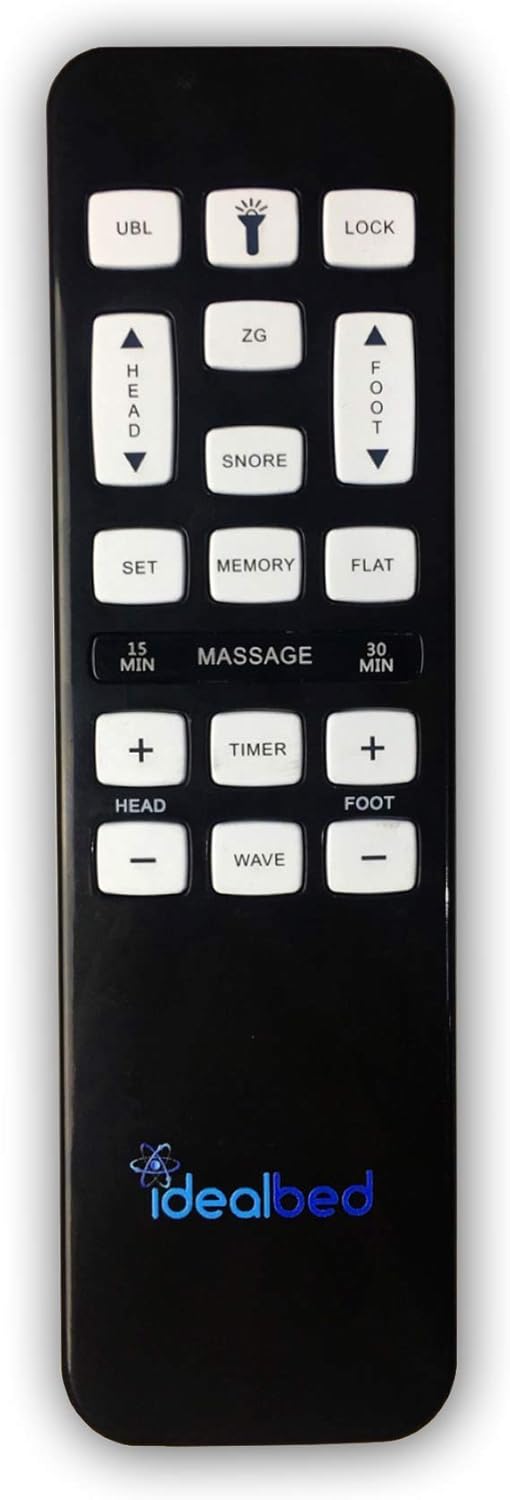
Image: The 18-button wireless remote control for the iDealBed iEscape.
- Head Up/Down: Adjusts the head section of the bed. The head can articulate up to 70°.
- Foot Up/Down: Adjusts the foot section of the bed. The foot can articulate up to 45°.
- Backlit Buttons: The remote features backlit buttons for easy use in low light conditions.
- LED Flashlight: A built-in LED flashlight provides convenience.
Pre-set Positions
The remote includes one-touch buttons for common positions:
- Zero-Gravity (ZG): Elevates both the head and foot to a position that may reduce pressure on the back.
- Anti-Snore: Slightly raises the head to an angle that may help open airways.
- Flat: Returns the bed to a completely flat position.

Image: The bed base adjusted to the Zero-Gravity position.
Programmable Memory Positions
You can save two custom positions:
- Adjust the bed to your desired head and foot position.
- Press the SET button once.
- Press either MEMORY 1 or MEMORY 2 button to save the position. The bed will briefly move to confirm.
- To recall a saved position, simply press the corresponding MEMORY button.
Massage Function
The bed base features a full-body massage system with various modes and intensity levels:
- Massage Modes: Includes Wave, Pulse, and Constant modes.
- Intensity Levels: Three intensity levels are available.
- Timer: Set the massage to run for 15 or 30 minutes.
USB Charging Ports
The bed base is equipped with Next Generation USB charging ports, including High Power USB-C ports. There are 4 charge ports conveniently located on each side of the bed, totaling 8 ports.

Image: Close-up of the USB and USB-C charging ports located on the bed base.
Under-Bed Night Light
An advanced LED under-bed night light can be activated for convenience, providing soft illumination.

Image: The under-bed LED light providing illumination.
Battery Back-Up
In the event of a power outage, the safety battery back-up allows you to return the bed to a flat position.
Maintenance
Proper maintenance ensures the longevity and optimal performance of your adjustable bed base:
- Cleaning: Wipe the bed base frame with a damp cloth. Avoid harsh chemicals or abrasive cleaners.
- Motor Care: The ultra-quiet power lift motors are designed for durability. Do not attempt to lubricate or open the motor housing.
- Cord Management: Periodically check all power cords and connections for wear or damage. Ensure they are securely plugged in and not tangled.
- Fastener Check: Occasionally inspect all bolts and fasteners to ensure they are tight. Retighten if necessary.
Troubleshooting
If you encounter issues with your iDealBed iEscape, refer to the following common problems and solutions:
| Problem | Possible Cause | Solution |
|---|---|---|
| Bed does not move / Remote not responding | No power; Remote batteries low/dead; Remote not paired; Control box issue. | Check power cord connection to outlet and bed base. Replace remote batteries. Re-pair remote if necessary (refer to specific pairing instructions, usually involves pressing a button on the control box). |
| USB ports not charging | No power to bed base; Device not compatible; Port malfunction. | Ensure bed base has power. Try a different device or cable. If issue persists, contact customer support. |
| Mattress slides on base | Foot retainer bar not installed or loose; Mattress material. | Ensure foot retainer bar is securely installed. The NanoHook Retention System should also help. Adjust mattress position as needed. |
| Unusual noises during operation | Loose fasteners; Obstruction under bed; Motor issue. | Check for loose fasteners and tighten. Ensure no objects are obstructing moving parts. If noise persists or is severe, discontinue use and contact customer support. |
If troubleshooting steps do not resolve the issue, please contact iDealBed Customer Support for assistance.
Specifications
Detailed specifications for the iDealBed iEscape Adjustable Bed Base (Full Size, Model 4AW112):
| Feature | Detail |
|---|---|
| Model Number | 4AW112 |
| Size | Full |
| Product Dimensions | 75 x 54 x 15 inches (Length x Width x Height) |
| Item Weight | 150 pounds |
| Lift Capacity | Up to 850 lbs (per unit) |
| Head Articulation | Up to 70° |
| Foot Articulation | Up to 45° |
| Leg Heights | Adjustable (6", 7", 8", 9", 10") |
| Special Features | Adjustable, Wireless Remote, Wall Hugger, Massage, Zero-Gravity, Anti-Snore, Night Light, USB-A & USB-C Ports, Memory Positions, Battery Back-Up |
| Remote Batteries | 2 AAA batteries (included) |
| Color | Grey |
| Manufacturer | iDealBed (Leggett & Platt motors) |

Image: Diagram showing the dimensions of the bed base.
Warranty Information
The iDealBed iEscape Adjustable Bed Base is backed by a reliable 25-year manufacturer coverage, provided through Leggett & Platt. For specific details regarding warranty terms and conditions, please refer to the warranty card included with your product or contact customer support.
Customer Support
For any questions, technical assistance, or warranty claims, please contact iDealBed Customer Support. You can typically find contact information on the product packaging, warranty card, or the official iDealBed website.
Seller: DealBeds