
Hitachi 324-988
Contents
Instruction Manual: Hitachi 324-988 Fences (A)
For Hitachi C12LDH and C12FDH Power Tool Models
1. Product Overview
This manual provides essential information for the proper installation, use, and maintenance of the Hitachi 324-988 Fences (A). These fences are genuine Hitachi replacement parts designed specifically for compatibility with Hitachi C12LDH and C12FDH power tool models. They are crucial components for ensuring precise cuts and safe operation of your tool.
Each package includes two (2) Hitachi Fences (A), Model #324988. Please note that the power tools themselves are not included with this part.

Figure 1: Two Hitachi 324-988 Fences (A) for C12LDH, C12FDH. This image displays the two Hitachi 324-988 Fences (A), which are genuine replacement parts designed for use with Hitachi C12LDH and C12FDH power tool models. Each fence is made of metal and features multiple mounting points and a pointed end for precise alignment.
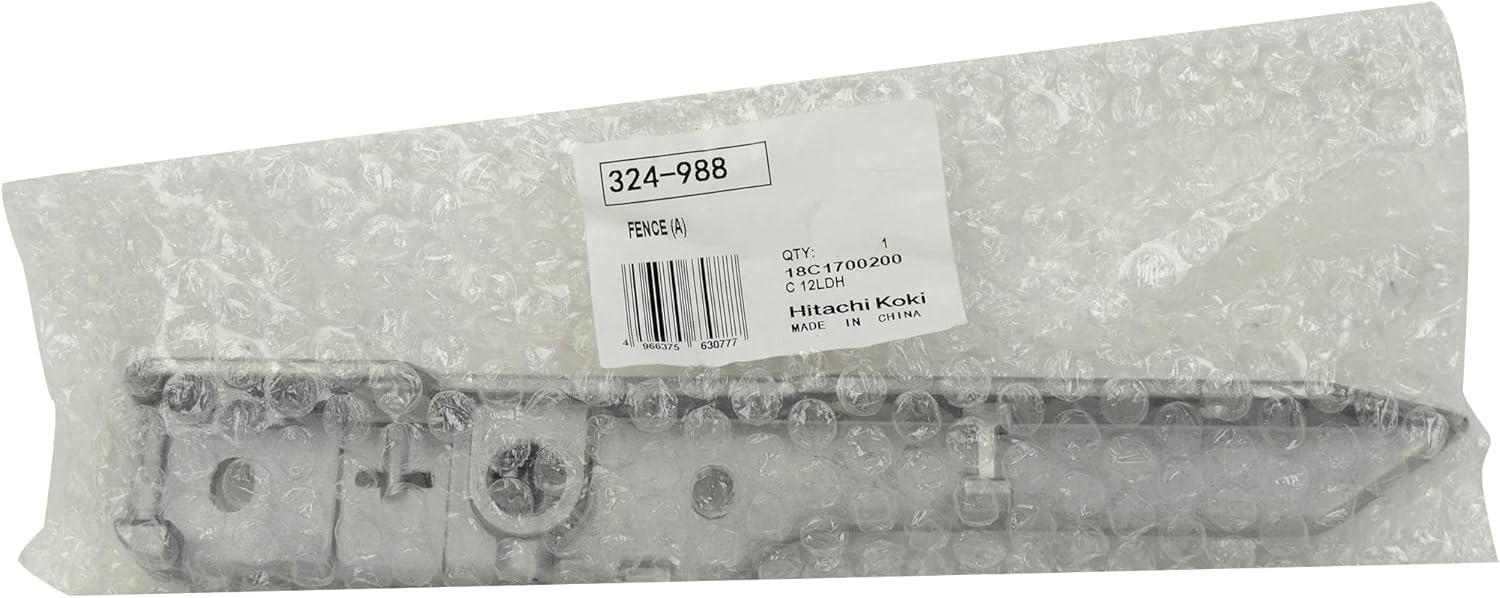
Figure 2: Hitachi 324-988 Fence (A) in original packaging. This image shows one of the Hitachi 324-988 Fences (A) partially visible through its original clear plastic packaging. A white label is affixed to the packaging, clearly displaying '324-988', 'FENCE (A)', 'QTY: 1', and 'Hitachi Koki MADE IN CHINA', confirming it as a genuine part. The barcode visible on the packaging is 4966375630777.
2. Setup and Installation
Before attempting to install these replacement fences, always ensure your power tool is disconnected from its power source to prevent accidental startup and injury. Refer to your specific Hitachi C12LDH or C12FDH power tool's original instruction manual for detailed diagrams and step-by-step instructions on replacing the fences.
- Safety First: Disconnect the power tool from the electrical outlet.
- Identify Components: Locate the existing fences on your power tool and identify the mounting points.
- Remove Old Fences: Carefully remove any fasteners securing the old fences. Keep all hardware organized.
- Install New Fences: Align the new Hitachi 324-988 Fences (A) with the designated mounting points on your tool. Ensure proper orientation as per your tool's diagram.
- Secure Fasteners: Re-attach all fasteners securely. Do not overtighten.
- Verify Alignment: After installation, visually inspect the fences to ensure they are properly aligned and move freely (if applicable) according to your tool's design.
If you are unsure about any step, consult a qualified technician or the official Hitachi service center.
3. Operation Guidelines
Once the new fences are securely installed, their operation is integrated with the functionality of your Hitachi C12LDH or C12FDH power tool. The fences are designed to guide material and ensure accurate cuts. Always ensure the fences are properly adjusted and locked in place before operating the tool. Regularly check for any looseness or misalignment during use, as this can affect cutting accuracy and safety.
4. Maintenance
To ensure the longevity and optimal performance of your Hitachi 324-988 Fences (A), follow these maintenance guidelines:
- Cleaning: After each use, clean any sawdust, debris, or residue from the fences using a dry cloth or brush. Avoid using harsh chemicals that may damage the material.
- Inspection: Periodically inspect the fences for any signs of wear, damage, bending, or corrosion. Check that all mounting points and fasteners remain secure.
- Lubrication (if applicable): If your tool's design requires lubrication for fence movement mechanisms, refer to your tool's manual for appropriate lubricants and application points.
- Storage: Store the tool with the fences attached in a clean, dry environment, away from extreme temperatures and humidity.
5. Troubleshooting
If you encounter issues after installing the Hitachi 324-988 Fences (A), consider the following:
- Fences are Loose: Ensure all fasteners are tightened securely. Refer to your tool's manual for specific torque recommendations if available.
- Inaccurate Cuts: Verify that the fences are correctly aligned and parallel to the blade (if applicable to your tool model). Check for any debris obstructing their movement or alignment.
- Difficulty Installing: Double-check that you have the correct replacement part (Model #324988) for your specific Hitachi C12LDH or C12FDH tool model. Ensure no old hardware or debris is preventing proper seating.
- Damaged Part: If the fences appear damaged upon arrival, do not attempt to install them. Contact the seller or Hitachi customer support for assistance.
For complex issues or if the problem persists, it is recommended to consult the official Hitachi service manual for your power tool or contact Hitachi customer support.
6. Product Specifications
| Specification | Detail |
|---|---|
| Manufacturer | Hitachi |
| Part Model Number | 324-988 |
| Compatible Tool Models | Hitachi C12LDH, C12FDH |
| Item Weight | 12.8 ounces |
| Item Package Quantity | 2 Fences |
| ASIN | B07GBJF8V6 |
| Date First Available | August 9, 2018 |
| Batteries Required | No |
7. Warranty and Support
As genuine Hitachi replacement parts, these fences are manufactured to high standards. For specific warranty information regarding replacement parts, please refer to the warranty policy provided with your original Hitachi power tool or contact Hitachi customer service directly. Always ensure you purchase genuine parts to maintain the integrity and warranty of your tool.
For further assistance, technical support, or to locate authorized service centers, please visit the official Hitachi Store on Amazon or the main Hitachi website.
Documents and downloads
Ask a question about this manual
Ask about setup, troubleshooting, compatibility, parts, safety, or missing instructions. Manuals+ will review the question and use this page’s manual context to help answer it.