
1. Introduction
This manual provides detailed instructions for the installation, operation, and maintenance of your Friedrich RT6/RT7 Remote Digital Thermostat. This wired thermostat operates on 24V DC and is designed for precise temperature control in HVAC systems. It features a digital display and supports both remote control and Wi-Fi connectivity for enhanced convenience.
The thermostat is suitable for systems requiring 1 cooling stage and 1 heating stage for both conventional and heat pump configurations. It offers a control temperature range from a minimum of 45 degrees F to a maximum of 90 degrees F.
2. Safety Information
WARNING: Electrical shock hazard. Disconnect power to the heating/cooling system before installing or servicing this thermostat. Failure to do so may result in electrical shock or equipment damage.
- Always turn off power at the main service panel before performing any wiring.
- This thermostat operates on 24V DC. Ensure your system is compatible with this voltage.
- All wiring must comply with local electrical codes and ordinances.
- If you are unsure about any part of the installation process, consult a qualified electrician or HVAC technician.
- Do not use this thermostat for purposes other than those specified in this manual.
3. Package Contents
Verify that all items are present in your package:
- Friedrich RT6/RT7 Remote Digital Thermostat Unit
- Mounting Hardware (screws and wall anchors)
- User Manual (this document)
4. Setup and Installation
Proper installation is crucial for the optimal performance of your thermostat. It is recommended that installation be performed by a qualified professional.
4.1 Mounting Location
- Install the thermostat on an interior wall, approximately 5 feet (1.5 meters) above the floor.
- Avoid locations near heat sources (lamps, sunlight, fireplaces), drafts (windows, doors), or areas with poor air circulation.
4.2 Wiring Instructions
IMPORTANT: Disconnect all power to the heating/cooling system at the main fuse or circuit breaker panel before wiring.
- Carefully remove your old thermostat, noting the wire connections. Label each wire with the terminal designation it was connected to.
- Mount the new Friedrich RT6/RT7 thermostat base plate to the wall using the provided screws and anchors.
- Connect the 24V DC wires to the corresponding terminals on the new thermostat. Refer to your HVAC system's manual for specific wiring diagrams if needed.
- Ensure all wire connections are secure and no bare wires are touching each other or the wall.
- Attach the thermostat faceplate to the base plate.
- Restore power to the heating/cooling system.
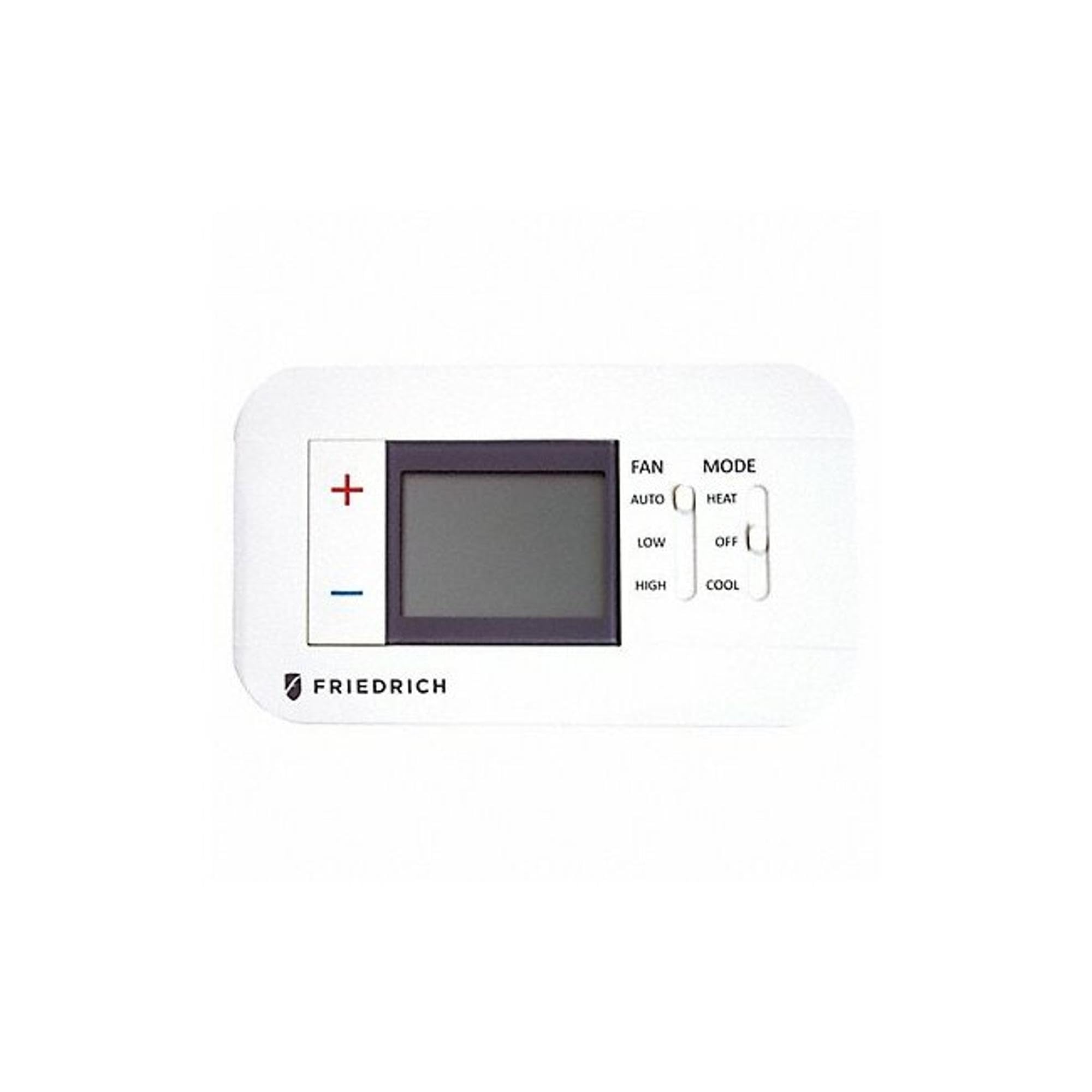
Figure 1: Front view of the Friedrich RT6/RT7 Remote Digital Thermostat. This image displays the digital screen, control buttons, and the overall rectangular shape of the device, typically mounted on a wall.
5. Operating Instructions
Your Friedrich RT6/RT7 thermostat is designed for straightforward operation with its digital display and remote control capabilities.
5.1 Powering On/Off
Once properly wired and power is restored, the thermostat will power on automatically. There is typically no separate power button for wired thermostats.
5.2 Setting the Temperature
- Use the Up/Down arrow buttons on the thermostat or the remote control to adjust the desired temperature.
- The digital display will show the current room temperature and the set temperature.
5.3 Mode Selection
Press the 'Mode' button (if present) to cycle through available modes such as Heat, Cool, or Off. The active mode will be indicated on the digital display.
5.4 Fan Control
Press the 'Fan' button (if present) to select fan operation: Auto (fan runs only when heating/cooling) or On (fan runs continuously).
5.5 Backlight
The thermostat features a backlight for improved visibility in low-light conditions. The backlight typically activates with button presses and may dim or turn off after a period of inactivity.
5.6 Wi-Fi Connectivity (if applicable)
If your model includes Wi-Fi connectivity, refer to the separate Wi-Fi setup guide or the thermostat's on-screen prompts for connecting to your home network and enabling remote control via a smartphone application.
6. Maintenance
The Friedrich RT6/RT7 thermostat requires minimal maintenance to ensure continued optimal performance.
- Cleaning: Periodically wipe the exterior of the thermostat with a soft, damp cloth. Do not use abrasive cleaners, solvents, or chemical sprays, as these can damage the plastic housing or electronic components.
- Air Vents: Ensure that the small vents on the thermostat casing are free from dust and debris, as these allow the internal temperature sensor to accurately read room temperature.
- No User-Serviceable Parts: The thermostat contains no user-serviceable parts. Do not attempt to open the unit beyond what is described in the installation section.
7. Troubleshooting
If you encounter issues with your thermostat, try the following troubleshooting steps:
- No Display/No Power:
- Check the circuit breaker or fuse for your heating/cooling system.
- Ensure all wiring connections at the thermostat and the HVAC system are secure.
- Verify that the system is receiving 24V DC power.
- Incorrect Temperature Reading:
- Ensure the thermostat is not exposed to direct sunlight, drafts, or heat sources.
- Clean any dust or debris from the thermostat's vents.
- System Not Responding to Thermostat:
- Confirm the thermostat is set to the correct mode (Heat or Cool).
- Check that the set temperature is above (for heating) or below (for cooling) the current room temperature.
- Verify wiring connections.
- Wi-Fi Connectivity Issues:
- Ensure your home Wi-Fi network is operational.
- Restart your Wi-Fi router.
- Follow the Wi-Fi setup instructions carefully, ensuring correct network credentials.
If these steps do not resolve the issue, contact Friedrich customer support or a qualified HVAC technician.
8. Specifications
| Brand | Friedrich |
| Model Number | RT6 |
| Product Dimensions | 30"D x 8"W x 6"H (Note: This dimension appears unusually large for a thermostat and may refer to packaging or a different product aspect. Refer to actual unit for precise dimensions.) |
| Overall Depth | 2 1/8 inches |
| Overall Height | 5 11/16 inches |
| Overall Width | 7 9/16 inches |
| Controller Type | Remote Control, Wi-Fi |
| Color | White |
| Temperature Control Type | Digital |
| Connectivity Technology | Wi-Fi |
| Item Weight | 0.01 Ounces |
| Voltage | 24 Volts DC |
| Material | Plastic |
| Display Type | Digital |
| Control Method | Remote |
| Connectivity Protocol | Wi-Fi |
| Backlight | Yes |
| Cooling Stages (Conventional) | 1 |
| Cooling Stages (Heat Pump) | 1 |
| Heating Stages (Conventional) | 1 |
| Heating Stages (Heat Pump) | 1 |
| Maximum Control Temperature | 90 Degrees F |
| Minimum Control Temperature | 45 Degrees F |
| UPC | 826708596801 |
| Date First Available | April 18, 2019 |
9. Warranty and Support
For information regarding the product warranty, please refer to the warranty card included with your purchase or visit the official Friedrich website. Warranty terms and conditions may vary.
For technical support, troubleshooting assistance beyond what is provided in this manual, or to inquire about replacement parts, please contact Friedrich customer service through their official website or the contact information provided in your product packaging.


