
1. Introduction
The XTAR VC2L is an advanced 2-slot universal battery charger designed for a wide range of rechargeable Li-ion and Ni-MH batteries. Featuring a USB-C input, LCD display, and multiple charging current options, it provides efficient and safe charging for your batteries. This manual provides detailed instructions for proper use and maintenance of your VC2L charger.
2. Safety Information
Please read all safety warnings and instructions before using this product. Failure to follow these instructions may result in electric shock, fire, or serious injury.
- Use the charger only for rechargeable batteries specified in this manual. Charging other battery types may cause explosion, battery rupture, or leakage, leading to property damage and personal injury.
- Do not disassemble, modify, or repair the charger.
- Do not expose the charger to water, high humidity, or extreme temperatures.
- Keep the charger out of reach of children and pets.
- Ensure proper polarity when inserting batteries. Incorrect insertion can cause damage to the charger and batteries.
- Unplug the charger from the power source when not in use or before cleaning.
- Do not operate the charger if it has been damaged in any way.
3. Product Overview
The XTAR VC2L charger offers a compact design with intelligent features for optimal battery charging.
Key Features:
- USB-C Input: Modern and convenient power input.
- Max 2A Charging Current: Fast charging for compatible batteries.
- LCD Display: Real-time display of battery type, charging current, voltage, and charged capacity.
- Wide Compatibility: Supports various Li-ion and Ni-MH battery sizes, including protected 21700 batteries.
- 0V Activation Function: Can revive over-discharged Li-ion batteries.
- Multiple Protections: Short circuit, reverse polarity, over-current, overload, over-voltage, and intelligent temperature control.
Package Contents:
- XTAR VC2L Charger
- USB-C Cable
- User Manual

Image: Contents of the XTAR VC2L charger package, including the charger unit, USB-C cable, and user manual.
4. Setup
- Connect Power: Connect the provided USB-C cable to the charger's USB-C input port. Plug the other end of the USB-C cable into a compatible 5V 2.1A USB power adapter (not included). The LCD display will illuminate.
- Initial Display: Upon connection, the charger's LCD display will show initial information, indicating it is ready for use.
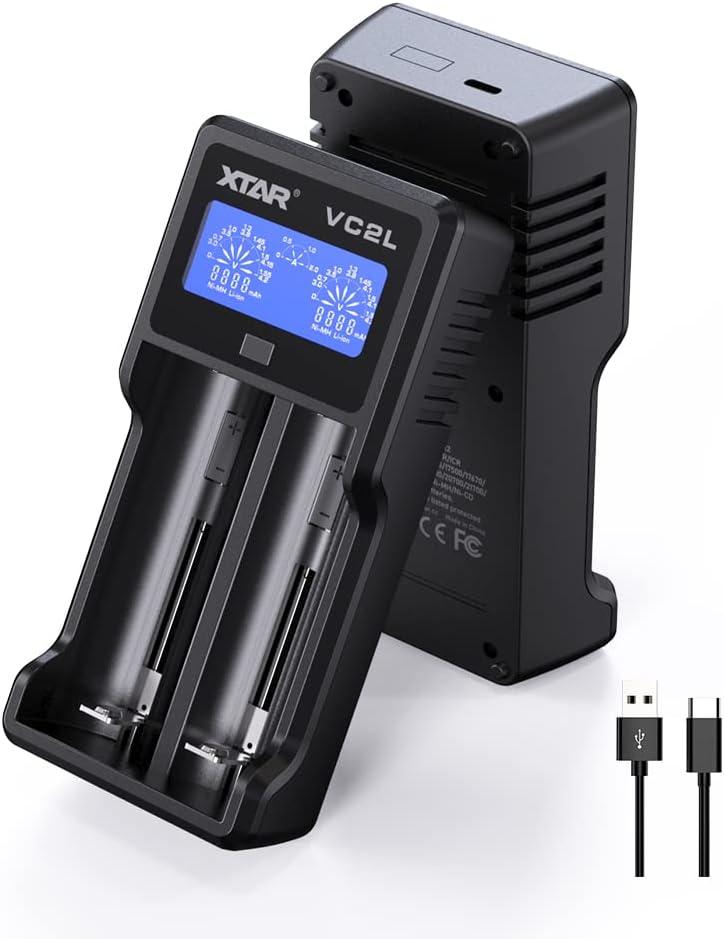
Image: The XTAR VC2L charger shown with its USB-C input port and the included USB-C cable.
5. Operating Instructions
Inserting Batteries:
Carefully insert one or two rechargeable batteries into the charging slots, ensuring correct polarity (+ and - ends match the markings on the charger). The charger will automatically detect the battery type and begin charging.
Adjusting Charging Current:
The VC2L allows you to select the charging current. After inserting a battery, press the adjustable button to cycle through available current options: 2A, 1A, and 0.5A. The selected current will be displayed on the LCD. For optimal battery life, it is generally recommended to use a lower charging current when time is not critical.

Image: A finger pressing the adjustable button on the XTAR VC2L charger to change the charging current setting.

Image: The XTAR VC2L charger displaying the available charging current options: 0.5A, 1.0A, and 2.0A.
0V Activation Function:
The charger can attempt to activate over-discharged Li-ion batteries (often referred to as 'sleepy' batteries). If an over-discharged Li-ion battery is inserted, the VC2L will automatically try to activate it. If successful, the battery will begin charging normally.
6. Battery Compatibility
The XTAR VC2L charger is compatible with a wide range of rechargeable batteries:
3.6V/3.7V Li-ion/IMR/INR/ICR Batteries:
- 10440, 14500, 14650, 16340, 16650, 17500, 17670, 18350, 18490, 18500, 18650, 18700, 20700, 21700, 22650, 25500, 26650.
- Supports 21700 batteries with a protective plate.
1.2V Ni-MH/Ni-CD Batteries:
- AAAA, AAA, AA, A, SC, C.

Image: The XTAR VC2L charger with various battery types, illustrating its broad compatibility with Li-ion and Ni-MH/Ni-CD cells.
7. Display Information
The LCD display provides real-time charging status:
- Battery Type: Indicates whether the inserted battery is Li-ion or Ni-MH.
- Charging Current: Shows the current charging rate (e.g., 0.5A, 1.0A, 2.0A).
- Battery Voltage: Displays the current voltage of the battery.
- Charged Capacity: Shows the accumulated capacity charged into the battery in mAh.

Image: Close-up of the XTAR VC2L's LCD display, highlighting indicators for charging current, real-time voltage, and charged capacity.

Image: A detailed view of the XTAR VC2L's LCD screen, specifically showing the charged capacity in mAh for a Li-ion battery.
8. Maintenance
- Cleaning: Disconnect the charger from power before cleaning. Use a soft, dry cloth to wipe the surface of the charger. Do not use abrasive cleaners or solvents.
- Storage: Store the charger in a cool, dry place away from direct sunlight and extreme temperatures.
- Avoid Impact: Protect the charger from drops or heavy impacts, which can damage internal components.
9. Troubleshooting
- Charger not turning on: Ensure the USB-C cable is securely connected to both the charger and a functional USB power adapter. Try a different USB-C cable or power adapter.
- Battery not charging:
- Check battery polarity.
- Ensure the battery is a compatible rechargeable type.
- If it's an over-discharged Li-ion battery, allow the 0V activation function to attempt revival.
- Clean battery contacts and charger contacts with a dry cloth.
- Inaccurate readings: While the charger provides real-time data, for highly precise measurements, specialized testing equipment may be required.
10. Specifications

Image: A table detailing the technical specifications of the XTAR VC2L charger.
| Specification | Value |
|---|---|
| Model | VC2L |
| Input | 5V # 2.1A |
| Constant Current | 4.2V # 2Ax1 / 1Ax2 / 0.5Ax2 | 1.45V # 2Ax1 / 1Ax2 / 0.5Ax2 |
| Cut-Off Voltage | 4.2±0.05V |
| Cut-Off Current | ≤150mA |
| Operating Temperature | 0-40°C |
| Product Dimensions | 4.53 x 5.87 x 1.38 inches (11.5 x 14.9 x 3.5 cm) |
| Item Weight | 7.4 ounces (209.8 g) |
11. Warranty and Support
XTAR provides lifetime technical support for the VC2L charger. For any questions, issues, or technical assistance, please contact XTAR customer service through the official XTAR website or your purchase platform.
For more information, visit the official XTAR store: XTAR Official Store


