
1. Important Safety Instructions
Please read these safety instructions carefully before using your Fmart E-R550W Robot Vacuum Cleaner and keep them for future reference. Failure to follow these instructions may result in electric shock, fire, or serious injury.
- This appliance can be used by children aged from 8 years and above and persons with reduced physical, sensory or mental capabilities or lack of experience and knowledge if they have been given supervision or instruction concerning use of the appliance in a safe way and understand the hazards involved.
- Children shall not play with the appliance. Cleaning and user maintenance shall not be made by children without supervision.
- Only use the original power adapter provided by the manufacturer.
- Do not operate the robot in environments with open flames or explosive materials.
- Keep hair, loose clothing, fingers, and all parts of the body away from openings and moving parts.
- Do not pick up large or sharp objects, liquids, or burning/smoking materials.
- Ensure the charging dock is placed on a level surface against a wall, with no obstacles within 1 meter (3 feet) in front and 0.5 meters (1.5 feet) on either side.
- Do not immerse the robot or charging dock in water or other liquids.
- Always turn off the robot and unplug the charging dock before cleaning or performing maintenance.
2. Package Contents
Verify that all items are present in the package:
- Fmart E-R550W Robot Vacuum Cleaner
- Charging Dock
- Power Adapter
- Remote Control
- Side Brushes (2 pairs)
- HEPA Filter (pre-installed + 1 spare)
- Cleaning Tool
- Water Tank
- Mop Cloth (2 pieces)
- User Manual
3. Product Overview
3.1 Robot Components

The Fmart E-R550W robot vacuum cleaner, shown with its top panel display and a smartphone displaying the remote control application. The top panel features buttons for 'PLAN', 'SPOT', 'CLEAN', and 'HOME', along with a digital display.
The Fmart E-R550W features a sleek, circular design with an intuitive top panel. Key components include:
- Top Panel: Features an LED touch screen display showing time and status, along with touch buttons for 'PLAN' (scheduling), 'SPOT' (spot cleaning), 'CLEAN' (start/pause), and 'HOME' (return to charging dock).
- Front Bumper: Equipped with anti-collision sensors to detect obstacles.
- Side Brushes: Two rotating brushes on the underside to sweep debris into the suction path.
- Main Brush: A central rolling brush for deeper cleaning.
- Driving Wheels: Two large wheels for navigating various floor types.
- Drop Sensors: Located on the underside to prevent the robot from falling down stairs or ledges.
- Charging Contacts: Metal plates on the side/bottom for automatic charging.
- Dustbin: Removable compartment for collecting dirt and debris.
- Water Tank: Detachable tank for wet mopping functionality.
4. Setup
4.1 Charging Dock Placement
Place the charging dock on a hard, level surface against a wall. Ensure there are no obstacles within 1 meter (3 feet) in front of the dock and 0.5 meters (1.5 feet) on either side to allow the robot to return and dock successfully.
4.2 Initial Charge
Before first use, fully charge the robot. Connect the power adapter to the charging dock and plug it into a wall outlet. Place the robot onto the charging dock, ensuring the charging contacts align. The display will indicate charging status. A full charge typically takes 240-360 minutes.
4.3 Side Brush Installation
Turn the robot over. Align the side brushes with the designated posts on the underside of the robot and press them down until they click into place.
4.4 Power On/Off
To power on, press and hold the 'CLEAN' button on the top panel until the display lights up. To power off, press and hold the 'CLEAN' button until the display turns off.
5. Operating Instructions
5.1 Starting and Pausing Cleaning
Press the 'CLEAN' button on the robot or the remote control to start cleaning in Auto mode. Press 'CLEAN' again to pause the cleaning cycle.
5.2 Cleaning Modes
The Fmart E-R550W offers multiple cleaning modes to suit various needs:
- Auto Mode: The robot intelligently navigates and cleans the entire floor area. This is the default mode.
- Edge Mode: The robot cleans along walls and furniture edges. Select this mode using the remote control.
- Spot Mode: For concentrated cleaning of a small, dirty area. Place the robot in the center of the area and press the 'SPOT' button on the robot or remote.
- Scheduling Mode: Use the 'PLAN' button on the robot or the remote control to set a specific time for the robot to start cleaning daily.
- Intensive Mode: Provides a more thorough cleaning cycle.
5.3 Wet/Dry Mopping Function
The robot supports wet and dry mopping. To use the mopping function:
- Fill the water tank (128ml capacity) with clean water.
- Attach a clean mop cloth to the water tank.
- Remove the dustbin and insert the filled water tank assembly into the robot.
- Start a cleaning cycle. The robot will now vacuum and mop simultaneously.
Note: Do not use the mopping function on carpets or rugs. Remove the water tank and mop cloth after each use and allow them to dry.
5.4 Automatic Self-Charging

The Fmart E-R550W robot vacuum cleaner is shown automatically navigating back to its charging dock, illustrating its self-charging capability. Arrows indicate the path to the dock.
When the battery level is low, the robot will automatically return to its charging dock to recharge. You can also manually send the robot back to the dock by pressing the 'HOME' button on the robot or remote control.
5.5 Intelligent Navigation and Obstacle Avoidance

The Fmart E-R550W robot vacuum cleaner is depicted at the edge of a step, with visual cues indicating its intelligent drop prevention sensors detecting the drop-off and preventing it from falling.

The Fmart E-R550W robot vacuum cleaner is shown detecting a chair leg using its intelligent anti-collision sensors, with blue waves indicating the sensor's range and the robot's ability to avoid impact.
The E-R550W is equipped with infrared sensors for anti-drop and anti-collision capabilities, protecting your furniture and preventing falls down stairs. It employs a zig-zag route for efficient coverage.

A diagram illustrating the zig-zag cleaning route of the Fmart E-R550W robot vacuum cleaner across a floor plan, demonstrating its systematic cleaning pattern for thorough coverage.
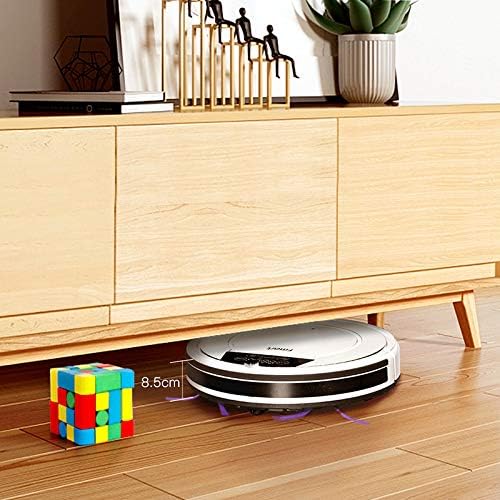
The Fmart E-R550W robot vacuum cleaner is shown cleaning effectively underneath a low-clearance cabinet, highlighting its slim design (8.5cm height) that allows it to access hard-to-reach areas.

The Fmart E-R550W robot vacuum cleaner is shown effortlessly climbing over a 1.5 cm threshold, demonstrating its ability to navigate between different floor levels and rooms.
5.6 Cleaning Performance and Noise Level

The Fmart E-R550W robot vacuum cleaner is displayed on a floor with scattered debris, highlighting its 1000 Pa suction power, 350ml dustbin capacity, 128ml water tank capacity, and a low noise level of 70db.

A person is shown sleeping peacefully on a carpet while the Fmart E-R550W robot vacuum cleaner operates nearby, emphasizing its quiet cleaning capability with a noise level below 70db.
The E-R550W provides strong suction (up to 1000 Pa) for effective cleaning of dirt, dust, and pet hair. It operates at a low noise level, typically below 70dB, allowing for quiet cleaning.
6. Maintenance
Regular maintenance ensures optimal performance and extends the lifespan of your robot vacuum.
6.1 Dustbin and Filter
- Emptying the Dustbin: Press the 'PUSH' button on the screen to remove the dustbin. Empty its contents after each cleaning cycle.
- Cleaning the Primary Filter: The nylon net filter can be rinsed with water. Ensure it is completely dry before re-installing.
- Cleaning/Replacing the HEPA Filter: The HEPA filter is unwashable. Tap it gently to remove dust. Replace the HEPA filter every 3-6 months, or more frequently depending on usage.
6.2 Side Brushes
Check the side brushes regularly for tangled hair or debris. Remove any obstructions and clean the brushes. Replace them if they become worn or damaged.
6.3 Main Brush
Remove the main brush cover and lift out the main brush. Use the provided cleaning tool to cut and remove any tangled hair or fibers. Reinstall the main brush and cover securely.
6.4 Sensors and Charging Contacts
Wipe the drop sensors, anti-collision sensors, and charging contacts on both the robot and the charging dock with a clean, dry cloth to ensure proper function.
6.5 Water Tank and Mop Cloth
After each mopping session, empty any remaining water from the tank. Remove and wash the mop cloth. Allow both the water tank and mop cloth to air dry completely before storing or reusing.
7. Troubleshooting
If your Fmart E-R550W encounters an issue, refer to the table below for common problems and solutions.
| Problem | Possible Cause | Solution |
|---|---|---|
| Robot does not turn on | Low battery; Power switch off | Charge the robot; Ensure power switch is on |
| Robot does not charge | Charging contacts dirty; Power adapter not connected | Clean charging contacts; Check power adapter connection |
| Robot gets stuck frequently | Obstacles (cables, rugs); Sensors dirty | Clear obstacles; Clean sensors |
| Poor cleaning performance | Dustbin full; Filters clogged; Brushes tangled/worn | Empty dustbin; Clean/replace filters; Clean/replace brushes |
| Water tank leaks | Improper installation; Damaged tank | Ensure tank is correctly installed; Contact support if damaged |
| Remote control not working | Low battery in remote; Obstruction between remote and robot | Replace remote batteries; Ensure clear line of sight |
8. Specifications
| Feature | Specification |
|---|---|
| Brand | Fmart |
| Model Number | E-R550W-USA |
| Item Size (Height) | 3.3 inches (8.5 cm) |
| Color | White |
| Net Weight | 8.4 LB (3.8 kg) |
| Power | 20W |
| Power Voltage | 100-240V (AC) |
| Suction | 800-1000 Pa |
| Battery | 2500mAh Ni-MH/14.4V |
| Screen | LED Touch Screen |
| Function | Sweep-Suction-Mop |
| Water Tank Capacity | 128ml |
| Dustbin Capacity | 350ml |
| Cleaning Area | 100㎡-150㎡ (1076-1614 sq ft) |
| Usable Surfaces | Wood, Tile, Marble, Laminate, Thin Carpet |
| Working Time | 50min-120min |
| Charging Time | 240min-360min |
| Sound Level | <55db (Product description says <55db, image says 70db. Using <55db as per description text.) |
| Suction Configuration | Direct Suction Port |
| Pet Hair Care | Yes |
| Charging Type | Auto/Manual charging |
| Remote Control | Yes |
| Special Features | HEPA Filter, Drop-Sensing, Anti-collision |
9. Warranty and Support
Fmart products are designed and manufactured to the highest quality standards. For information regarding warranty coverage, please refer to the warranty card included in your product packaging or visit the official Fmart website.
If you encounter any issues or have questions about your Fmart E-R550W Robot Vacuum Cleaner, please contact Fmart customer support for assistance. Contact details can typically be found on the product packaging, the official website, or through your retailer.