
Introduction
This manual provides comprehensive instructions for the ECONTROLLY SH-13+L Universal Remote Control. This remote is designed to replace original remote controls for a wide range of Sharp brand LCD, LED, and HD Smart TVs. It offers direct compatibility with most Sharp TV models without requiring complex programming.

Figure 1: Front view of the ECONTROLLY SH-13+L Universal Remote Control.
Setup
1. Battery Installation
The SH-13+L remote control requires two (2) AAA batteries (not included). Follow these steps to install the batteries:
- Locate the battery compartment on the back of the remote control.
- Slide the battery compartment cover downwards to open it.
- Insert two AAA batteries, ensuring the positive (+) and negative (-) terminals align correctly with the markings inside the compartment.
- Slide the battery compartment cover back into place until it clicks securely.

Figure 2: Illustration of battery compartment and battery installation process.
2. Initial Use (No Programming Required)
The ECONTROLLY SH-13+L Universal Remote Control is designed for immediate use with most Sharp brand LCD, LED, and HD Smart TVs. No programming or setup is typically required. Simply install the batteries, point the remote at your television, and begin using it.

Figure 3: The remote control is ready for use without programming.
Operating Instructions
Familiarize yourself with the functions of the buttons on your SH-13+L remote control:

Figure 4: Key functions of the SH-13+L remote control buttons.
- POWER: Turns the TV On/Off.
- DISPLAY (SOURCE): Selects input sources (HDMI, AV, etc.).
- OPTION / AAL / AQUOS NETFLIX: Accesses specific TV functions or streaming services depending on the TV model.
- Navigation Buttons (Up, Down, Left, Right, ENTER): Used for menu navigation and selection.
- MENU: Opens the TV's main menu.
- RETURN: Returns to the previous menu or screen.
- EXIT: Exits the current menu or application.
- VOL +/-: Adjusts the volume level.
- CH +/-: Changes TV channels.
- MUTE: Mutes or unmutes the TV audio.
- INPUT: Cycles through available input sources.
- Number Pad (0-9): Direct channel entry.
- CC: Toggles Closed Captions.
- AV MODE / VIEW MODE / FLASHBACK: Accesses various display or viewing modes.
- Playback Controls (Rewind, Play, Fast Forward, Stop, Pause, Record): Controls media playback.
- SURROUND / SLEEP / AUDIO / FREEZE: Activates specific audio modes, sets sleep timer, or freezes the screen.
- 3D: Activates 3D mode (if supported by TV).
- Smart Central: Accesses Smart TV features.
- FAVORITE / FAV APP: Accesses favorite channels or applications.
- Color Buttons (Red, Green, Yellow, Blue): Used for specific functions within menus or applications, as indicated on the TV screen.

Figure 5: The remote control in use with a Sharp TV.
Maintenance
1. Cleaning
To clean your remote control, gently wipe it with a soft, dry cloth. For stubborn dirt, slightly dampen the cloth with water or a mild, non-abrasive cleaner. Avoid using harsh chemicals or abrasive materials, as these can damage the remote's surface or internal components.
2. Battery Replacement
Replace the batteries when the remote's responsiveness decreases or it stops functioning. Always replace both batteries at the same time with new AAA alkaline batteries. Do not mix old and new batteries, or different types of batteries, as this can lead to leakage or damage.
Dispose of used batteries according to local regulations.
Troubleshooting
| Problem | Possible Cause | Solution |
|---|---|---|
| Remote is not working. | Batteries are dead or incorrectly installed. | Check battery orientation (+/-). Replace with new AAA batteries. |
| Remote has limited functionality or some buttons don't work. | The remote may not be fully compatible with all specific functions of your Sharp TV model, especially older or very new models. | While designed for broad compatibility, some advanced or model-specific functions may not be supported. Ensure the remote is pointed directly at the TV's IR receiver. |
| Remote works intermittently. | Low battery power; obstruction between remote and TV; remote is too far from TV. | Replace batteries. Remove any obstructions. Move closer to the TV. |
| Remote requires multiple presses to work. | Low battery power or weak IR signal. | Replace batteries. Ensure direct line of sight to the TV. |
Note: This remote is designed to work without programming for most Sharp TVs. If you encounter issues beyond basic functionality, verify your TV model's compatibility or consider if your specific TV requires a different type of remote.
Specifications
| Model Number | SH-13+L (RCEC-SH-13+L) |
| Brand | ECONTROLLY |
| Compatible Devices | Sharp Brand LCD, LED, HD Smart TVs |
| Power Source | 2 x AAA Batteries (not included) |
| Product Dimensions | 7 x 2 x 0.65 inches (17.78 x 5.08 x 1.65 cm) |
| Item Weight | 1 ounce (28.35 grams) |
| Color | Black |
| Special Feature | Universal, No Programming Required for most models |
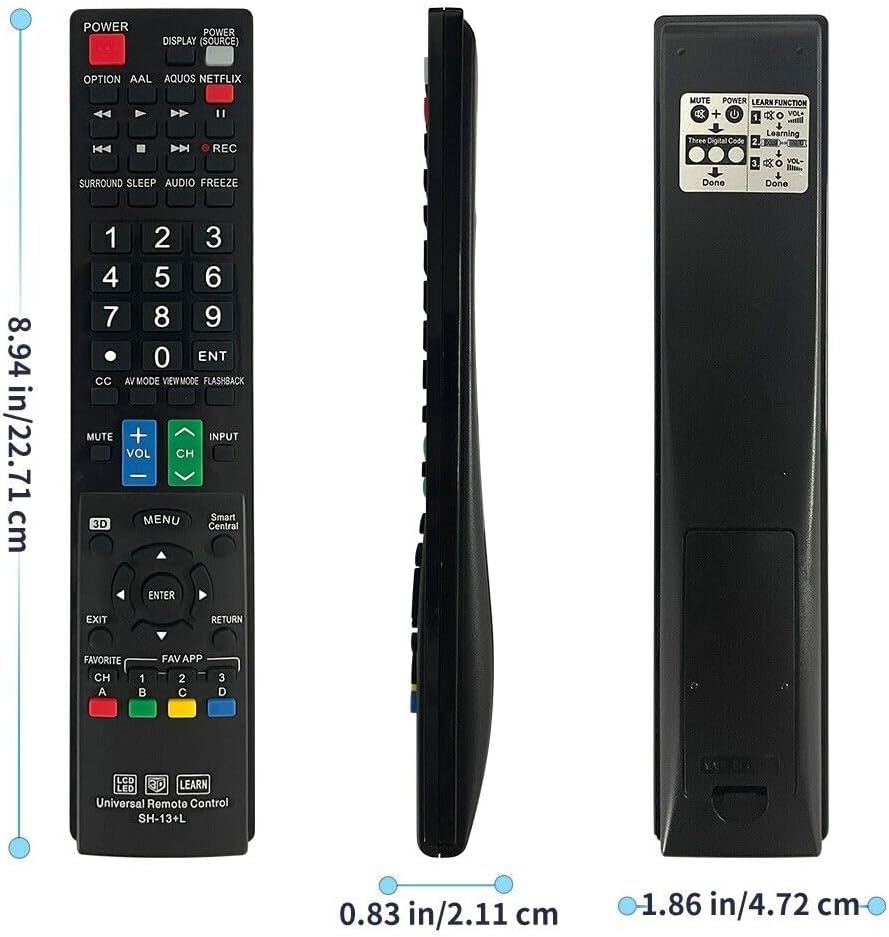
Figure 6: Physical dimensions of the remote control.
Warranty and Support
Information regarding specific warranty terms for the ECONTROLLY SH-13+L Universal Remote Control is not provided in this manual. For warranty inquiries or technical support, please refer to the product listing on the platform where it was purchased or contact the seller directly.
Ensure you have your purchase details readily available when contacting support.