
1. Product Overview
The APPS2Car Tablet Car Mount is designed to securely hold tablets and smartphones ranging from 4.7 to 11 inches, including various iPad, iPhone, Samsung, and Google Pixel models. It features a strong suction cup with a long, flexible arm and a stabilizer for enhanced stability during vehicle operation. This mount is ideal for hands-free navigation and entertainment for passengers during road trips.

Image 1.1: Tablet Car Mount in use, showing a tablet displaying navigation on the dashboard.
2. Key Features
- Wide Compatibility: Supports devices with screens from 4.7 to 11 inches, including various iPad, iPhone, Samsung, and Google Pixel models.
- 2-In-1 Car Phone Mount: Functions for both tablets and phones, featuring a cable hole design for convenient charging.
- Flexible Long Arm: Constructed with thick, rubberized aluminum, the 13-inch arm allows for easy positioning and access to your device.
- Strong Adhesive Suction Cup: Two-stage locking suction cup with a sticky gel pad for firm adhesion to smooth, flat surfaces. Reusable after rinsing with warm water and air drying.
- Variable Angles: Offers 360-degree rotation and swivel for optimal viewing angles in both landscape and portrait orientations.
- Anti-Shake Design: Includes a sticky stabilizer to minimize device movement on bumpy roads.

Image 2.1: Illustration of the mount's adjustable angles, including 240° tilt and 360° rotation.
3. Safety Information
- Ensure the mount is securely installed before placing any device.
- Do not obstruct your view of the road or vehicle controls with the mounted device.
- Avoid adjusting the mount or device while driving.
- Verify device compatibility: The clamp opens up to 208 mm (8.19 in) wide and has a depth of 20 mm (0.79 in). Not compatible with iPad Pro 12.9-inch, iPad Pro 13-inch, 2024 iPad Air 13-inch, Galaxy Tab S8 Ultra, Galaxy Tab S9 Ultra, laptops, portable CarPlay devices, or cases over 20 mm thick.
- For tablets, attach using the left and right edges. For phones, grip by the long side.
4. Setup and Installation
4.1 Attaching the Suction Cup
- Clean the desired installation area on your windshield or a smooth, flat dashboard surface thoroughly.
- Remove the protective film from the suction cup.
- Press the suction cup firmly against the surface and push down the two-stage locking lever to secure it.
- Allow more than 24 hours for the adhesive bond to fully cure before heavy use.

Image 4.1: Suction cup installation guide for smooth and textured surfaces.
4.2 Installing the Stabilizer
- Identify a suitable point on the dashboard where the long arm can rest.
- Clean the dashboard surface at this point.
- Affix the sticky stabilizer onto the dashboard to provide additional support for the long arm.

Image 4.2: The anti-shake long arm and sticky stabilizer in position.
4.3 Attaching Your Device
- Adjust the clamp holder by pressing the side buttons to extend it to the appropriate width for your device.
- Place your tablet or phone into the clamp, ensuring it is held securely.
- The spring-loaded mechanism will hold the device firmly.
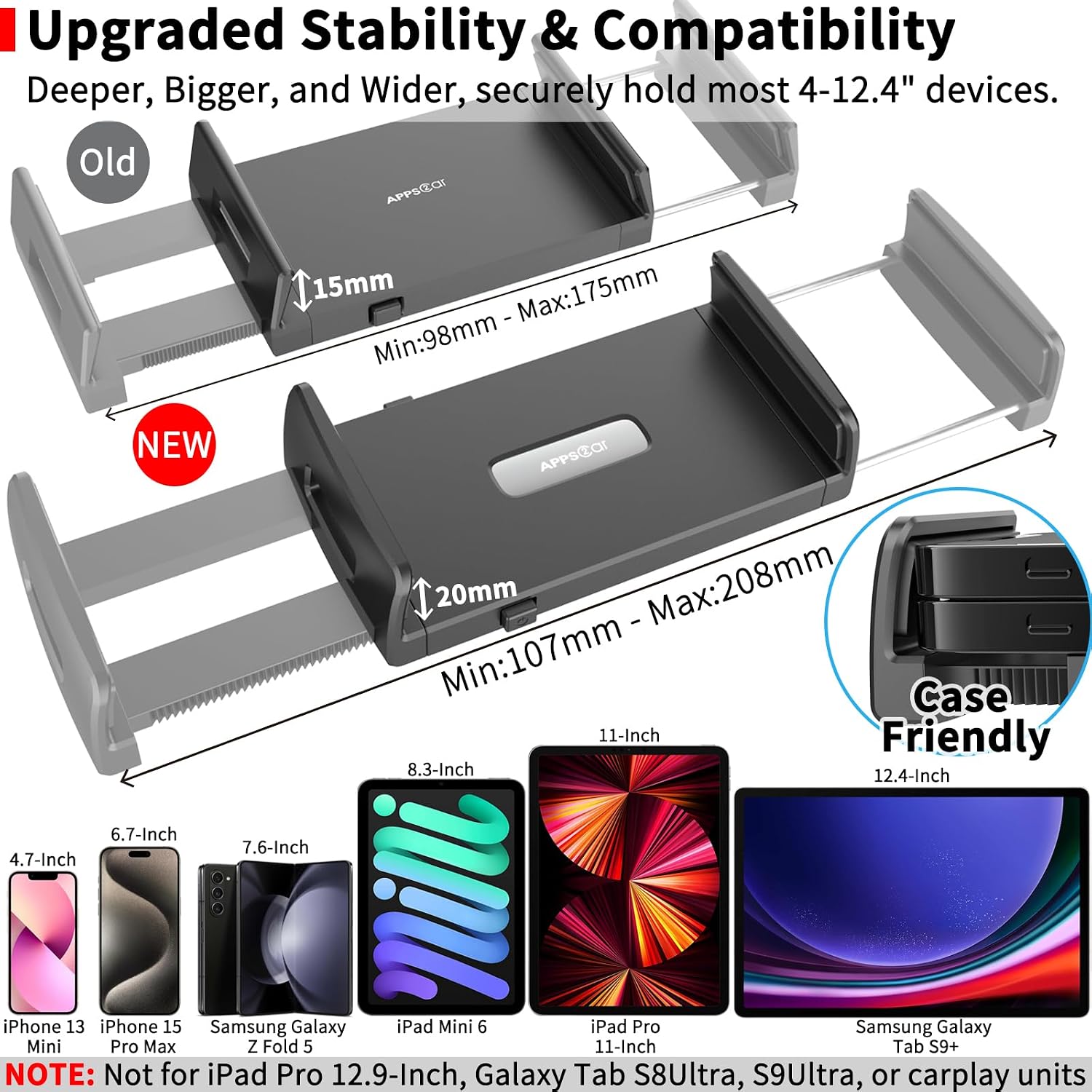
Image 4.3: Device compatibility and secure clamping mechanism.
5. Operating Instructions
5.1 Adjusting the Arm and Viewing Angle
- The flexible gooseneck arm can be bent and shaped to achieve your desired position.
- The ball joint allows for 360-degree rotation and tilting of your device for optimal viewing in either portrait or landscape mode.

Image 5.1: The flexible 13-inch gooseneck arm for custom positioning.
5.2 Charging Your Device
- The mount features a cable hole design at the bottom of the clamp, allowing you to easily connect a charging cable to your device while it is mounted.

Image 5.2: Smartphone mounted with charging cable connected.
6. Maintenance
6.1 Cleaning the Suction Cup
- If the suction cup loses its stickiness, rinse it with warm water.
- Allow the suction cup to air dry completely. Do not wipe with a cloth, as this may leave lint.
- Once dry, the suction cup's original stickiness will be restored, allowing for reuse.
7. Troubleshooting
7.1 Mount Not Adhering Securely
- Surface Type: Ensure the mount is installed on a smooth, rigid surface like a windshield. Avoid textured, wet, oily, uneven, or soft surfaces.
- Cleanliness: Thoroughly clean the installation surface and the suction cup before application.
- Curing Time: Allow at least 24 hours after installation for the adhesive bond to fully cure.
- Reactivation: If the suction cup has lost stickiness, clean it with warm water and air dry as described in the Maintenance section.
7.2 Device Wobbles While Driving
- Stabilizer Use: Ensure the sticky stabilizer is correctly installed and supporting the long arm on the dashboard.
- Arm Position: Adjust the flexible arm to a position that minimizes leverage and provides maximum support. A shorter distance between the stabilizer and the device holder can reduce vibration.
- Clamp Tightness: Verify that your device is firmly secured within the adjustable clamp.
8. Specifications
| Attribute | Value |
|---|---|
| Brand | APPS2Car |
| Model Name | Tablet Car Mount Pro |
| Model Number | IP2-S3L |
| Color | Black |
| Compatible Devices | Smartphones, Tablets (4.7 to 11 inches) |
| Mounting Type | Windshield |
| Arm Length | 13 Inches |
| Item Weight | 8.8 ounces |
| Item Dimensions | 2.6 x 7 x 3.4 inches |
| Material | Acrylonitrile Butadiene Styrene, Aluminum |
| UPC | 619960277201, 615150780780 |
9. Official Product Video
Video 9.1: Official APPS2Car Long Arm Tablet Car Mount demonstration, showcasing its features and flexibility.
10. Warranty and Support
This product comes with a manufacturer's warranty for 24 months from the date of purchase. For warranty claims or technical support, please refer to the contact information provided with your product packaging or visit the official APPS2Car website.