
1. Product Overview
This manual provides instructions for the ECONTROLLY Replacement Remote Control, designed to be compatible with a wide range of SEIKI TV models. This remote control offers a direct replacement solution, requiring no programming or complex setup. Simply insert batteries, and it is ready for use.
Compatible SEIKI TV models include, but are not limited to: SE55GY19, SE65UY04, SE22FE01, SE65GY25, SE40FY27, SE32FY22, SE24FE01-W, SE19HE01, SE39HE02, LC-32G82, SE24FT01, SE20HS04, SE26HQ04, SE50FY28, SC151FS, SC241FS, LC24G82, LC22G82, SC221FS, SC261FS, SC262FS, SC32HT04, SC371TS, SC391TS, LC-40G81, SC461TS, SC501TS, SC552GS, SC601GS, SC601US, SC601TS, SE131FS, SE191FS, SE221FS, SE222FS, SE22HY01, SE241TS, SE242TS, SE321FB, SE391TS, SE401GS, SE461TS, SE501TS, SE551GS, SE55GH01, SE60GY05, SE32HY27, SE20HS02, SE48FY19, SE22FR01, SE70GY03, SE65JY25, SE60GY05, SE55GY04, SE55GY07, SE50FY10, SE50UY04, SE50FY04, SE46FY10, SE46FT03, SE42FY08, SE40FH03, SE40GT03, SE39FH03, SE39UY04, SE39FY09, SE32HY10, SE32HT05, SE32HY01, SE28HT07, SE28HY10, SE28HY01, SE26HY10, SE24FT07, SE24FY10, SE24FY01, SE22FR01, SE22FT07, SE22FY01, SE19HY10, SE19HY01.
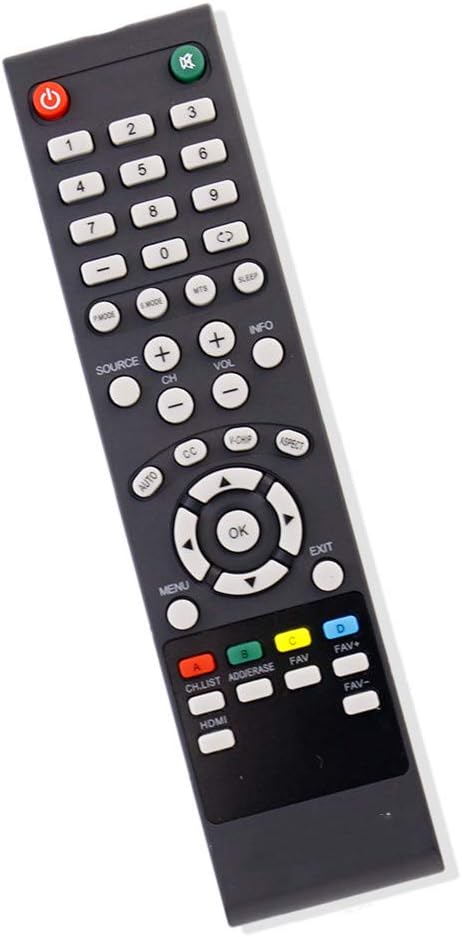
Figure 1: Front view of the ECONTROLLY Replacement Remote Control, showing all buttons and their labels.
2. Setup
The ECONTROLLY Replacement Remote Control requires no programming or pairing. Its setup involves only the installation of batteries.
2.1 Battery Installation
- Locate the battery compartment on the back of the remote control.
- Slide the battery compartment cover downwards or in the direction indicated by an arrow to open it.
- Insert two (2) AAA alkaline batteries, ensuring the positive (+) and negative (-) terminals align correctly with the markings inside the compartment.
- Replace the battery compartment cover by sliding it back into place until it clicks securely.
Once batteries are installed, the remote control is ready for immediate use with your compatible SEIKI TV.

Figure 2: Back view of the remote control, illustrating the battery compartment and the correct orientation for AAA battery insertion.
3. Operating Instructions
This remote control functions identically to your original SEIKI TV remote. Point the remote directly at your television's infrared receiver for optimal performance.
3.1 Basic Functions
- Power Button (●): Turns the TV on or off.
- Mute Button (🔇): Mutes or unmutes the TV sound.
- Number Buttons (0-9): Directly select channels.
- Volume Up/Down (VOL +/-): Adjusts the volume level.
- Channel Up/Down (CH +/-): Changes the TV channel.
- Source Button (SOURCE): Selects input sources (e.g., HDMI, AV).
- Menu Button (MENU): Accesses the TV's main menu.
- Navigation Buttons (Up, Down, Left, Right, OK): Navigate through menus and confirm selections.
- Exit Button (EXIT): Exits the current menu or function.
3.2 Advanced Functions
- Sleep Button (SLEEP): Sets a timer for the TV to turn off automatically.
- Aspect Button (ASPECT): Changes the screen aspect ratio.
- Info Button (INFO): Displays current channel information.
- Color Buttons (A, B, C, D): Used for specific functions within certain TV menus or smart TV applications, as indicated on screen.
- HDMI Button (HDMI): Directly switches to an HDMI input.
4. Maintenance
Proper maintenance ensures the longevity and optimal performance of your remote control.
4.1 Cleaning
- Use a soft, dry cloth to wipe the surface of the remote control.
- For stubborn dirt, slightly dampen the cloth with water or a mild, non-abrasive cleaner. Avoid excessive moisture.
- Do not use harsh chemicals, solvents, or abrasive cleaning pads, as these can damage the remote's finish or internal components.
4.2 Battery Replacement
- Replace batteries when the remote control's response becomes sluggish or stops working.
- Always replace both AAA batteries simultaneously with new alkaline batteries.
- Do not mix old and new batteries, or different types of batteries.
- Remove batteries if the remote control will not be used for an extended period to prevent leakage and damage.
4.3 Storage
Store the remote control in a cool, dry place away from direct sunlight, extreme temperatures, and high humidity.
5. Troubleshooting
If you experience issues with your remote control, refer to the following common troubleshooting steps.
| Problem | Possible Cause | Solution |
|---|---|---|
| Remote not responding. | Dead or incorrectly inserted batteries. | Replace batteries with new AAA alkaline batteries, ensuring correct polarity. |
| Remote works intermittently. | Low battery power; obstruction between remote and TV; remote too far from TV. | Replace batteries. Ensure a clear line of sight to the TV's IR receiver. Move closer to the TV. |
| Certain buttons do not work. | Button stuck or damaged; TV model incompatibility for specific advanced functions. | Check if the button is physically stuck. While this remote is broadly compatible, some very specific or advanced functions might not be supported on all SEIKI TV models. |
| TV does not respond to power button. | TV is unplugged or main power switch is off. | Ensure the TV is plugged in and its main power is on. |
6. Specifications
- Model Number: RCEC-SEIKI2.5
- Brand: ECONTROLLY
- Compatible Devices: SEIKI Televisions (various models)
- Power Source: 2 x AAA Alkaline Batteries (not included)
- Connectivity Technology: Infrared (IR)
- Product Dimensions: 7 x 2 x 0.65 inches (approximately)
- Item Weight: 0.493 ounces (without batteries)
7. Warranty and Support
For warranty information or technical support, please refer to the retailer or manufacturer's official website where the product was purchased. Keep your purchase receipt as proof of purchase.
This remote control is designed as a direct replacement and typically does not require complex technical support beyond battery installation and basic troubleshooting.