
1. Introduction
Thank you for choosing the Yootech X11 Wireless Charging Stand. This manual provides essential information for setting up, operating, and maintaining your device. Please read it carefully before use to ensure optimal performance and safety.
2. Package Contents
Upon unpacking, please ensure all items listed below are present and in good condition:
- 1 x Yootech Wireless Charging Stand
- 1 x USB Type-C Cable (3.3ft)
- 1 x User Manual

Image: Yootech Wireless Charging Stand and included USB Type-C cable.
3. Setup Guide
3.1 Connecting the Charger
- Connect the USB Type-C end of the provided cable to the charging port on the back of the Yootech Wireless Charging Stand.
- Connect the USB-A end of the cable to a compatible power adapter (not included). A QC 2.0/3.0 adapter is highly recommended for optimal charging speeds.
- Plug the power adapter into a wall outlet. The GREEN LED indicator on the stand will flash for 3 seconds, indicating it is powered on and ready.

Image: Close-up view of the USB Type-C input port on the charging stand.
4. Operating Instructions
4.1 Placing Your Device for Charging
The Yootech X11 Wireless Charging Stand features dual coils, allowing for flexible device placement.
- Place your Qi-enabled smartphone directly onto the stand.
- Ensure the phone is centered on the stand for proper alignment with the charging coils.
- The stand supports both vertical and horizontal charging orientations.

Image: A smartphone placed vertically on the charging stand, indicating active charging.

Image: A smartphone placed horizontally on the charging stand, suitable for media viewing while charging.
4.2 Charging Modes and Compatibility
The charger automatically detects and delivers the optimal charging power for your device:
| Charging Mode | Compatible Devices |
|---|---|
| 10W Fast Charge | Samsung Galaxy S22/S22 Ultra/S21/S20/S10/S10 Plus/Note 10/Note9, etc. |
| 7.5W Charge | iPhone 16/15/14/13/13 Pro/13 Mini/13 Pro Max/SE 2022/12/11/11 Pro/11 Pro Max/XS MAX/XS/XR/X/8/8 Plus with latest iOS System. |
| 5W Standard Charge | All other Qi-enabled devices, including Google Pixel 3/3XL/4XL, etc. |

Image: Visual representation of the three charging modes and compatible devices.
4.3 LED Indicator Behavior (Sleep-Friendly Design)
- When the power source is connected, the GREEN LED indicator will flash for 3 seconds.
- When a compatible phone is placed on the charger and recognized, the LED will turn on for 16 seconds.
- After 16 seconds, the LED light will turn off and remain off during the entire charging process to ensure a sleep-friendly environment.
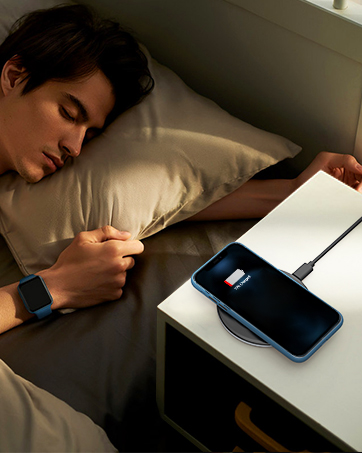
Image: The sleep-friendly design of the charger, with the LED indicator turning off after initial recognition.
4.4 Case Compatibility
The charger is designed to work with most phone cases up to 4mm thick. However, certain materials or accessories may interfere with wireless charging:
- Remove any metal cases, magnetic attachments, or credit cards from your phone before placing it on the charger.
- Avoid cases thicker than 4mm, as they may prevent efficient charging.

Image: Illustration of case compatibility, highlighting that cases up to 4mm are supported, but metal, magnets, and credit cards should be removed.
5. Safety Information
To ensure safe operation and prevent damage to your device, please observe the following:
- Do not expose the charger to water, moisture, or extreme temperatures.
- Avoid dropping or subjecting the charger to strong impacts.
- Do not disassemble or attempt to repair the charger yourself.
- Use only the provided USB cable or a certified equivalent.
- Keep foreign objects, especially metal, away from the charging surface.
6. Maintenance
To maintain the performance and longevity of your Yootech Wireless Charging Stand:
- Clean the surface of the charger regularly with a soft, dry cloth.
- Do not use abrasive cleaners or solvents.
- Store the charger in a cool, dry place when not in use.
7. Troubleshooting
If you encounter issues with your wireless charger, refer to the following common solutions:
- Device not charging:
- Ensure your phone is Qi-enabled and properly aligned on the charging stand.
- Check that the USB cable is securely connected to both the charger and the power adapter.
- Verify that the power adapter is plugged into a working wall outlet.
- Remove any metal objects, magnetic attachments, or thick cases from your phone.
- Try using a different compatible power adapter (QC 2.0/3.0 recommended).
- Slow charging:
- Ensure you are using a QC 2.0/3.0 compatible power adapter. Standard 5V/1A adapters will result in slower charging.
- Check for proper phone alignment on the charging coils.
- Ensure no foreign objects are interfering with the charging process.
- LED indicator not lighting up:
- Verify the power connection to the charger and wall outlet.
- The LED turns off after 16 seconds of recognizing the phone; this is normal behavior for the sleep-friendly design.
8. Product Specifications
| Feature | Detail |
|---|---|
| Brand | Yootech |
| Model Number | X11 |
| Input Voltage | 5V/2A, 9V/2A |
| Output Wattage | 5W, 7.5W, 10W (Max) |
| Connector Type | USB Type C |
| Special Features | Charging Indicator, Wireless Charging |
| Color | Black |
| Item Weight | 150 Grams |
| Specification Met | Qi |
9. Warranty and Support
9.1 Warranty Information
This Yootech X11 Wireless Charging Stand comes with a 1-year warranty from the date of purchase. This warranty covers manufacturing defects and malfunctions under normal use. It does not cover damage caused by misuse, accidents, unauthorized modifications, or external factors.
9.2 Customer Support
For any questions, technical support, or warranty claims, please contact Yootech customer service. Refer to the contact information provided in your product packaging or visit the official Yootech website for assistance.


