
Introduction
This manual provides instructions for the YING RAY replacement remote control, designed for use with specific LG air conditioner models, particularly those originally compatible with LG remote model AKB73635606. Please read this manual carefully before using the remote control.
Important Note:
This is not a universal LG air conditioner remote control. It is specifically designed as a replacement for the AKB73635606 model. If you are unsure about compatibility with your air conditioner unit, please verify the original remote model number or contact the manufacturer for assistance before use.
Setup and Battery Installation
The remote control requires two "AAA" 1.5V ordinary batteries (not included). Ensure correct polarity when inserting batteries.
- Open the battery compartment cover on the back of the remote control.
- Insert two "AAA" 1.5V batteries, matching the (+) and (-) terminals inside the compartment.
- Close the battery compartment cover securely.

Image: Tips for Battery Used. This image illustrates two types of AAA batteries, labeled "A" and "B". Type "A" has a slightly longer positive pole. Type "B" has a shorter positive pole, which may lead to poor contact with the remote's battery spring. The image also shows a method to gently pull out the battery spring in the remote's compartment to ensure better contact for Type "B" batteries.
In some cases, particularly with "Type B" batteries (as shown in the image above), the battery's positive pole may not make sufficient contact with the remote's spring. If the remote does not power on after battery insertion, gently pull the battery spring out a little to improve contact. It is recommended to use "Type A" batteries if available.
Remote Control Overview
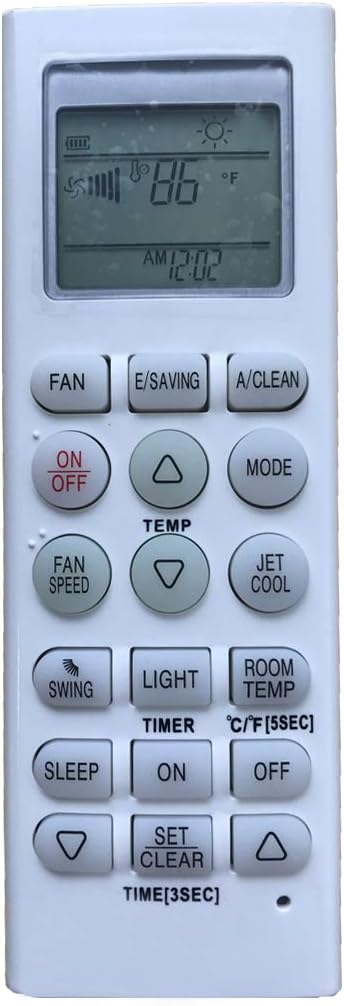
Image: Front view of the remote control. This image displays the entire front panel of the remote control, including the LCD screen at the top and all control buttons arranged below it. The buttons are clearly labeled for various functions such as Power, Temperature, Mode, Fan Speed, Swing, Timer, and special functions.
Operating Instructions
This section outlines the primary functions of the remote control buttons.
- ON/OFF: Press to turn the air conditioner unit on or off.
- TEMP (▲/▼): Press the up (▲) or down (▼) arrows to adjust the desired temperature. The display is in Fahrenheit.
- MODE: Cycles through available operating modes (e.g., Cool, Heat, Fan, Dry, Auto).
- FAN SPEED: Adjusts the fan speed (e.g., Low, Medium, High, Auto).
- SWING: Activates or deactivates the automatic louver swing function.
- TIMER ON/OFF: Sets the timer for the unit to turn on or off automatically.
- SLEEP: Activates or deactivates sleep mode, which adjusts temperature for comfortable sleep.
- JET COOL: Initiates rapid cooling for a short period.
- E/SAVING: Activates energy-saving mode.
- A/CLEAN: Activates the auto-clean function for the indoor unit.
- LIGHT: Controls the display light on the air conditioner unit.
- ROOM TEMP: Displays the current room temperature.
- °C/°F [5SEC]: Press and hold for 5 seconds to switch the temperature display between Celsius and Fahrenheit.
- SET/CLEAR: Used in conjunction with timer settings.
- TIME [3SEC]: Press and hold for 3 seconds to set the current time.
Care and Maintenance
- Cleaning: Wipe the remote control with a soft, dry cloth. Do not use liquid cleaners or abrasive materials.
- Battery Replacement: Replace batteries when the remote's range decreases or if the display becomes dim. Always replace both batteries simultaneously with new "AAA" 1.5V batteries.
- Storage: If the remote control will not be used for an extended period, remove the batteries to prevent leakage and damage.
- Avoid Exposure: Keep the remote control away from direct sunlight, heat sources, and moisture.
Troubleshooting Common Issues
- Remote not responding:
- Check if the batteries are inserted correctly with the correct polarity.
- Replace old batteries with new "AAA" 1.5V batteries.
- If using "Type B" batteries (shorter positive pole), gently pull the battery spring out a little to ensure proper contact, as illustrated in the "Setup and Battery Installation" section.
- Ensure there are no obstructions between the remote control and the air conditioner unit's receiver.
- Incorrect temperature display: If the temperature is displayed in Celsius instead of Fahrenheit, press and hold the "°C/°F" button for 5 seconds to switch the unit.
- Remote does not control the AC unit: Verify that your air conditioner model is compatible with a remote control designed for LG AKB73635606. This remote is not universal.
Product Specifications
- Brand: YING RAY
- Replacement Model: AKB73635606 (for LG Air Conditioner)
- Internal Model Number: UNIVERSAL-LG-2018080313
- Battery Type: 2 x "AAA" 1.5V (not included)
- Display: Fahrenheit (switchable to Celsius)
- Controller Type: Button Control
- Special Feature: Ergonomic design
Support Information
For further assistance or questions regarding the compatibility of this remote control with your specific LG air conditioner model, please contact the YING RAY customer support. Providing your original air conditioner model number will help expedite support.