
Introduction
This manual provides essential information for the proper use, care, and maintenance of your Certina DS PODIUM C0016473605700 Swiss Quartz Sport Watch. Please read these instructions carefully to ensure optimal performance and longevity of your timepiece.
Product Overview
The Certina DS PODIUM C0016473605700 is a Swiss Quartz chronograph sport watch featuring a stainless steel case, a black dial with index and Arabic markers, and a beige leather strap with a push-button deployment clasp. It is designed for durability and precision.
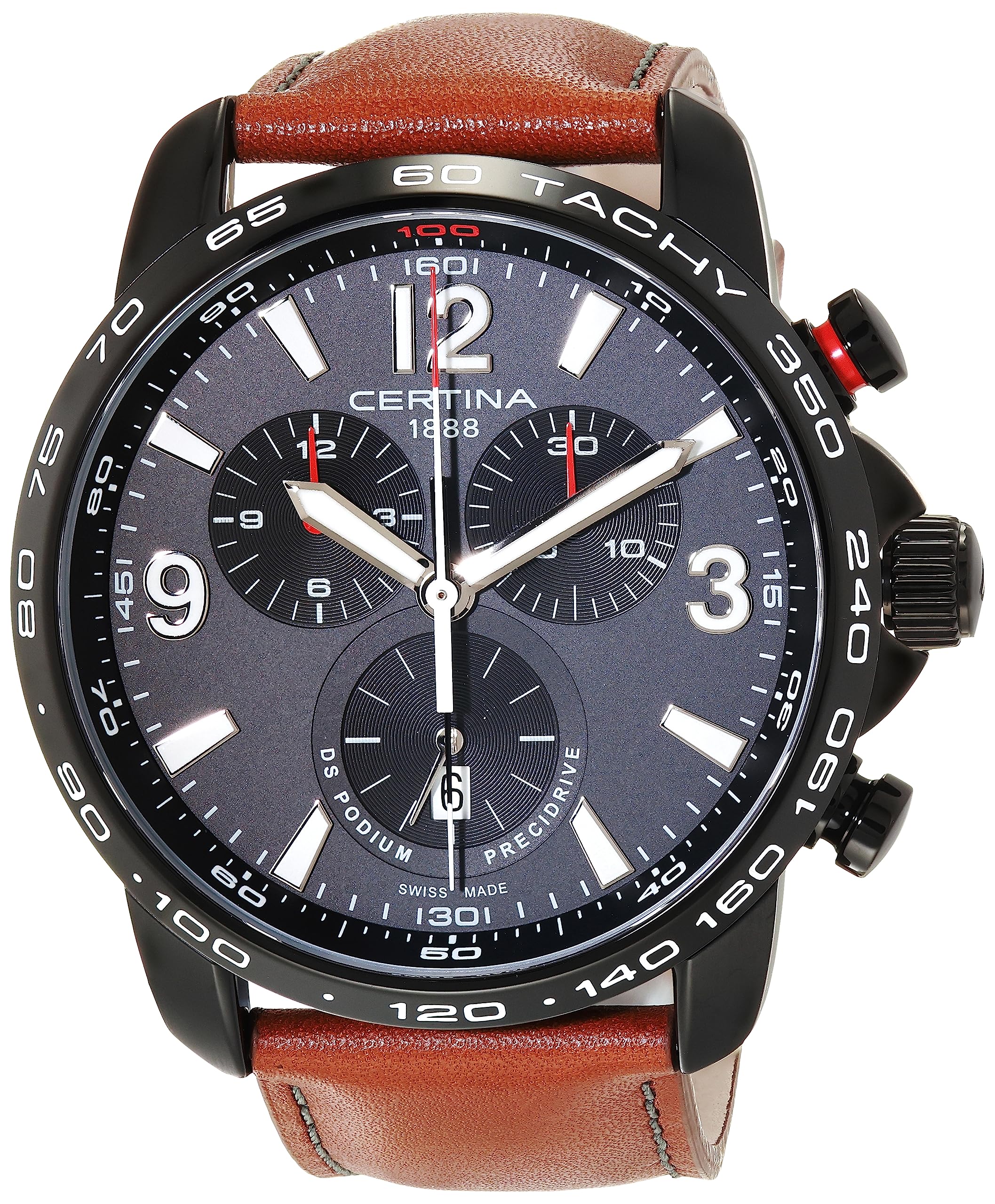
Image: Front view of the Certina DS PODIUM C0016473605700 Swiss Quartz Sport Watch, showcasing the black dial, chronograph subdials, and beige leather strap.
Setup and Initial Use
A. Setting the Time
- Pull the crown (center knob) out to position 2. The second hand will stop.
- Turn the crown clockwise or counter-clockwise to set the hour and minute hands to the desired time. Ensure the AM/PM is correctly set if your watch has a 24-hour indicator or date changes at midnight.
- Push the crown back into position 0. The second hand will resume movement.
B. Setting the Date
- Pull the crown out to position 1.
- Turn the crown clockwise to advance the date. Do not attempt to set the date between 9 PM and 3 AM, as this may damage the movement.
- Once the correct date is displayed, push the crown back into position 0.
C. Adjusting the Bracelet
The watch features a beige leather bracelet with a push-button deployment clasp. To adjust the fit, the clasp typically has micro-adjustment holes or requires professional adjustment by a jeweler to remove or add links (though this is a leather strap, so it's more about buckle adjustment or strap replacement). For a deployment clasp on a leather strap, ensure the strap is correctly threaded and secured through the buckle mechanism for a comfortable fit.

Image: Side view of the Certina DS PODIUM C0016473605700, showing the crown and chronograph pushers used for setting time and operating functions.
Operating the Chronograph Function
Your Certina DS PODIUM watch is equipped with a Swiss Quartz chronograph movement, allowing for precise timing of events.
- Start/Stop: Press the upper pusher (button A) to start the chronograph. Press it again to stop the timing.
- Reset: After stopping the chronograph, press the lower pusher (button B) to reset all chronograph hands to their zero positions.
- Intermediate Times (Split Time): Some chronographs allow for split times. If applicable, press button B while the chronograph is running to display an intermediate time. Press button B again to catch up to the running time. Press button A to stop, then button B to reset.
Refer to the specific movement instructions for detailed operation of 1/100th second chronographs if applicable, as this model is listed as "DS PODIUM Chronograph 1/100 Sec".
Maintenance and Care
A. Cleaning
- Wipe the watch case and sapphire crystal with a soft, dry cloth.
- For the leather strap, avoid prolonged exposure to water, direct sunlight, and harsh chemicals to prevent damage and discoloration. Clean with a slightly damp cloth and mild soap if necessary, then dry thoroughly.
B. Water Resistance
Your watch is water-resistant up to a pressure of 20 bar (200 meters / 660 feet). This makes it suitable for short periods of recreational swimming and showering. Important: Do not operate the crown or pushers while the watch is wet or submerged, as this can compromise the water resistance. Avoid diving or snorkeling with this watch.
C. Battery Replacement
As a Swiss Quartz watch, it is powered by a battery. When the battery is depleted, the second hand may start jumping in 2 or 4-second intervals (End-of-Life indicator). Battery replacement should be performed by an authorized Certina service center or a qualified watchmaker to ensure proper sealing and maintain water resistance.
D. General Care
- Avoid exposing your watch to extreme temperatures or sudden temperature changes.
- Keep the watch away from strong magnetic fields, which can affect the accuracy of quartz movements.
- Protect the watch from impacts and shocks.
Troubleshooting
| Problem | Possible Cause | Solution |
|---|---|---|
| Watch not running | Depleted battery | Replace battery at an authorized service center. |
| Incorrect time/date | Time/date not set correctly; crown pulled out. | Refer to "Setting the Time" and "Setting the Date" sections. Ensure crown is pushed in. |
| Chronograph hands not resetting to zero | Requires calibration. | Consult an authorized service center for calibration instructions specific to the movement. |
| Condensation under crystal | Water resistance compromised. | Immediately take the watch to an authorized service center to prevent further damage. |
Specifications
- Model Name: DS PODIUM Chronograph 1/100 Sec
- Model Number: C0016473605700
- Movement: Swiss Quartz Chrono
- Case Material: Stainless Steel
- Case Diameter: 44.00 mm
- Case Thickness: 13.25 mm
- Band Material: Leather (Beige)
- Band Width: 22 mm
- Crystal: Sapphire Crystal
- Dial Color: Black
- Water Resistance: 20 bar (200 m / 660 ft)
- Clasp Type: Push Button Deployment Clasp
- Functions: Time (hours, minutes, seconds), Date, Chronograph
- Weight: Approximately 0.9 Pounds (14.4 ounces)

Image: Rear view of the Certina DS PODIUM C0016473605700, showing the engraved case back and the open push-button deployment clasp on the beige leather strap.
Warranty Information
Your Certina DS PODIUM C0016473605700 watch comes with a 2 Year International Warranty. This warranty covers manufacturing defects and material flaws under normal use. It does not cover damage resulting from improper handling, accidents, unauthorized repairs, or normal wear and tear (e.g., battery, strap, crystal scratches).
For warranty claims or service, please contact an authorized Certina service center or the retailer where the watch was purchased. Keep your proof of purchase and warranty card.
Extended protection plans may be available from your retailer. For example, 2-Year and 3-Year Protection Plans are offered, as well as a Complete Protect monthly plan.
Support and Contact
For further assistance, technical support, or to locate an authorized service center, please visit the official Certina website or contact their customer service department. Always ensure that any service or repair is carried out by qualified personnel using genuine Certina parts to maintain the integrity and warranty of your watch.
Certina Official Website: www.certina.com
Note: No official product videos from the seller were found in the provided data for this specific model.