
1. Introduction
Thank you for choosing the KitchenBoss Food Vacuum Sealer Machine G208-Black. This appliance is designed to extend the freshness of your food by removing air from specially designed bags and containers, preventing spoilage and freezer burn. Proper use of this vacuum sealer can help preserve nutrients, flavor, and extend the shelf life of various food items, reducing waste and saving you time and money.
This manual provides detailed instructions for setting up, operating, maintaining, and troubleshooting your new KitchenBoss vacuum sealer. Please read it thoroughly before first use to ensure safe and efficient operation.

Figure 1: KitchenBoss G208-Black Food Vacuum Sealer Machine.
2. Setup
2.1 Unpacking and Inspection
- Carefully remove all components from the packaging.
- Inspect the vacuum sealer and all accessories for any signs of damage. If any damage is found, do not use the appliance and contact customer support.
- Ensure all listed components are present: vacuum sealer machine, user manual, vacuum tube, and initial vacuum sealer bags.

Figure 2: Package contents of the KitchenBoss G208 Vacuum Sealer.
2.2 Initial Cleaning
Before first use, wipe the exterior of the vacuum sealer with a damp cloth. Do not immerse the unit in water. Clean the sealing strip and vacuum chamber with a soft, damp cloth.
2.3 Placement
Place the vacuum sealer on a flat, stable, and dry surface. Ensure there is enough space around the unit for proper operation and ventilation.
3. Operating Instructions
3.1 Preparing the Bag and Food
- Place the food item into a vacuum sealer bag. Ensure the bag is suitable for vacuum sealing.
- Leave at least 3 inches (7.6 cm) of space between the food and the top edge of the bag to allow for proper sealing.
- Ensure the open end of the bag is clean, dry, and free from food particles or moisture.
3.2 Vacuum Sealing Process
- Open the lid of the vacuum sealer.
- Place the open end of the bag into the vacuum chamber, ensuring it is within the dotted line and covers the vacuum extraction port.
- Close the lid firmly by pressing down on both ends until two "click" sounds are heard, indicating it is securely locked.
- Select the appropriate mode based on your food type:
- Dry Mode: For solid, dry food items like grains, nuts, or dried fruits. Press the "DRY" button.
- Moist Mode: For moist or juicy food items like fresh meat, fish, or marinated foods. Press the "WET" button.
- Seal Only: To seal a bag without vacuuming, or to create custom-sized bags from a roll. Press the "SEAL ONLY" button.
- Inching Mode: For delicate items like cookies or chips, allowing manual control over vacuum pressure. Press the "INCHING" button repeatedly until desired vacuum level is reached, then press "SEAL ONLY".
- The machine will automatically vacuum the air and then seal the bag. Indicator lights will show the progress.
- Once the process is complete and the lights stop blinking, press the "OPEN" button to release the locks and open the lid.
- Remove the sealed bag.

Figure 3: Step-by-step instructions for using the vacuum sealer.

Figure 4: Proper placement of the vacuum bag opening within the vacuum chamber.
3.3 External Vacuum Function
The KitchenBoss G208 is equipped with a vacuum tube for use with external vacuum containers (sold separately).
- Connect one end of the vacuum tube to the external vacuum port on the machine.
- Connect the other end of the tube to the port on your vacuum container.
- Ensure the container lid is properly sealed.
- Press the "EXTERNAL" button (if available, or follow specific instructions for external vacuuming if using a combined button). The machine will begin to extract air from the container.
- Once vacuuming is complete, remove the tube.
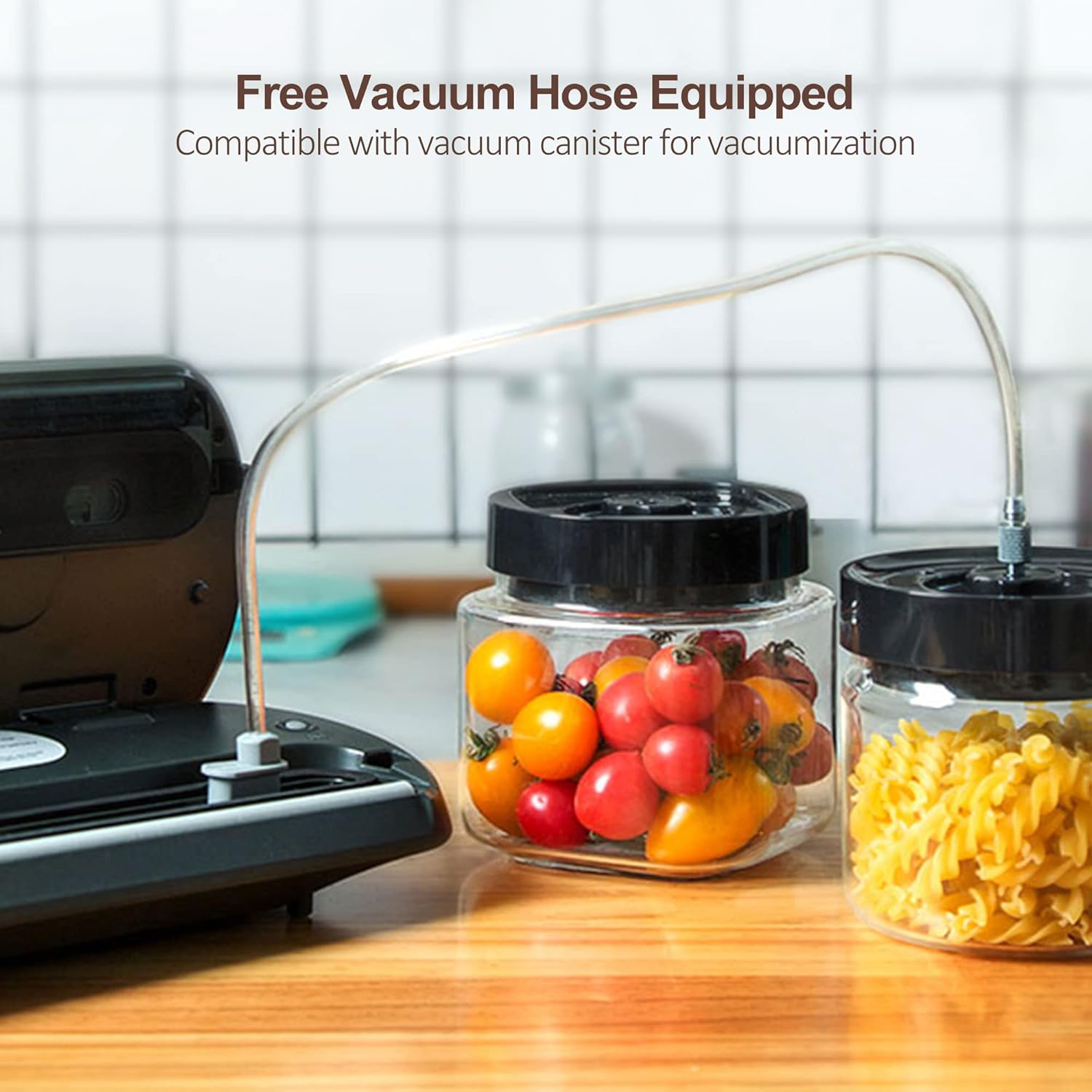
Figure 5: Using the external vacuum function with a container.

Figure 6: Examples of external vacuum sealing for containers, jars, lunch boxes, and wine plugs.
4. Maintenance
4.1 Cleaning the Unit
Always unplug the appliance before cleaning. Wipe the exterior with a soft, damp cloth. Clean the vacuum chamber and sealing strip regularly to prevent food residue buildup, which can affect sealing performance. Do not use abrasive cleaners or immerse the unit in water.
4.2 Replacing the Vacuum Gasket
Over time, the vacuum gasket may wear out, affecting the vacuum seal. The KitchenBoss G208 comes with a replacement vacuum gasket. To replace:
- Carefully remove the old gasket from its groove.
- Clean the groove thoroughly.
- Insert the new gasket, ensuring it is seated properly and evenly in the groove.
Figure 7: Replacement vacuum gasket.
5. Troubleshooting
| Problem | Possible Cause | Solution |
|---|---|---|
| Machine does not turn on | Not plugged in; power outlet issue | Ensure the power cord is securely plugged into a working outlet. |
| No vacuum or poor vacuum | Lid not properly closed; bag not correctly placed; dirty/damaged gasket | Ensure the lid is locked with two clicks. Reposition the bag. Clean or replace the vacuum gasket. |
| Bag does not seal properly | Moisture/food particles on sealing area; overheated sealing strip; incorrect bag type | Ensure the bag opening is clean and dry. Allow the machine to cool down for a few minutes. Use only vacuum sealer bags designed for this appliance. |
| Vacuuming but no sealing | Sealing strip issue; temperature control issue | Ensure the sealing strip is clean. If the problem persists, contact customer support. |
| External vacuum not working | Tube not connected properly; container not sealed | Check connections of the vacuum tube. Ensure the external container lid is securely closed. |
6. Specifications
- Brand: KitchenBoss
- Model Number: G208
- Color: G208-Black
- Material: Carbon Fiber
- Product Dimensions: 15.5"L x 6"W x 3.2"H (39.4 cm x 15.2 cm x 8.1 cm)
- Item Weight: 3.87 Pounds (1.76 kg)
- Power Source: AC
- Operation Mode: Automatic, Manual
- Wattage: 100 watts
- Voltage: 120V
- Maximum Sealing Width: 12 inches (30.5 cm)
- Included Components: Vacuum sealer machine, vacuum sealer bags, vacuum tube, user manual.
7. Warranty and Support
For warranty information, please refer to the documentation included with your product packaging or contact KitchenBoss customer support directly. If you have any questions, concerns, or require assistance with your KitchenBoss Food Vacuum Sealer Machine, please contact us:
- Email: service@kitchenbossglobal.com
- Facebook: kitchenboss_official
8. Additional Information
8.1 Food Preservation Benefits

Figure 8: Vacuum sealing extends food freshness compared to traditional storage.
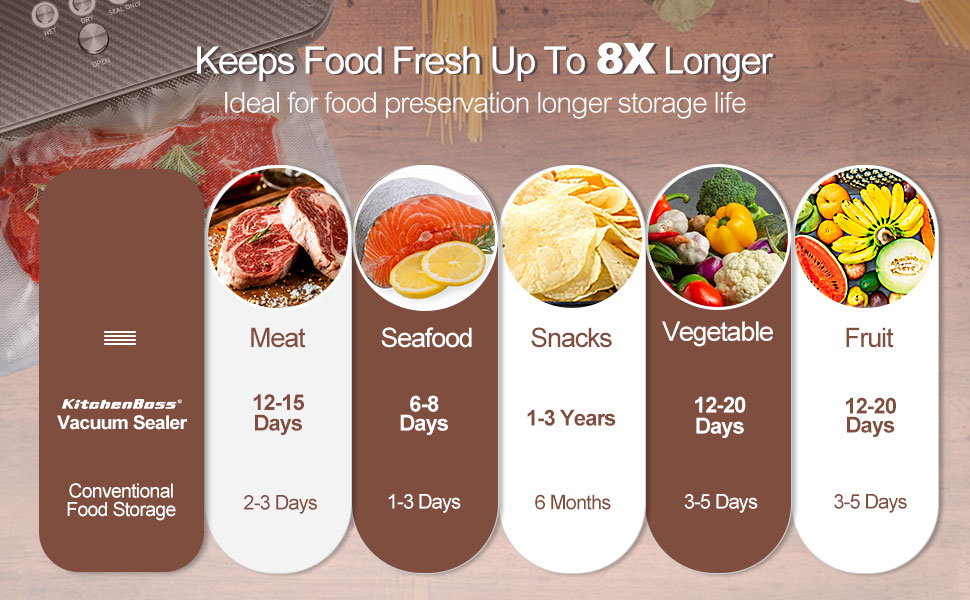
Figure 9: Extended food preservation times with vacuum sealing.
8.2 Product Video
Video 1: Official KitchenBoss demonstration of the vacuum sealer machine in action.


