
1. Important Safety Instructions
Please read all instructions carefully before using the shredder and retain this manual for future reference. Failure to follow these instructions may result in injury or damage to the shredder.
- Electrical Safety: Do not operate the shredder with a damaged power cord or plug. Ensure the power outlet is easily accessible. Do not overload the power outlet.
- Children and Pets: Keep the shredder away from children and pets. The shredder has sharp blades and moving parts that can cause injury.
- Personal Safety: Keep loose clothing, jewelry, hair, and hands away from the paper entry slot.
- Prohibited Materials: Do not shred adhesive labels, continuous forms, transparencies, newspaper, or plastic other than credit cards. Do not shred wet or damp paper.
- Flammable Materials: Do not spray any flammable products or place any flammable materials near the shredder.
- Disassembly: Do not attempt to repair or disassemble the shredder yourself. Contact customer support for assistance.
- Wastebasket: Always ensure the wastebasket is correctly inserted before operation.

Image: Top panel of the shredder showing safety icons and warning labels.
2. Product Overview
The Bonsaii C220-B is a high-security micro-cut paper shredder designed for office and home use. It efficiently shreds confidential documents, credit cards, and small metal items like staples and paper clips.
- Shredding Capacity: Up to 10 sheets of Letter Size (75g/m²) paper per pass.
- Micro-Cut Security: Shreds paper into tiny 5/32 by 15/32 inches (4x12mm) particles, meeting P-4 security level for enhanced data protection.
- Multi-Material Shredding: Destroys paper, staples, paper clips, and credit cards (one at a time).
- Wastebasket: 3.5-gallon (approx. 13.2 liters) pull-out wastebasket with a transparent window for easy monitoring of shredded waste levels.
- Continuous Run Time: 5 minutes continuous operation with a 45-minute cool-down period.
- Jam Protection: Features auto start and manual reverse functions to prevent and clear paper jams.
- Safety Features: Overheating and overloading protection technology ensures durability and safe operation.

Image: The Bonsaii C220-B paper shredder, a compact unit with a visible wastebasket window.

Image: Detail showing the micro-cut size of shredded paper, approximately 5x12mm, for P-4 security.
3. Setup
- Unpack: Carefully remove the shredder from its packaging. Retain packaging for future transport or storage.
- Placement: Place the shredder on a flat, stable surface. Ensure there is adequate space around the unit for ventilation and wastebasket removal.
- Wastebasket Installation: Ensure the pull-out wastebasket is fully and correctly inserted into the shredder body. The shredder will not operate if the wastebasket is not properly seated.
- Connect Power: Plug the power cord into a standard 120V AC outlet.
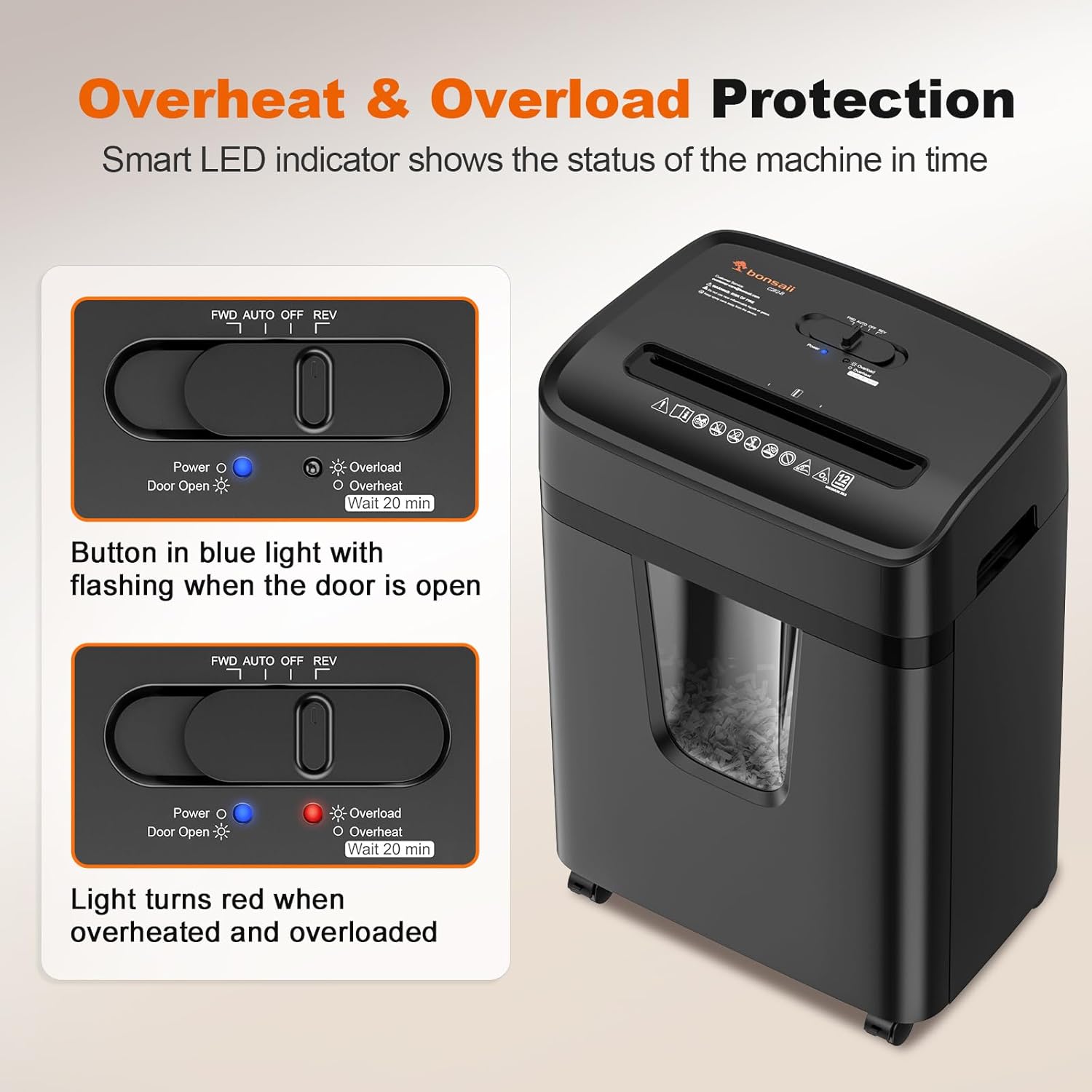
Image: The shredder positioned in an office environment, demonstrating suitable placement.
4. Operating Instructions
Control Switch Functions:
- REV (Reverse): Moves the shredder blades in reverse to help clear paper jams.
- OFF: Turns the shredder off.
- AUTO (Forward): The shredder is in standby mode. When paper is inserted, it will automatically start shredding.
Shredding Paper:
- Set the control switch to AUTO.
- Insert up to 10 sheets of paper (75g/m²) straight into the paper entry slot. Do not exceed the maximum capacity to prevent jams.
- The shredder will automatically start and stop once the paper has passed through.
Shredding Credit Cards and Staples:
- Set the control switch to AUTO.
- Insert one credit card or a stapled document (with small staples) into the paper entry slot.
- The shredder will process the item and stop automatically.

Image: The shredder actively shredding a credit card, demonstrating its multi-material capability.
Continuous Operation and Cool-down:
The shredder is designed for 5 minutes of continuous shredding. After this period, it will automatically shut off to prevent overheating. Allow the shredder to cool down for approximately 45 minutes before resuming operation. This protects the motor and extends the product's lifespan.

Image: Illustration of the shredder's duty cycle. Note: Actual continuous run time is 5 minutes with a 45-minute cool-down, as per product specifications.
Overheat and Overload Protection:
The shredder is equipped with intelligent protection systems. If the shredder overheats or is overloaded (e.g., too many sheets inserted), it will automatically stop. An indicator light (Overload/Overheat) will illuminate. Allow the shredder to cool down or clear the overload before attempting to use it again.

Image: The control panel with indicators for Power, Overload, and Overheat status.
5. Maintenance
Emptying the Wastebasket:
- When the transparent window indicates the wastebasket is full, turn the shredder OFF and unplug it.
- Pull out the wastebasket from the front of the shredder.
- Dispose of the shredded material.
- Slide the wastebasket back into the shredder until it clicks securely into place.

Image: The pull-out wastebasket being removed from the shredder for emptying.
Cleaning the Shredder:
- Always unplug the shredder before cleaning.
- Wipe the exterior of the shredder with a soft, dry cloth. Do not use abrasive cleaners or solvents.
- Periodically clean the paper entry area to remove any paper dust or debris.
Oiling the Shredder:
For optimal performance and to prolong the life of your micro-cut shredder, it is recommended to oil the cutting blades regularly (e.g., once a month or after every few wastebasket empties). Use a shredder-specific lubricant sheet or liquid shredder oil applied to a sheet of paper and shredded.
6. Troubleshooting
| Problem | Possible Cause | Solution |
|---|---|---|
| Shredder does not turn on. |
|
|
| Paper jam. |
|
|
| Shredder stops during operation and Overheat/Overload light is on. |
|
|
7. Specifications
- Brand: bonsaii
- Model Number: C220-B
- Cut Type: Micro-Cut (P-4 Security)
- Shred Size: 5/32 by 15/32 inches (4x12mm)
- Sheet Capacity: 10 sheets (Letter Size, 75g/m²)
- Shreds: Paper, Staples, Credit Cards
- Wastebasket Capacity: 3.5 Gallons (approx. 13.2 Liters)
- Continuous Run Time: 5 minutes
- Cool Down Time: 45 minutes
- Special Features: Automatic Start/Stop, Manual Reverse, Overheating Protection, Overloading Protection
- Item Dimensions (D x W x H): 8.9"D x 13.2"W x 17.8"H
- Item Weight: 14.95 Pounds
- Power Source: AC (Note: Product specifications listed 'Battery Powered', but this model typically uses AC power.)
8. Warranty and Support
For any questions, technical support, or warranty inquiries regarding your Bonsaii C220-B paper shredder, please contact Bonsaii customer service:
- Email: customer-care@bonsaii.com
- Toll-Free Number: 1-844-728-6917
Please have your model number (C220-B) and purchase information ready when contacting support.


