
Introduction
This document provides comprehensive instructions for the YING RAY replacement remote control, designed for specific Soleus Air GREE air conditioner models. This remote control operates with a Fahrenheit temperature display. Please read this manual thoroughly before use to ensure proper operation and to maximize the lifespan of your device.
Product Overview
The YING RAY replacement remote control is a dedicated device for controlling compatible Soleus Air GREE air conditioning units. It is specifically designed to replace original remote controls for models P-KY80-36, KY-80, and SG-PAC-08E3. This remote is not a universal remote control; its functionality is limited to the specified air conditioner models.
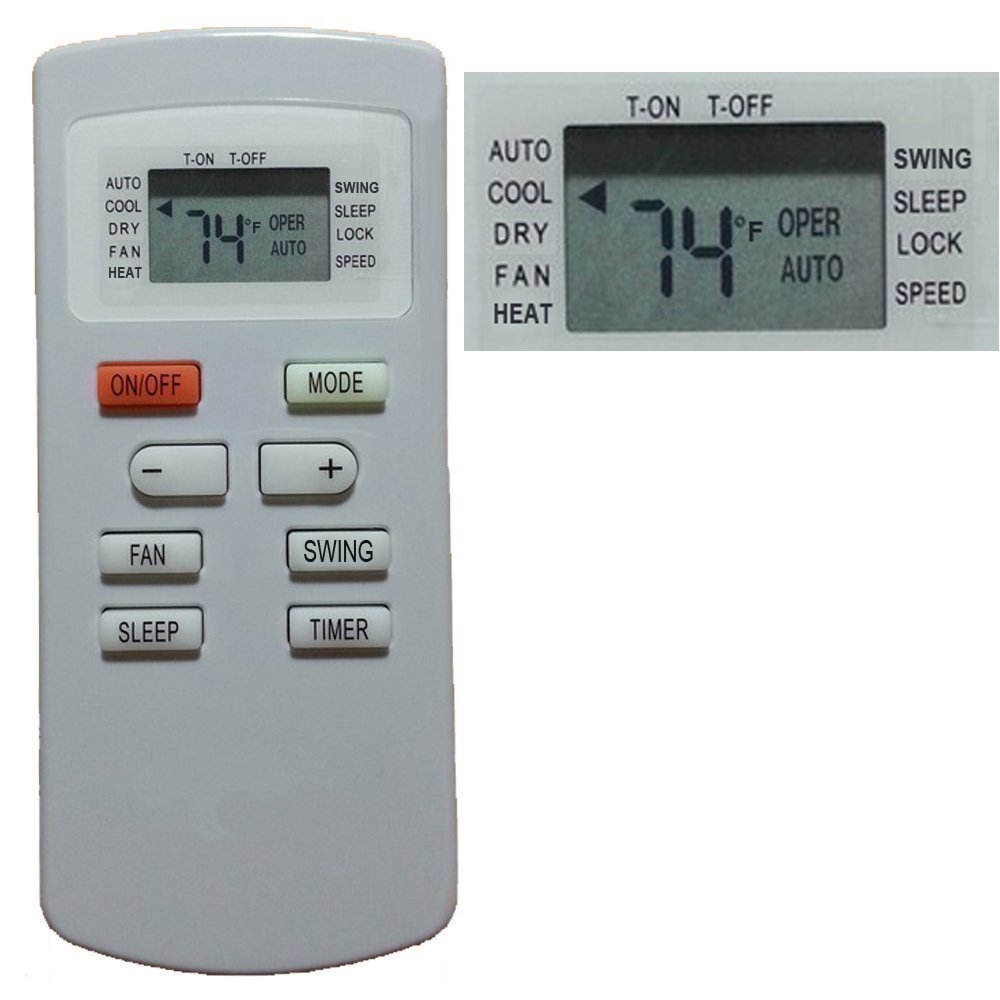
Image 1: Front view of the YING RAY replacement remote control. The display shows '74°F OPER AUTO' and buttons for ON/OFF, MODE, temperature adjustment, FAN, SWING, SLEEP, and TIMER are visible.
Setup
Battery Installation
- Locate the battery compartment cover on the back of the remote control.
- Slide the cover downwards or press the latch to open it.
- Insert two AAA 1.5V ordinary batteries, ensuring the positive (+) and negative (-) terminals align correctly with the markings inside the compartment.
- Close the battery compartment cover securely.
Note: This remote control does not require programming. It is designed to work directly with compatible air conditioner models once batteries are installed.
Operating Instructions
Point the remote control directly towards the air conditioner unit's receiver when operating.
Button Functions:
- ON/OFF: Press to turn the air conditioner unit on or off.
- MODE: Cycles through available operating modes: AUTO, COOL, DRY, FAN, HEAT. The current mode is displayed on the remote's screen.
- Temperature Adjustment (+/-): Use the '+' button to increase the temperature setting and the '-' button to decrease it. The temperature is displayed in Fahrenheit.
- FAN: Adjusts the fan speed. Options typically include AUTO, LOW, MEDIUM, HIGH.
- SWING: Activates or deactivates the automatic louver swing function, directing airflow.
- SLEEP: Engages the sleep mode, which adjusts temperature and fan speed for comfortable sleep and energy saving.
- TIMER: Sets the timer for automatic turn-on (T-ON) or turn-off (T-OFF) of the air conditioner. Follow the on-screen prompts to set the desired time.
Display Information:
The remote's LCD screen displays the current temperature setting in Fahrenheit, the operating mode (e.g., AUTO, COOL), fan speed, and any active timer settings (T-ON, T-OFF).
Maintenance
Battery Replacement
Replace batteries when the remote's display becomes dim or the remote fails to operate the air conditioner unit. Always replace both batteries simultaneously with new AAA 1.5V batteries. Do not mix old and new batteries or different types of batteries.
Cleaning
Wipe the remote control with a soft, dry cloth. Do not use liquid cleaners, abrasive cleaners, or chemical solvents, as these may damage the remote's surface or internal components.
Troubleshooting
- Remote not responding:
- Ensure the remote is pointed directly at the air conditioner's receiver.
- Check if the batteries are inserted correctly with the correct polarity.
- Replace old batteries with new ones.
- If the remote still does not work, check the battery spring contact. Sometimes, the battery's positive pole may not make proper contact with the spring. Gently pull the battery spring out a little to ensure better contact.
- Limited range:
- Ensure there are no obstructions between the remote and the air conditioner unit.
- Replace batteries if they are low.
Specifications
- Brand: YING RAY
- Model Name: 2018080104
- Compatible Devices: Soleus Air GREE Air Conditioner Models P-KY80-36, KY-80, SG-PAC-08E3
- Connectivity Technology: Infrared
- Battery Type: 2 x AAA 1.5V (not included)
- Maximum Range: 10 Meters (approximately 33 feet)
- Display: Fahrenheit
- Special Feature: Ergonomic design
- Button Quantity: 12
- Item Weight: 0.05 Kilograms
Warranty and Support
For information regarding warranty coverage or technical support, please refer to the seller's policies or contact the seller directly through the platform where the product was purchased. Keep your purchase receipt for any warranty claims.