
1. Introduction
This manual provides essential instructions for the proper setup, operation, and maintenance of your ZdalaMit NH409UD Replacement Remote Control. This remote is designed to function as a direct replacement for various Magnavox TV models without requiring any programming.
2. Product Overview
The NH409UD remote control features a standard layout with dedicated buttons for power, source selection, channel control, volume adjustment, and direct access to streaming services like Netflix and Vudu. It is designed for comfortable handling and intuitive use.

Figure 2.1: Front view of the NH409UD Remote Control. This image displays the full button layout, including the power button at the top, numerical keypad, volume and channel controls, directional pad, and dedicated buttons for Netflix and Vudu.
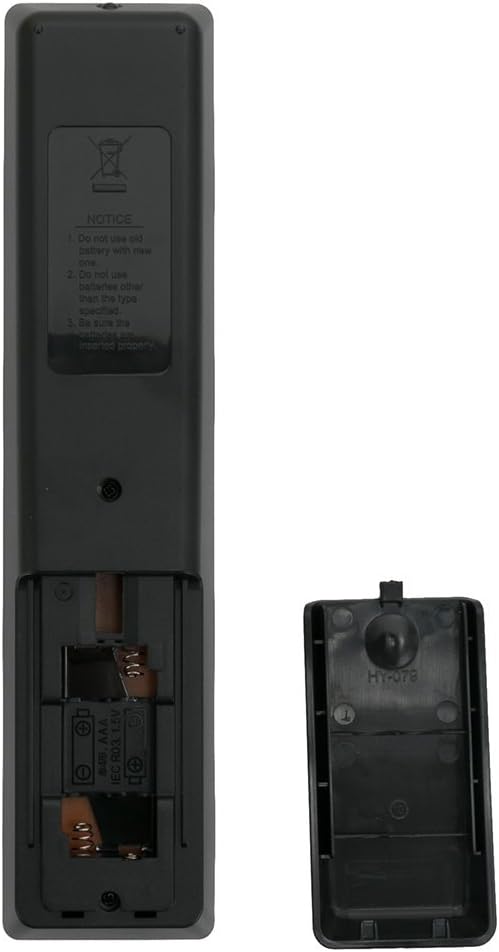
Figure 2.2: Back view of the NH409UD Remote Control with battery compartment open. This image illustrates the battery compartment, indicating the correct orientation for inserting two AAA batteries.
3. Setup
3.1 Battery Installation
- Locate the battery compartment on the back of the remote control.
- Slide the battery cover downwards and remove it.
- Insert two (2) new AAA alkaline batteries, ensuring the positive (+) and negative (-) terminals match the diagrams inside the compartment.
- Replace the battery cover by sliding it back into position until it clicks securely.
Important Note:
- No programming or pairing is required for this replacement remote control. Once batteries are installed, it is ready for immediate use with compatible Magnavox TV models.
- Ensure batteries are inserted correctly to avoid malfunction.
4. Operating Instructions
The NH409UD remote control is designed to replicate the functionality of your original Magnavox TV remote. Point the remote directly at your television's infrared receiver for optimal performance.
4.1 Basic Functions
- Power Button (●): Turns the TV on or off.
- Source Button: Cycles through input sources (HDMI, AV, etc.).
- VOL +/- Buttons: Adjusts the volume level.
- CH +/- Buttons: Changes TV channels.
- Number Pad (0-9): Directly enters channel numbers.
- Navigation Pad (Up, Down, Left, Right, OK): Navigates menus and confirms selections.
- Netflix / Vudu Buttons: Provides direct access to these streaming applications (TV must be a smart TV with these apps installed).
4.2 Compatible Magnavox TV Models
This remote control is compatible with the following Magnavox TV models:
- 32MV304/F7, 55MV314X, 50MV314X/F7, 40MV336X, 32MV304X, 50MV314X, 43MV314X, 40MV324X, 43MV314X/F7, 55MV314X/F7, 40MV324X/F7, 32MV304X/F7
5. Maintenance
5.1 Cleaning
To clean the remote control, gently wipe it with a soft, dry cloth. Do not use liquid cleaners, abrasive materials, or chemical solvents, as these may damage the remote's surface or internal components.
5.2 Battery Replacement
Replace batteries when the remote's response becomes sluggish or stops working. Always replace both batteries simultaneously with new AAA alkaline batteries. Do not mix old and new batteries or different types of batteries.
6. Troubleshooting
6.1 Remote Not Responding
- Check Batteries: Ensure batteries are correctly inserted with the proper polarity (+/-) and are not depleted. Replace with fresh AAA alkaline batteries if necessary.
- Line of Sight: Verify there are no obstructions between the remote control and the TV's infrared sensor.
- Distance: Ensure you are within the effective operating range of the TV's infrared sensor.
6.2 Limited Functionality
- TV Compatibility: Confirm your Magnavox TV model is listed in the compatible models section (Section 4.2). While this remote is a direct replacement, some specific TV features might vary.
- Smart TV Features: Dedicated streaming buttons (Netflix, Vudu) will only function if your Magnavox TV is a smart TV with these applications installed and an active internet connection.
7. Specifications
| Feature | Detail |
|---|---|
| Model Number | NH409UD |
| Power Supply | 2 x AAA Alkaline Batteries (not included) |
| Compatible Devices | Magnavox Televisions |
| Dimensions | 7 x 1.5 x 0.6 inches (approximately) |
| Item Weight | 1.41 ounces (without batteries) |
| Color | Black |
8. Support
For any queries or assistance regarding your ZdalaMit NH409UD Replacement Remote Control, please contact the seller or manufacturer directly. Refer to your purchase documentation for specific contact information.