Introduction
This manual provides essential instructions for the safe and efficient operation of your Intempo EE3332CRMSTKEU Bluetooth Speaker with FM Radio. Please read this manual thoroughly before use and retain it for future reference.
Safety Information
- Do not expose the speaker to water or moisture.
- Avoid extreme temperatures.
- Do not attempt to disassemble or repair the unit yourself. Refer all servicing to qualified personnel.
- Keep away from children.
- Use only the specified charging cable.
Package Contents
- Intempo EE3332CRMSTKEU Bluetooth Speaker
- USB Charging Cable
- User Manual (this document)
Product Overview
Familiarize yourself with the components of your speaker.

Figure 1: Front view of the Intempo Bluetooth Speaker next to a smartphone, showing the speaker grille, 'intempo' logo, FM dial, volume knob, and mode indicators (BT, AUX/FM).
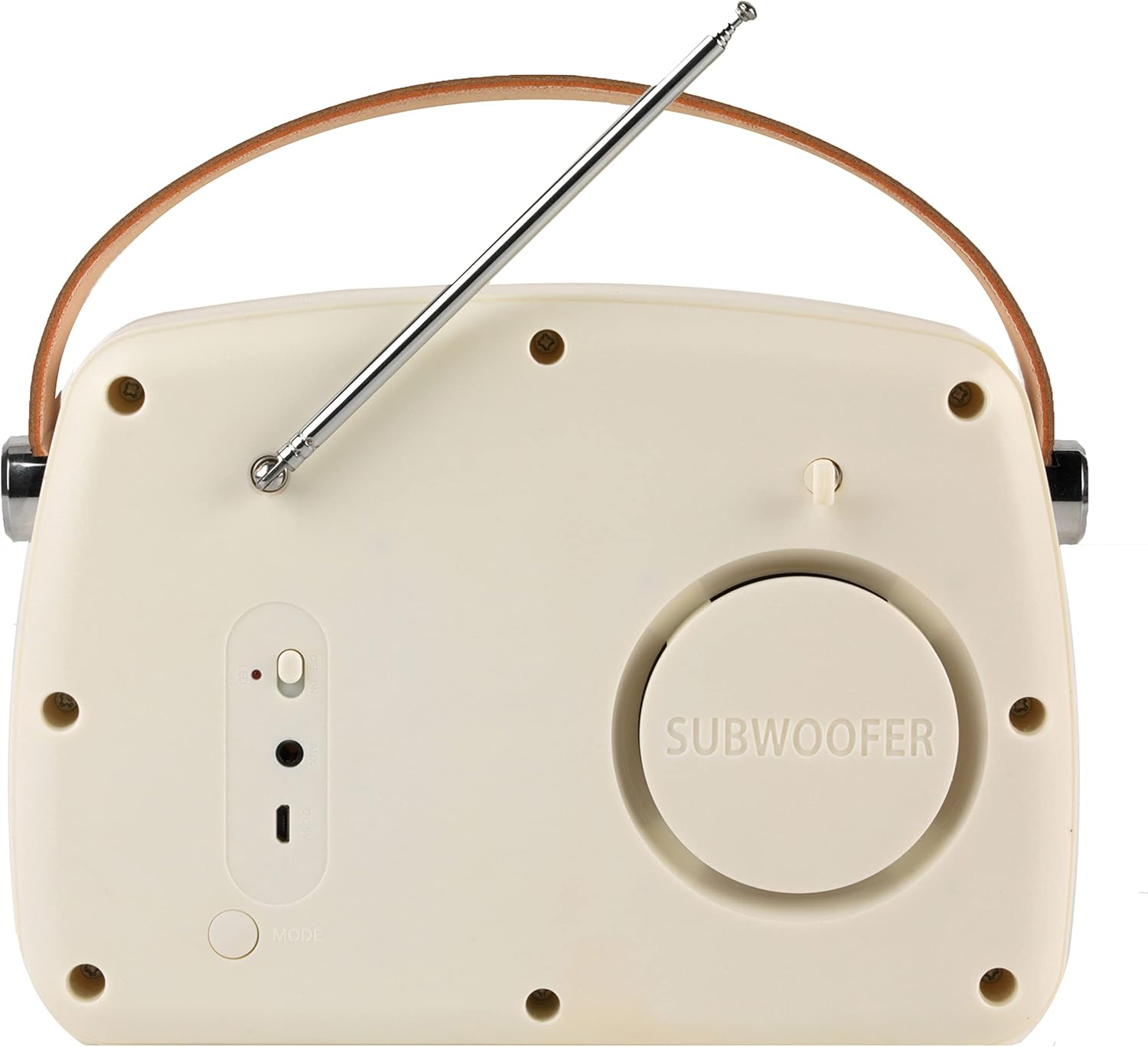
Figure 2: Rear view of the Intempo Bluetooth Speaker with the FM antenna extended, showing the power switch, charging port, and mode button.
Controls and Indicators:
- FM Dial: Used to select FM radio frequencies.
- Volume Knob (Vol): Rotates to adjust audio volume.
- BT Indicator: Lights up when in Bluetooth mode.
- AUX/FM Indicator: Lights up when in AUX or FM radio mode.
- Power Switch: Located on the rear, slides to turn the speaker ON/OFF.
- Charging Port: Micro USB port for charging the internal battery.
- Mode Button: Switches between Bluetooth, FM, and AUX modes.
- FM Antenna: Extend for improved FM radio reception.
Setup
1. Charging the Speaker
- Connect the small end of the USB charging cable to the charging port on the rear of the speaker.
- Connect the large end of the USB charging cable to a suitable USB power adapter (not included) or a computer's USB port.
- The charging indicator light will illuminate during charging.
- Allow approximately 3 hours for a full charge. The indicator light will change or turn off once fully charged.
2. Powering On/Off
- To power on, slide the Power Switch on the rear of the speaker to the 'ON' position.
- To power off, slide the Power Switch to the 'OFF' position.
Operating
1. Bluetooth Mode
- Ensure the speaker is powered on.
- Press the 'Mode' button on the rear until the 'BT' indicator light illuminates, indicating Bluetooth pairing mode.
- On your Bluetooth-enabled device (e.g., smartphone), navigate to the Bluetooth settings.
- Search for available devices and select "EE3332CRMSTKEU" or "Intempo Speaker" from the list.
- Once paired, the speaker will emit a confirmation sound, and the 'BT' indicator will remain solid.
- You can now play audio from your device through the speaker.
2. FM Radio Mode
- Ensure the speaker is powered on.
- Extend the FM antenna on the rear of the speaker for optimal reception.
- Press the 'Mode' button on the rear until the 'AUX/FM' indicator light illuminates, and you hear static or a radio station.
- Rotate the FM Dial on the front of the speaker to tune into your desired radio station.
- Adjust the volume using the Volume Knob.
3. AUX Mode
- Ensure the speaker is powered on.
- Connect one end of a 3.5mm audio cable (not included) to the AUX IN port on the speaker.
- Connect the other end of the 3.5mm audio cable to the headphone jack or audio output of your non-Bluetooth device.
- Press the 'Mode' button on the rear until the 'AUX/FM' indicator light illuminates and the speaker is ready for AUX input.
- Play audio from your connected device.
Maintenance
- Clean the speaker with a soft, dry cloth. Do not use abrasive cleaners or solvents.
- Store the speaker in a cool, dry place when not in use.
- Avoid dropping or subjecting the speaker to strong impacts.
Troubleshooting
| Problem | Possible Cause | Solution |
|---|---|---|
| No power | Battery is depleted. | Charge the speaker fully. |
| Cannot pair Bluetooth | Speaker not in pairing mode; device too far; previously paired device connected. | Ensure speaker is in BT pairing mode. Move device closer. Disconnect from other devices. |
| Poor FM reception | Antenna not extended; weak signal. | Extend the FM antenna fully. Try repositioning the speaker. |
| No sound from AUX | Cable not connected properly; incorrect mode selected; volume too low. | Check cable connections. Ensure AUX mode is selected. Increase volume on both speaker and source device. |
Specifications
- Model: EE3332CRMSTKEU
- Brand: INTEMPO
- Connectivity: Bluetooth, AUX, USB (for charging)
- Output Power: 5 Watts
- Radio Bands: FM (88-108 MHz)
- Power Source: Battery Powered (Rechargeable)
- Product Dimensions: 21.6 x 8.9 x 15.1 cm
- Item Weight: 930 g
- Compatible Devices: Smartphones and other Bluetooth/AUX enabled devices
Warranty and Support
For warranty information or technical support, please refer to the documentation provided at the time of purchase or contact your retailer. Keep your proof of purchase for warranty claims.


