
andobil Car, Truck, Automobile
andobil Car Phone Holder Instruction Manual
Model: Car, Truck, Automobile
Introduction
Thank you for choosing the andobil Car Phone Holder. This manual provides detailed instructions for the proper setup, operation, and maintenance of your new car phone holder. Designed for stability and convenience, this holder ensures your device remains secure while driving. Please read this manual thoroughly before use to ensure optimal performance and safety.
What's in the Box
Carefully unpack all components and ensure all items are present:
- 1 x Car Phone Mount
- 1 x Retractable Arm Suction Cup
- 1 x Metal Air Vent Clip
- 1 x Dashboard Pad

Image: All components included in the andobil Car Phone Holder package.
Setup Instructions
The andobil Car Phone Holder offers three versatile mounting options: windshield, dashboard, and air vent. Choose the method that best suits your vehicle and preference.
1. Windshield Mounting
- Clean the desired area on your windshield thoroughly with a clean cloth.
- Attach the retractable arm suction cup to the phone holder by aligning the ball joint and tightening the collar nut.
- Press the suction cup firmly against the cleaned windshield surface.
- Push down the locking lever on the suction cup base to create a strong vacuum seal.
- Adjust the arm and holder to your desired viewing angle.
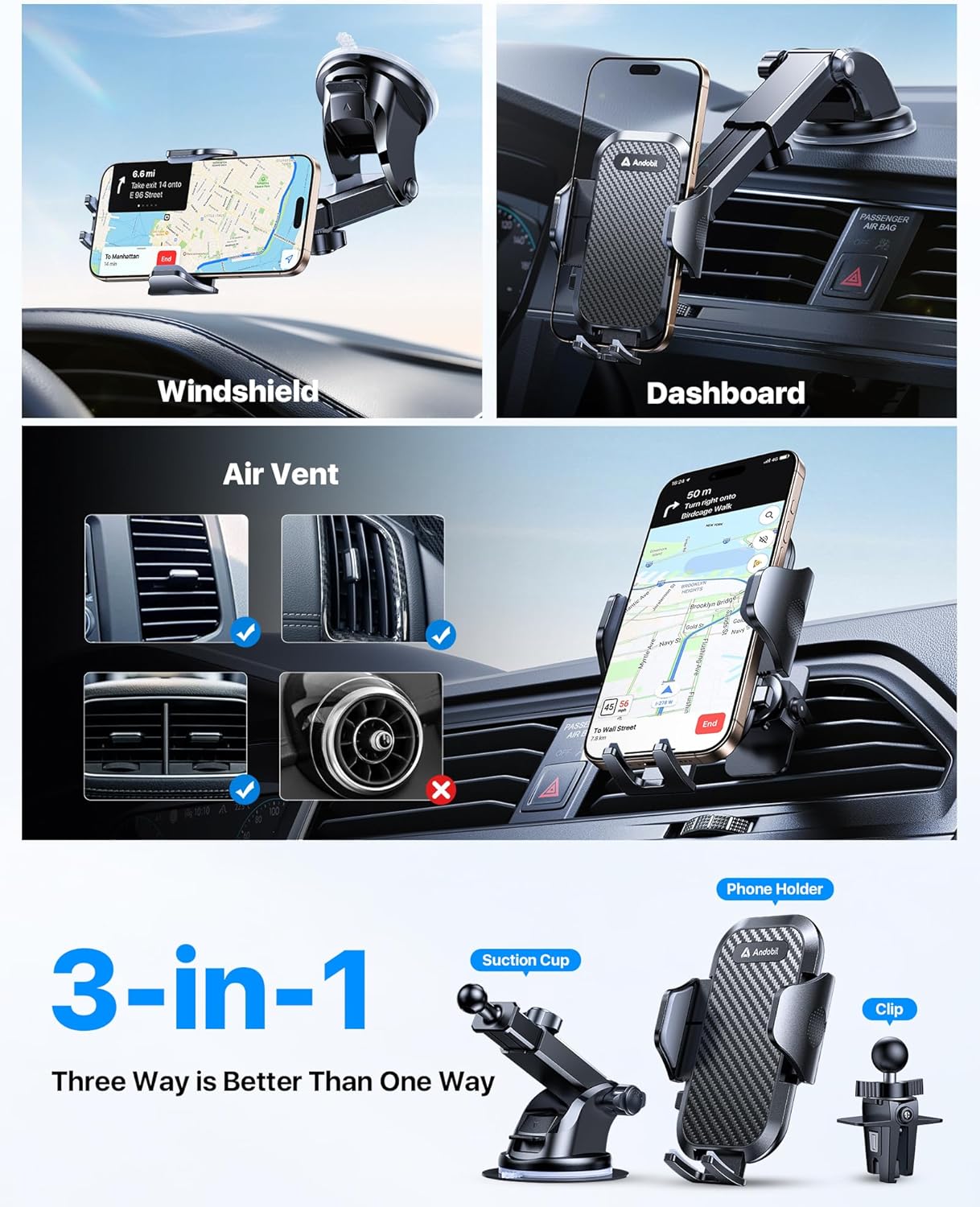
Image: The 3-in-1 mounting options, including windshield installation.
2. Dashboard Mounting
- Clean the desired flat area on your dashboard. For textured dashboards, use the provided dashboard pad.
- Peel off the protective film from the dashboard pad and firmly press it onto the dashboard. Allow it to set for 24 hours for optimal adhesion.
- Attach the retractable arm suction cup to the phone holder.
- Press the suction cup firmly onto the dashboard pad or directly onto the smooth dashboard surface.
- Push down the locking lever on the suction cup base to secure it.
- Adjust the arm and holder to your preferred viewing angle.

Image: The phone holder securely mounted on a car dashboard, showing the adjustable arm.
3. Air Vent Mounting
- Attach the metal air vent clip to the phone holder by aligning the ball joint and tightening the collar nut.
- Open the vent clip and securely attach it to one of your car's air vent blades. Ensure it is firmly clipped.
- Adjust the phone holder to your desired viewing angle.

Image: The andobil Car Phone Holder utilizing its steel vent clip for secure attachment to an air vent.

Image: Illustration showing compatibility with various car air vent designs.
Operating Instructions
Inserting Your Phone
- Gently press the release button on the side of the holder to open the clamping arms.
- Place your smartphone into the holder, ensuring it rests securely on the bottom support.
- The clamping arms will automatically close and secure your phone. For extra security, gently press the arms inward until they firmly grip your device.

Image: A smartphone firmly secured in the andobil car phone holder, demonstrating its stability.
Removing Your Phone
- Press the quick-release button on the side of the holder. The arms will automatically open, allowing you to safely remove your phone.
Adjusting the Viewing Angle
- The holder features a 360° rotatable ball head. Loosen the collar nut behind the holder, adjust the angle as needed, and then tighten the nut to lock it in place.
- The retractable arm can be extended from 5.1 to 7.3 inches and offers 270° adjustability. Loosen the adjustment knobs on the arm, position it as desired, and then tighten the knobs to secure.

Image: Demonstrating the telescopic extension and 270-degree flexible rotation capabilities of the holder's arm.

Image: The adjustable long arm of the holder, showing its extension range and angle flexibility.
Maintenance
To ensure the longevity and optimal performance of your andobil Car Phone Holder, follow these maintenance guidelines:
- Cleaning the Suction Cup: If the suction cup loses its stickiness, rinse it with warm water and let it air dry. Do not use harsh chemicals or abrasive materials.
- General Cleaning: Wipe the holder with a soft, damp cloth to remove dust and grime. Avoid excessive moisture.
- Temperature Exposure: While designed for a wide temperature range (44°F to 195°F), avoid prolonged exposure to extreme heat or cold when not in use to preserve material integrity.

Image: Instructions for cleaning and reusing the suction cup to restore its strong grip.

Image: Visual representation of the holder's high temperature non-melting feature, highlighting its durability in various climates.
Troubleshooting
If you encounter any issues with your andobil Car Phone Holder, please refer to the following common problems and solutions:
- Holder not sticking to the surface:
- Ensure the surface (windshield or dashboard) is clean, dry, and free of dust or oils.
- If using the dashboard pad, ensure it has had sufficient time to adhere to the dashboard (24 hours recommended).
- Rinse the suction cup with warm water and air dry to restore stickiness.
- Phone not held securely:
- Ensure the clamping arms are fully closed around your phone. Gently press them inward after placing the phone.
- Check if your phone case is excessively thick or has a PopSocket, as these may affect secure gripping. (Note: Not compatible with PopSockets phone cases).
- Holder wobbles or moves:
- Ensure all adjustment knobs and the suction cup locking lever are fully tightened.
- Verify that the mounting surface is flat and stable.
Specifications
| Feature | Detail |
|---|---|
| Product Dimensions | 3.07 x 4.8 x 4.8 inches |
| Item Weight | 5.9 ounces |
| Model Number | Car, Truck, Automobile |
| Color | Black |
| Mounting Type | Dashboard, Windshield, Air Vent |
| Compatible Phone Sizes | 4 to 7 inches (Not compatible with PopSockets phone cases) |
| Adjustability | 360° Rotation, 270° Arm Adjustment, 5.1-7.3 inch Telescopic Arm |
| Material | PC+ABS (Military-Grade), Nano Gel Suction Cups, Steel Vent Clip |
Warranty and Support
andobil stands behind the quality of its products. Your andobil Car Phone Holder comes with an industry-leading 3-year care. This warranty covers manufacturing defects and ensures your satisfaction.
- 24 Hours: Rapid Response
- 30 Days: Free Return
- 18 Months: Quality Backed
For any questions, support, or warranty claims, please contact andobil customer service through their official website or the platform where you purchased the product. Please have your purchase details and product model number ready.

Image: Overview of Andobil's customer care and support services.
Related documentsCar, Truck, Automobile


Ask a question about this manual
Ask about setup, troubleshooting, compatibility, parts, safety, or missing instructions. Manuals+ will review the question and use this page’s manual context to help answer it.