
PERLESMITH PSTVMC01
PERLESMITH Rolling TV Stand User Manual
Model: PSTVMC01
Introduction
Thank you for choosing the PERLESMITH Rolling TV Stand. This mobile TV stand is designed to provide a versatile and stable solution for displaying your television, offering features like height adjustment, integrated storage, and easy mobility. This manual provides detailed instructions for assembly, operation, maintenance, and troubleshooting to ensure safe and optimal use of your product.

The PERLESMITH Rolling TV Stand, designed for mobility and stability.
Safety Information
Please read all instructions carefully before assembly and use. Failure to do so may result in personal injury or property damage. Keep this manual for future reference.
- Weight Capacity: Do not exceed the maximum weight capacity of 132 lbs (60 kg). This stand is designed for TVs between 32 and 85 inches.
- VESA Compatibility: Ensure your TV's VESA pattern (mounting hole distance) is compatible with the stand (100x100mm to 600x400mm).
- Stability: Always ensure all bolts and screws are securely tightened before moving the stand or placing a TV on it. Use the lockable casters to secure the stand in place when stationary.
- Children: Keep children away from the stand during assembly. Do not allow children to climb on or play with the stand or mounted TV.
- Placement: Place the stand on a flat, stable surface. Avoid placing it in areas with high traffic where it could be easily bumped.
- Cable Management: Route all cables neatly through the provided cable management features to prevent tripping hazards and cable damage.
Package Contents
Verify that all components are present and undamaged. If any parts are missing or damaged, contact customer support immediately.
| Part | Description | Quantity |
|---|---|---|
| A | Base Assembly | 1 |
| B | Main Support Columns | 2 |
| C | TV Mounting Brackets | 2 |
| D | Adjustable Shelf | 1 |
| E | Pegboard Panel | 1 |
| F | Lockable Casters | 4 |
| G | Hardware Kit (Screws, Washers, Spacers, Wrenches) | 1 Set |
| H | Instruction Manual | 1 |
Setup and Assembly
Follow these steps carefully to assemble your PERLESMITH Rolling TV Stand. It is recommended to have two people for assembly, especially when mounting the TV.
Step 1: Attach Casters to Base
Secure the four lockable casters (F) to the base assembly (A) using the provided hardware. Ensure they are tightened firmly.
Step 2: Assemble Main Support Columns
Attach the main support columns (B) to the base assembly (A). Make sure they are aligned correctly and secured with the appropriate screws from the hardware kit (G).
Step 3: Install Adjustable Shelf and Pegboard
Slide the adjustable shelf (D) onto the main support columns at your desired height. Secure it in place. Attach the pegboard panel (E) to the upper section of the support columns. The pegboard provides convenient storage for remotes and accessories.

The adjustable shelf can be positioned at various heights.

Utilize the integrated pegboard for smart storage and the hollow columns for neat cable management.
Step 4: Attach TV Mounting Brackets to TV
Carefully attach the TV mounting brackets (C) to the back of your television. Select the correct screws, washers, and spacers from the hardware kit (G) that fit your TV's VESA mounting holes. Ensure the brackets are level and securely fastened.
Step 5: Mount TV to Stand
With assistance, carefully lift your TV and hook the attached mounting brackets onto the main support columns of the stand. Ensure the TV is centered and level. Secure the TV to the stand using the safety screws or locking mechanisms provided. This prevents accidental sliding or falling.

Engage the security locks to keep your TV firmly on the stand.
Operating Instructions
Adjusting TV Height
The PERLESMITH Rolling TV Stand allows for height adjustment to optimize your viewing experience. Loosen the height adjustment screws on the main support columns, carefully raise or lower the TV to the desired height, and then securely tighten the screws. The stand offers multiple height settings between 54.33 inches and 59.06 inches.
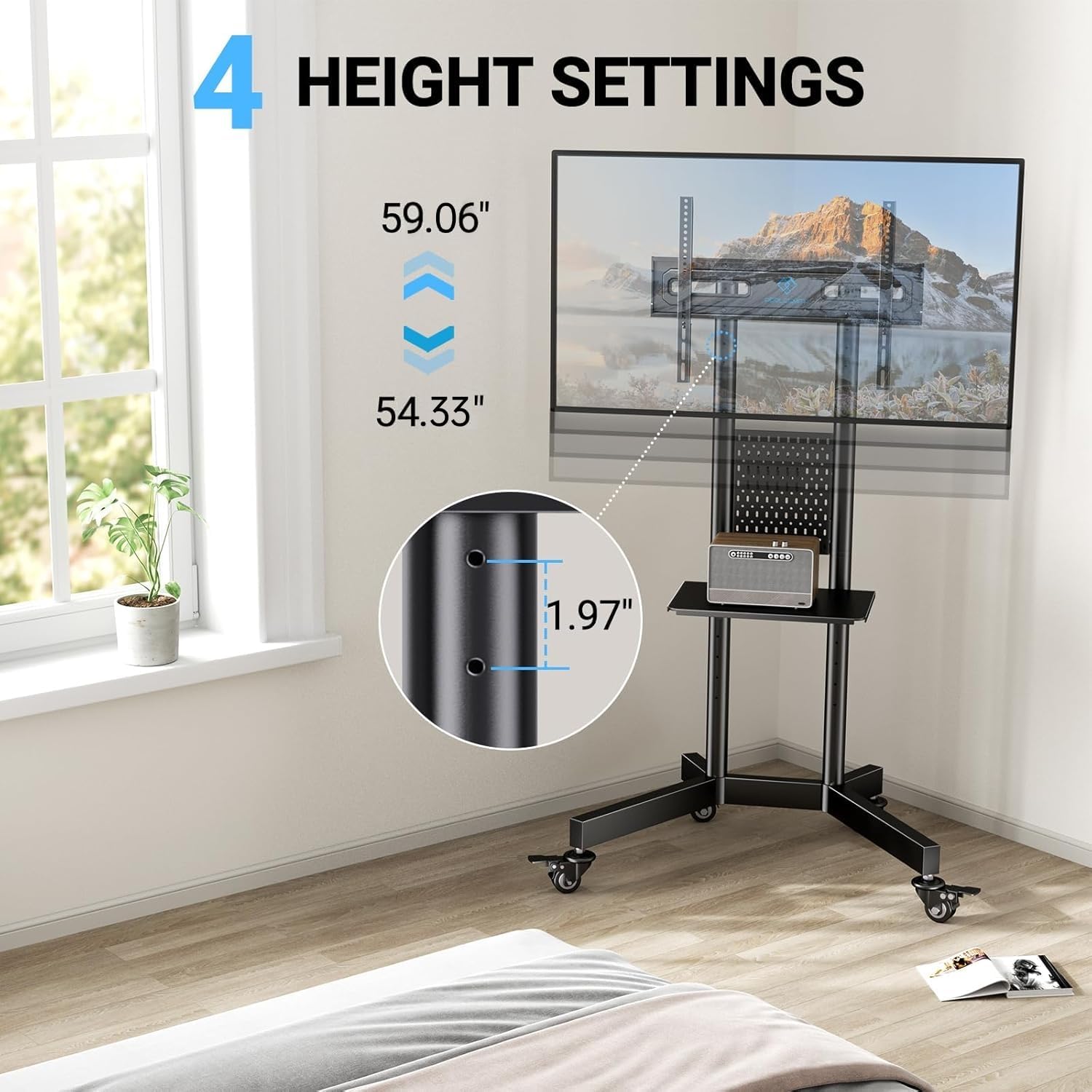
The stand provides multiple height settings for optimal viewing.
Mobility and Locking Casters
To move the TV stand, unlock all four casters by flipping their locking levers. Carefully push the stand to its new location. Once in position, engage the locking levers on all casters to prevent unintended movement and ensure stability.

Easily move the stand with 360-degree rotating casters and lock them for stability.
Using the Pegboard and Shelf
The integrated pegboard and adjustable shelf offer convenient storage. Use the pegboard with the included hooks to organize remotes, game controllers, or other small accessories. The shelf is ideal for placing media devices like DVRs, DVD players, cable boxes, or gaming consoles.
Maintenance
To ensure the longevity and proper functioning of your PERLESMITH Rolling TV Stand, follow these maintenance guidelines:
- Cleaning: Wipe down the stand with a soft, damp cloth. Avoid using abrasive cleaners or solvents that could damage the finish.
- Hardware Check: Periodically check all bolts and screws to ensure they remain tight. Re-tighten if necessary.
- Caster Maintenance: Keep the casters free of dust and debris to ensure smooth rolling.
- Storage: If storing the stand for an extended period, ensure it is clean, dry, and stored in a stable environment.
Troubleshooting
If you encounter any issues with your TV stand, refer to the following common problems and solutions:
| Problem | Possible Cause | Solution |
|---|---|---|
| Stand is wobbly/unstable | Loose hardware; uneven surface | Check and tighten all screws and bolts. Ensure the stand is on a flat, level surface. |
| Casters not rolling smoothly | Debris in casters; casters locked | Clean any debris from the caster wheels. Ensure all casters are unlocked before attempting to move. |
| TV not level after mounting | Mounting brackets unevenly installed | Remove TV, re-adjust and re-secure mounting brackets on the TV, ensuring they are level. |
| Difficulty adjusting TV height | Height adjustment screws too tight | Loosen the height adjustment screws sufficiently before attempting to adjust. |
Specifications
- Model: PSTVMC01
- Brand: PERLESMITH
- Material: Alloy Steel
- Color: Black
- Product Dimensions: 30.32 x 13.39 x 6.7 inches
- Item Weight: 28.3 pounds
- TV Size Compatibility: 32 - 85 inches
- Maximum Load Capacity: 132 lbs (60 kg)
- VESA Compatibility: 100x100mm, 100x200mm, 200x100mm, 200x200mm, 200x300mm, 300x200mm, 300x300mm, 400x200mm, 400x300mm, 400x400mm, 600x400mm
- Height Adjustment Range: 54.33 inches - 59.06 inches
- Movement Type: Fixed (TV mount on stand), Mobile (stand on casters)
- Special Features: Pegboard storage, Laptop shelf, Lockable casters, Cable management
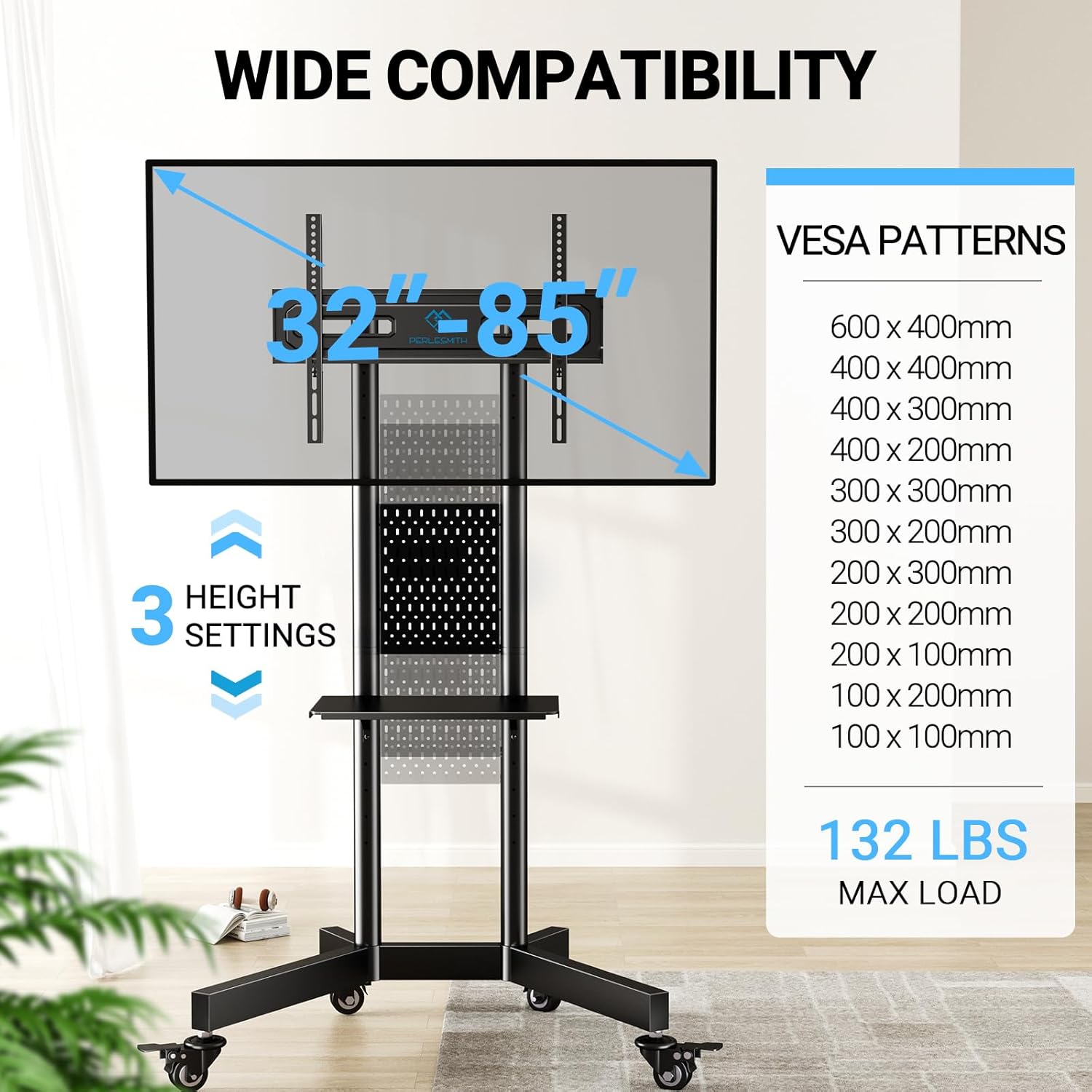
Compatibility details for the PERLESMITH Rolling TV Stand.
Warranty and Support
PERLESMITH stands behind the quality of its products. This product comes with a manufacturer's warranty. For detailed warranty information, product support, or to report missing/damaged parts, please contact PERLESMITH customer service through their official website or the retailer where you purchased the product. Please have your model number (PSTVMC01) and purchase date ready when contacting support.
Online Support: Visit the official PERLESMITH website for FAQs, product registration, and contact information. Visit PERLESMITH Store on Amazon
Related documentsPSTVMC01


Ask a question about this manual
Ask about setup, troubleshooting, compatibility, parts, safety, or missing instructions. Manuals+ will review the question and use this page’s manual context to help answer it.