
1. Introduction
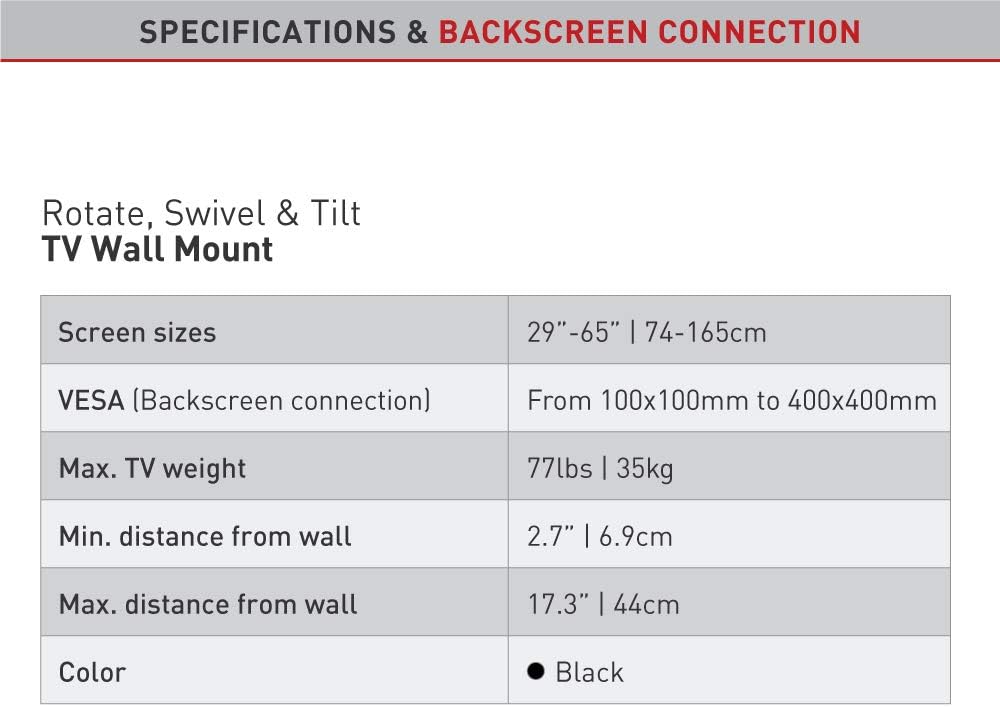
This manual provides detailed instructions for the safe and proper installation and operation of your Barkan L4TVM Articulated TV Wall Mount. This full-motion mount is designed for flat and curved screens ranging from 29 to 65 inches and supports a maximum weight of 35 kg (77 lbs). It offers four movements: rotate, fold, swivel, and tilt, allowing for optimal viewing angles from various positions.

2. Safety Information
Please read all instructions carefully before installation. Incorrect assembly or use may result in serious injury or damage to your TV and property. If you have any doubts, consult a qualified professional.
- Ensure the wall structure can safely support the combined weight of the mount and your TV.
- Do not exceed the maximum weight capacity of 35 kg (77 lbs).
- Use only the provided mounting hardware or suitable alternatives for your specific wall type.
- Always check for hidden electrical wires, water pipes, or gas lines before drilling.
- Keep children and pets away during installation.
- Two people are recommended for installation, especially when lifting the TV.
3. Package Contents
Verify that all components are present before beginning installation.
- Barkan L4TVM TV Wall Mount
- Mounting Instructions
- Wall Screws and Anchors (for various wall types)
- TV Mounting Hardware (M4, M6, M8 screws, metal washers, plastic spacers)

4. Setup & Installation
Follow these steps carefully to install your Barkan L4TVM TV Wall Mount.
4.1 Pre-Installation Checks
- TV Size and Weight: Ensure your TV is between 29 and 65 inches and weighs no more than 35 kg (77 lbs).
- VESA Compatibility: Check the VESA mounting pattern on the back of your TV. This mount supports VESA patterns from 100x100mm up to 400x400mm.
- Wall Type: Determine your wall type (e.g., concrete, brick, wood stud, drywall) to select the appropriate anchors and screws.

4.2 Mounting the Wall Plate
- Locate the desired mounting position on your wall. Use a stud finder for wood stud walls.
- Mark the drilling points for the wall plate. Ensure the marks are level.
- Drill pilot holes according to the instructions for your specific wall type and chosen anchors.
- Secure the wall plate to the wall using the appropriate Barkan wall screws and anchors. Ensure it is firmly attached and level.
4.3 Attaching TV Brackets
- Place your TV face down on a soft, clean surface to protect the screen.
- Identify the VESA mounting holes on the back of your TV.
- Select the correct size screws (M4, M6, or M8) and spacers from the hardware kit that fit your TV's mounting holes.
Note: Some Samsung TVs may require M8 x 45mm screws, which are not included. If needed, purchase these separately. - Attach the TV adapter plates to the back of your TV using the selected screws and spacers. Refer to the "Backscreen Connection Positioning Options" diagram for optimal plate configuration based on your TV's VESA pattern.

4.4 Mounting TV to Wall Mount
- With assistance, carefully lift the TV and hook the attached TV adapter plates onto the wall mount arm.
- Ensure the TV is securely seated on the mount. The internal anti-disengagement structure prevents accidental detachment.
- Tighten any safety screws or locking mechanisms as per the detailed instructions provided in the physical manual to prevent the TV from being lifted off the mount.
5. Operating Instructions
The Barkan L4TVM mount offers flexible adjustments for optimal viewing.
- Swivel: The mount features three pivot points for extensive swivel capabilities:
- Near the wall: Up to 180 degrees.
- Foldable arm: Up to 360 degrees.
- Near the screen connection plate: Up to 180 degrees.
- Tilt: Adjust the screen's vertical angle from 0 to 15 degrees without tools. Gently push or pull the top or bottom of the TV to achieve the desired tilt.
- Screen Leveling: An integrated mechanism allows for fine-tuning the screen's level after installation. Consult the physical manual for specific adjustment steps.
- Extension/Retraction: The mount allows the TV to extend up to 43.9 cm (17.3 inches) from the wall and retract to a minimum distance of 6.9 cm (2.7 inches).
6. Maintenance
Regular maintenance ensures the longevity and safe operation of your TV mount.
- Cleaning: Wipe the mount with a soft, dry cloth. Avoid abrasive cleaners or solvents.
- Periodic Checks: Periodically check all screws and connections to ensure they remain tight and secure. Re-tighten if necessary.
- Movement: If the mount's movement becomes stiff, a small amount of silicone-based lubricant can be applied to the pivot points. Do not use oil-based lubricants.
7. Troubleshooting
If you encounter issues, refer to the following common solutions:
- TV is not level: Use the integrated screen leveling mechanism. Refer to the physical manual for detailed instructions on how to adjust it.
- Mount feels loose: Re-check all wall mounting screws and TV attachment screws. Ensure they are tightened securely. Do not overtighten.
- Difficulty moving the mount: Ensure no cables are snagged. If movement is stiff, apply a small amount of silicone lubricant to the joints.
- TV does not fit: Double-check your TV's size, weight, and VESA pattern against the specifications in Section 8. If it falls outside the supported range, the mount is not compatible.
8. Specifications
| Model Number | L4TVM |
| Brand | Barkan |
| Compatible Screen Sizes | 29 - 65 inches (74 - 165 cm) |
| Maximum TV Weight | 35 kg (77 lbs) |
| VESA Compatibility | 100x100mm, 200x100mm, 200x200mm, 300x300mm, 300x400mm, 400x200mm, 400x300mm, 400x400mm |
| Minimum Distance from Wall | 6.9 cm (2.7 inches) |
| Maximum Distance from Wall | 43.9 cm (17.3 inches) |
| Tilt Angle | 0 to 15 degrees |
| Swivel Angle | Up to 180 degrees (at wall), 360 degrees (foldable arm), 180 degrees (at screen plate) |
| Material | Steel or high-strength aluminum alloy |
| Color | Black |
| Item Weight | 7.52 lbs |
| GTIN / UPC | 818212001728 |
9. Warranty Information
This Barkan TV wall mount comes with a 10-year warranty. Please retain your proof of purchase for warranty claims. The warranty covers manufacturing defects under normal use. It does not cover damage caused by improper installation, misuse, or unauthorized modifications.
10. Customer Support
For further assistance, technical support, or if your backscreen connections are not included in the provided options, please visit the official Barkan support page:
You can also find more product information on the official product page: Barkan L4TVM Product Page


