
1. Introduction
The DJI RS Intelligent Tracking Module is an accessory designed to enhance the tracking capabilities of compatible DJI RS series gimbals. This module enables intelligent subject tracking and composition, facilitating dynamic camera movements for various shooting scenarios. It features a magnetic quick-release design for easy installation and weighs only 19 grams.
2. Product Overview
The Intelligent Tracking Module integrates seamlessly with your DJI RS gimbal to provide advanced tracking functionalities. Below is an overview of the module and its components.

Figure 2.1: The DJI RS Intelligent Tracking Module (right) and its Adapter Mount (left).
This image displays the compact DJI RS Intelligent Tracking Module, a light gray rectangular device with a lens on one end and connection pins on the other, alongside its black L-shaped Adapter Mount, which features a USB-C port and a locking mechanism.
2.1. In the Box
- RS Intelligent Tracking Module × 1
- RS Intelligent Tracking Module Adapter Mount × 1
3. Compatibility
The DJI RS Intelligent Tracking Module is compatible with the following DJI RS series gimbals:
- DJI RS 4 Mini
- DJI RS 4
- DJI RS 4 Pro
4. Setup and Installation
4.1. Installing on DJI RS 4 Mini
The RS Intelligent Tracking Module features a magnetic quick-release design for direct attachment to the DJI RS 4 Mini.
- Align the module with the designated mounting point on the DJI RS 4 Mini.
- Press the latches on the module and gently push it into place until it securely locks magnetically.

Figure 4.1: A hand demonstrating the installation of the Intelligent Tracking Module onto a DJI RS gimbal.
This image shows a hand holding the light gray Intelligent Tracking Module and aligning it with the mounting slot on a white DJI RS gimbal, illustrating the quick-release installation process.
4.2. Installing on DJI RS 4 or DJI RS 4 Pro (with Adapter Mount)
For DJI RS 4 and DJI RS 4 Pro, the included Adapter Mount is required for installation.
- Attach the RS Intelligent Tracking Module to the Adapter Mount.
- Mount the Adapter Mount with the attached module onto the DJI RS 4 or RS 4 Pro.
- Important Note: Using the Adapter Mount will occupy the gimbal's RSS port. Consequently, the camera control cable cannot be used when the Intelligent Tracking Module is installed via the Adapter Mount.
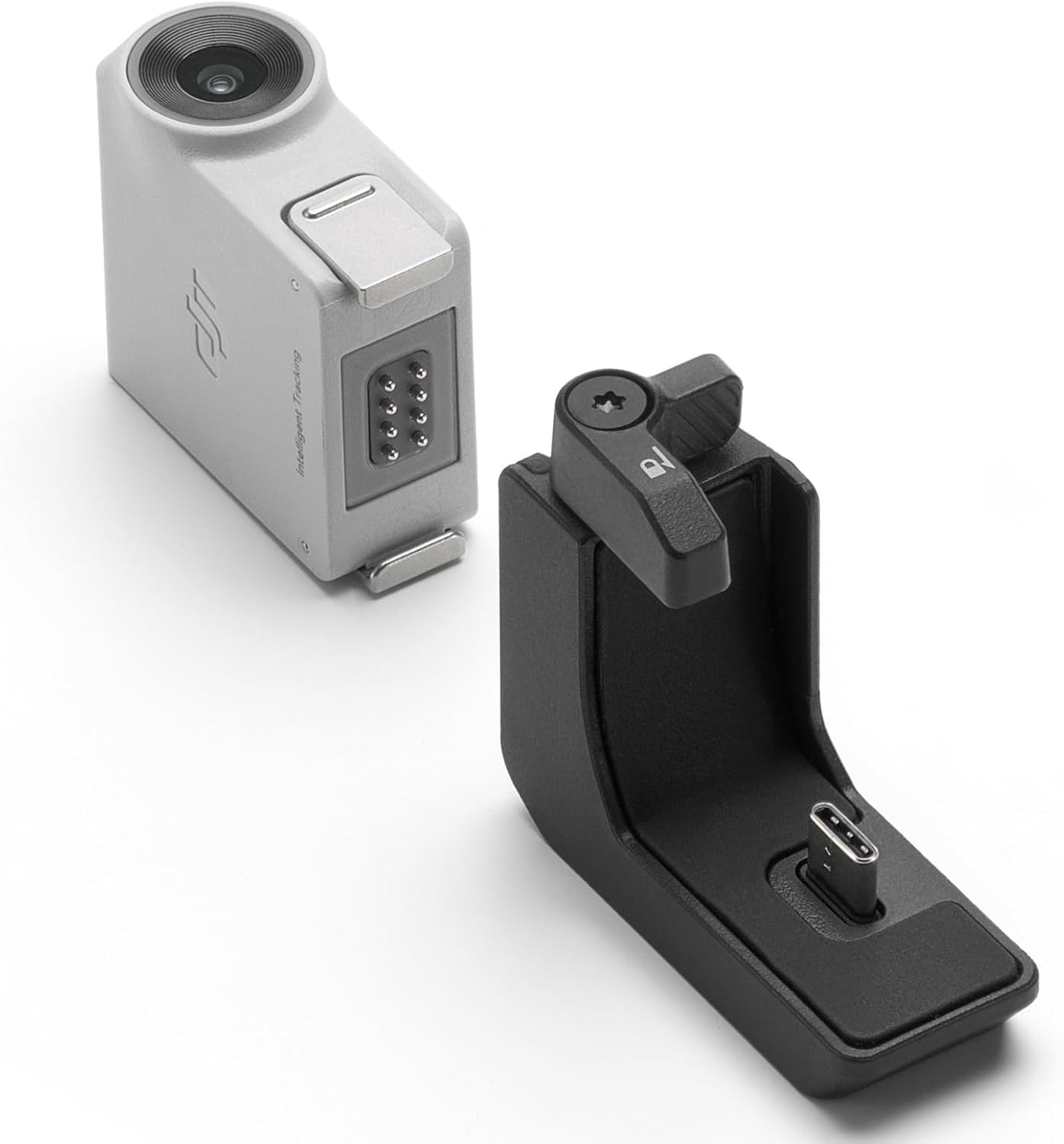
Figure 4.2: The Intelligent Tracking Module and its Adapter Mount shown separately.
This image displays the light gray Intelligent Tracking Module positioned next to its black L-shaped Adapter Mount, illustrating the two main components of the system.
5. Operating the Intelligent Tracking Module
Once installed, the Intelligent Tracking Module enables advanced tracking functionalities through the gimbal's interface.
5.1. Intelligent Tracking and Composition
The module allows for precise tracking and composition of a selected subject. This feature is particularly useful for:
- Smooth Orbit Shots: Automatically maintain a subject in the center while the gimbal orbits around it.
- Follow Shots: Keep the subject consistently framed as it moves.
- Solo Fixed-Position Tracking: Ideal for scenarios like selfies, vlogging, or live streaming where you need the camera to track you without an operator.

Figure 5.1: The Intelligent Tracking Module mounted on a gimbal, showing a green indicator light.
This image shows the light gray Intelligent Tracking Module securely attached to a white DJI RS gimbal, with a prominent green ring around its lens, indicating an active or ready state for tracking.

Figure 5.2: The Intelligent Tracking Module mounted on a gimbal, showing a red indicator light.
This image shows the light gray Intelligent Tracking Module attached to a white DJI RS gimbal, with a red ring around its lens, potentially indicating a tracking error, standby mode, or a specific operational status.
Refer to your specific DJI RS gimbal's user manual for detailed instructions on activating and controlling the intelligent tracking features through the gimbal's screen or companion app.
6. Maintenance
Proper maintenance ensures the longevity and optimal performance of your Intelligent Tracking Module.
- Cleaning: Use a soft, dry cloth to clean the module's exterior. For the lens, use a lens cleaning cloth and solution designed for optical surfaces. Avoid abrasive materials or harsh chemicals.
- Storage: Store the module in a cool, dry place away from direct sunlight and extreme temperatures. When not in use for extended periods, store it in its original packaging or a protective case.
- Handling: Handle the module with care to avoid dropping or impacting it, which could damage internal components or the lens.
7. Troubleshooting
If you encounter issues with your Intelligent Tracking Module, refer to the following common troubleshooting steps:
- Module Not Detected:
- Ensure the module is securely attached to the gimbal (or Adapter Mount) and the latches are fully engaged.
- Restart the gimbal and check for detection.
- Verify compatibility with your specific DJI RS gimbal model.
- Tracking Performance Issues:
- Ensure the module's lens is clean and free from obstructions.
- Check lighting conditions; extreme low light or harsh backlighting can affect tracking accuracy.
- Ensure the subject is clearly visible and distinct from the background.
- Update your gimbal's firmware to the latest version.
- Adapter Mount RSS Port Conflict:
- As noted in Section 4.2, the RSS port is occupied when using the Adapter Mount. This is expected behavior, and camera control via cable will not be available.
8. Specifications
| Feature | Detail |
|---|---|
| Brand | DJI |
| Model | RS Intelligent Tracking Module |
| Compatible Devices | DJI RS 4 Mini, DJI RS 4, DJI RS 4 Pro |
| Product Dimensions | 1.32"D x 0.69"W x 1.52"H |
| Item Weight | 19 Grams |
| UPC | 190021122345 |
9. Warranty and Support
For warranty information, technical support, or service inquiries, please visit the official DJI website or contact DJI customer support directly. Keep your proof of purchase for warranty claims.
Official DJI Website: www.dji.com


