1. Introduction
Thank you for choosing the iTouchless 13 Gallon Automatic Sensor Trash Can. This innovative product is designed to provide a hygienic and convenient waste disposal solution for your home or kitchen. Featuring a touchless motion sensor lid, an AbsorbX odor filter, and durable stainless steel construction, this trash can simplifies your daily routine. Please read this manual thoroughly before use to ensure proper setup, operation, and maintenance.
2. Package Contents
Please verify that all items listed below are included in your package:
- iTouchless 13 Gallon Automatic Sensor Trash Can (Main Unit)
- Lid Assembly with Motion Sensor
- AbsorbX Odor Filter (pre-installed or separate)
- 10 Premium Trash Bags
- User Manual (this document)

Image: Included iTouchless Premium Trash Bags.
3. Setup Guide
3.1 Battery Installation
- Locate the battery compartment on the underside of the lid.
- Open the battery compartment cover.
- Insert four (4) D-size alkaline batteries (not included) according to the polarity indicators (+/-).
- Close the battery compartment cover securely.
3.2 Odor Filter Installation
The AbsorbX Odor Filter helps neutralize trash odors.
- Locate the filter compartment on the underside of the lid.
- If not already installed, insert the AbsorbX Odor Filter into the designated slot. Ensure it is seated properly.
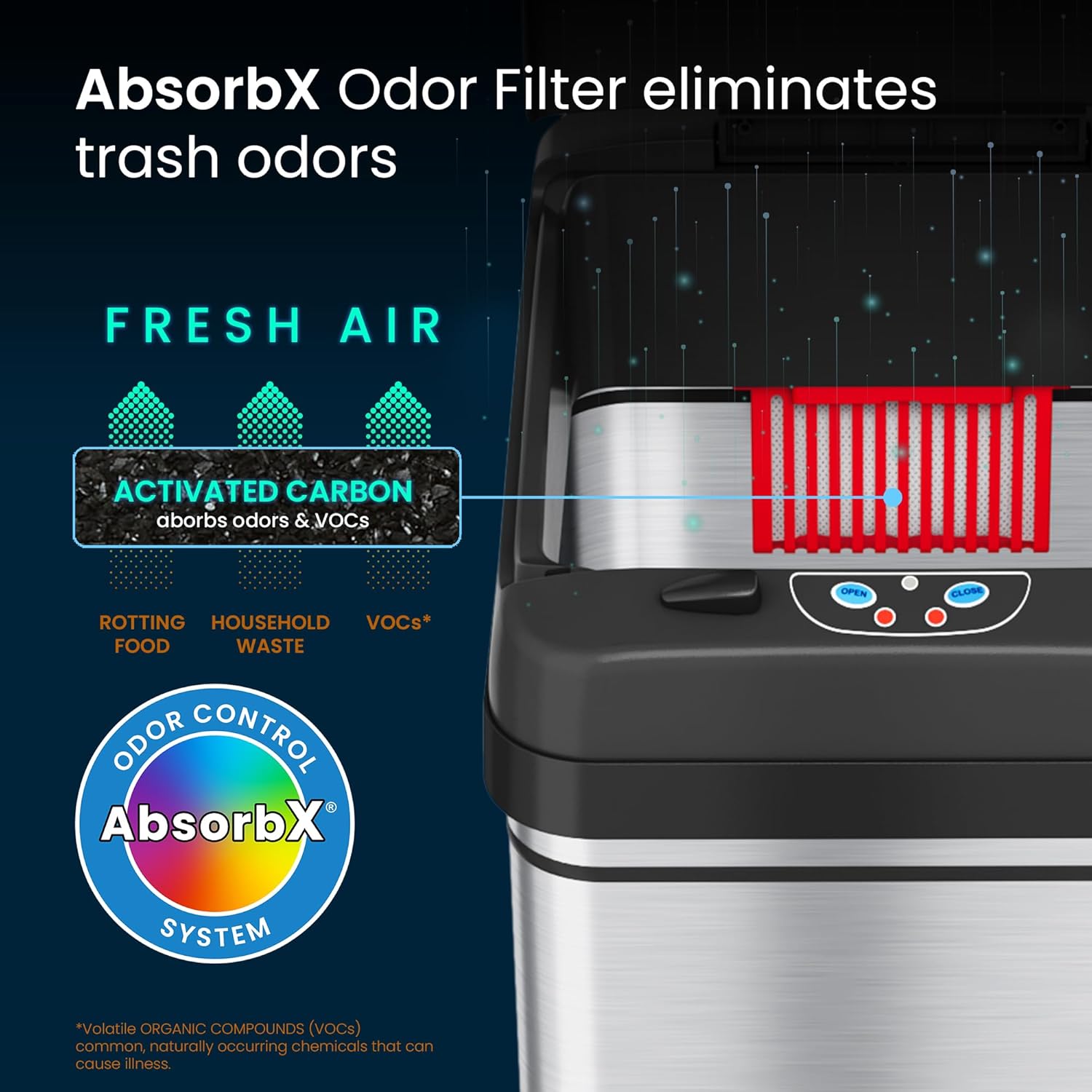
Image: AbsorbX Odor Filter location within the lid.
3.3 Trash Bag Installation
- Lift the lid of the trash can.
- Place a 13-gallon trash bag into the inner bucket, ensuring the top edge of the bag is folded over the rim of the bucket.
- Lower the lid back onto the trash can.
3.4 Initial Placement
Place the trash can in your desired location. Ensure there is clear space above the sensor for optimal operation.
Video: A general overview of the iTouchless automatic trash can, demonstrating its features and setup.
4. Operating Instructions
4.1 Automatic Sensor Operation
The iTouchless trash can features a motion sensor for hands-free operation.
- To open the lid, simply place your hand or an object within 6 inches (15 cm) of the sensor located on the front of the lid. The lid will open automatically.
- The lid will remain open as long as the sensor detects an object. Once the object is removed, the lid will close automatically after approximately 5 seconds.

Image: Demonstrating the automatic lid opening via motion sensor.
4.2 Manual Open/Close Buttons
For extended opening or manual control, use the buttons on the lid:
- Press the OPEN button to keep the lid open for a longer duration.
- Press the CLOSE button to close the lid manually.
- The sensor will reactivate once the lid is closed manually or after a period of inactivity if left open with the OPEN button.

Image: User interacting with the iTouchless automatic trash can in a kitchen setting.
4.3 Power Options
The trash can can be powered by batteries or an optional AC adapter.
- Battery Power: Uses 4 D-size batteries (not included). Provides up to 1.5 years of battery life.
- AC Adapter (Sold Separately): For continuous, battery-free operation, an optional iTouchless AC adapter can be purchased and connected to the power port on the lid.

Image: Visual representation of battery and AC adapter power options.
5. Maintenance
5.1 Cleaning the Exterior
The stainless steel exterior is fingerprint-proof and easy to clean.
- Wipe the exterior with a soft, damp cloth and a mild detergent.
- Avoid abrasive cleaners or scouring pads, as these can damage the finish.
- Do not submerge the lid in water or spray water directly onto the sensor area.

Image: Cleaning the stainless steel exterior of the trash can.
5.2 Replacing the Odor Filter
The AbsorbX Odor Filter should be replaced every 3 months for optimal odor control.
- Open the filter compartment on the underside of the lid.
- Remove the old filter and dispose of it.
- Insert a new AbsorbX Odor Filter (sold separately) into the compartment.
- Close the compartment cover.
5.3 Replacing Batteries
When the lid operation becomes slow or inconsistent, it's time to replace the batteries.
- Follow the steps in Section 3.1 Battery Installation to replace all four D-size batteries.
- Always replace all batteries at once with new ones for best performance.
6. Troubleshooting
If you encounter issues with your iTouchless Automatic Sensor Trash Can, please refer to the following common problems and solutions:
| Problem | Possible Cause | Solution |
|---|---|---|
| Lid does not open automatically. | 1. Batteries are low or incorrectly installed. 2. Sensor is obstructed or dirty. 3. Power switch is off. | 1. Replace batteries with new D-size batteries, ensuring correct polarity. If using AC adapter, check connection. 2. Clean the sensor window with a soft, dry cloth. Ensure no objects are blocking the sensor. 3. Ensure the power switch on the lid is in the 'ON' position. |
| Lid does not close completely or stays ajar. | 1. Obstruction in the lid's path. 2. Lid mechanism damage. 3. Low batteries. | 1. Check for any debris or objects preventing the lid from closing. Manually close the lid to reset. 2. Avoid manually forcing the lid open or closed, as this can damage the gears. If damage is suspected, contact customer support. 3. Replace batteries. |
| Lid opens randomly. | 1. Sensor is too sensitive or in a high-traffic area. 2. Direct sunlight or strong artificial light interfering with sensor. | 1. Relocate the trash can to an area with less foot traffic or away from pets. Ensure no objects are constantly near the sensor. 2. Move the trash can away from direct light sources. |
| Odor is still present. | AbsorbX Odor Filter needs replacement. | Replace the AbsorbX Odor Filter (recommended every 3 months). |
Video: Detailed demonstration of the iTouchless trash can's features and potential troubleshooting tips.
7. Product Specifications
| Feature | Detail |
|---|---|
| Brand | iTouchless |
| Model Number | DZT13BG10 |
| Capacity | 13 Gallons |
| Opening Mechanism | Motion-Sensor |
| Material | ABS Plastic, Stainless Steel |
| Color | Silver |
| Finish Type | Brushed |
| Item Weight | 8.6 Pounds |
| Product Dimensions (L x W x H) | 12.75" x 10.75" x 27.88" |
| Power Source | 4 D-size batteries (not included) or optional AC Adapter (sold separately) |
| Special Feature | Motion Sensor, Odor Filter |

Image: Product dimensions for the iTouchless 13 Gallon Automatic Trash Can.
8. Warranty and Support
For warranty information or technical support, please refer to the warranty card included with your product or visit the official iTouchless website. If you have any questions or require assistance, please contact iTouchless customer service directly.


