Introduction
Thank you for choosing the BN-LINK Dusk to Dawn Light Sensor Timer with Remote Control. This device is designed to automate your outdoor lighting, providing convenience and energy efficiency. It features a built-in photocell sensor for dusk-to-dawn operation and multiple countdown timer options, all controllable via a wireless remote.
Safety Information
Please read and understand all safety instructions before using this product. Failure to follow these instructions may result in electric shock, fire, or serious injury.
- This outdoor timer is ETL listed and has been rigorously tested for quality control and safety. It conforms to UL Std No. 60730-1 and 60730-2-1.
- Rated for 125V, 60Hz, 1875W, 15A Resistive & General Purpose, and 5A Tungsten. Do not exceed these electrical ratings.
- For outdoor use, ensure the timer is installed vertically and at least 2 feet (0.6 meters) above the ground to maintain its waterproof integrity.
- Always ensure the timer and connected devices are securely plugged in.
- Do not immerse the timer in water or expose it to direct water jets.
- Keep children away from the timer and electrical outlets.
- Disconnect power before performing any maintenance or cleaning.
Product Overview
Components
- BN-LINK Outdoor Timer Unit (Model BNC-60/U129R)
- Wireless Remote Control (includes 1 x 12V battery)
Features
- Waterproof Design: Suitable for outdoor environments, designed to withstand various weather conditions.
- Photocell Sensor: Automatically detects ambient light levels for dusk-to-dawn operation.
- Multiple Timer Functions: Offers Always ON, Always OFF, Dusk to Dawn, and countdown options (2H, 4H, 6H, 8H).
- Remote Control: Wireless remote with a range of up to 100 feet (30 meters) in direct line of sight. The RF signal can penetrate walls and doors.
- Three Grounded Outlets: Provides three outlets that operate simultaneously.
- ETL Listed: Ensures product safety and quality standards are met.
- Integrated Mounting Bracket: For secure installation.

Image: The BN-LINK outdoor timer unit with its three grounded outlets and the accompanying wireless remote control.
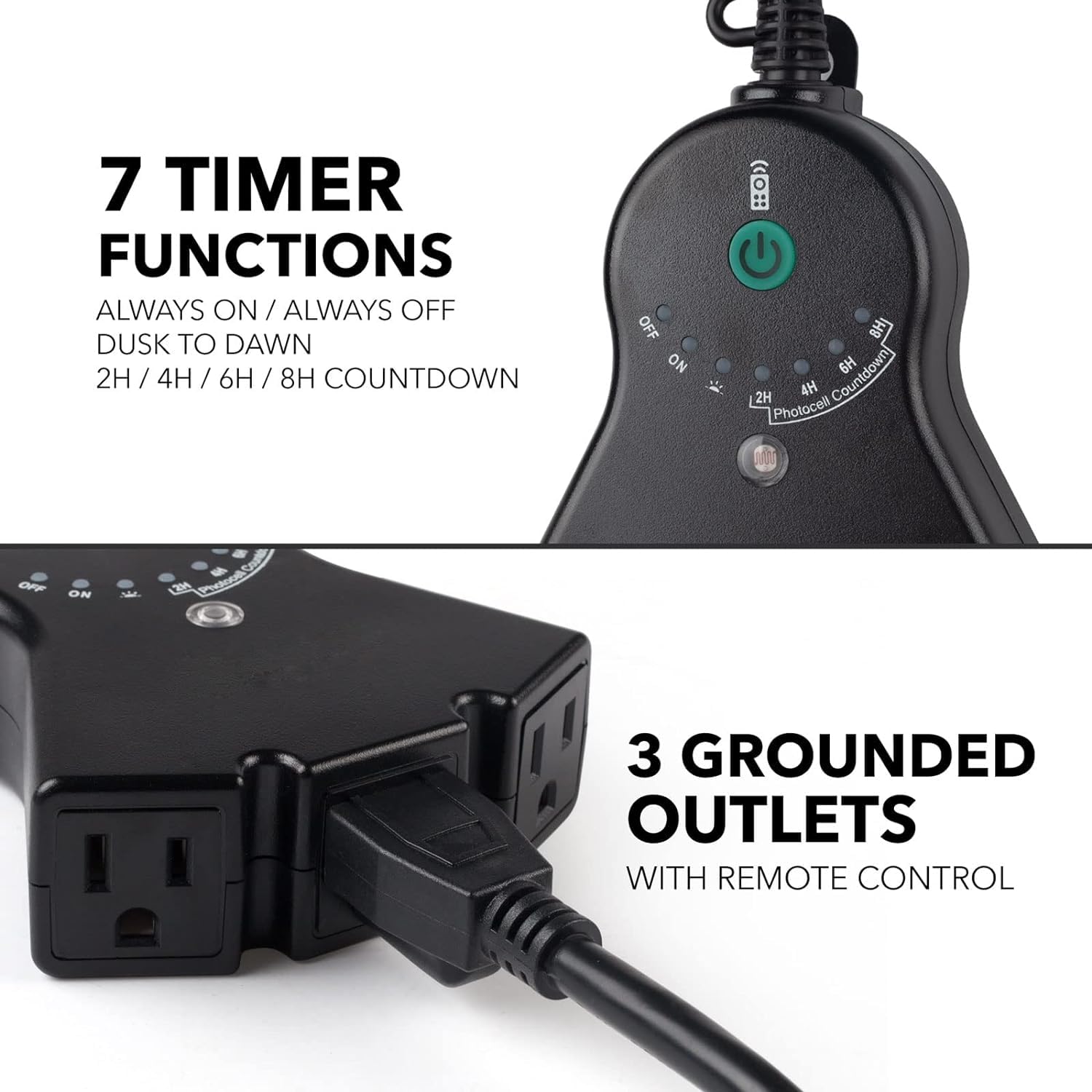
Image: Close-up view highlighting the timer's 7 functions (Always ON/OFF, Dusk to Dawn, 2H/4H/6H/8H Countdown) and the three grounded outlets.
Setup Instructions
- Choose Location: Select an outdoor location for the timer. Ensure it is mounted vertically and at least 2 feet (0.6 meters) above the ground to prevent water ingress and ensure proper photocell operation.

Image: Illustration showing the timer installed vertically and above ground level for waterproof protection.
- Connect Power: Plug the timer's power cord into a grounded outdoor electrical outlet.
- Connect Devices: Plug your outdoor lights or appliances into the three grounded outlets on the timer unit.
- Remote Battery: The remote control comes with a 12V battery pre-installed. If the remote does not respond, check the battery for proper contact or replacement.
- Pairing the Remote (if necessary):
- Unplug the timer unit from the wall outlet.
- On the remote, press and hold both the ON and OFF buttons simultaneously.
- While still holding the ON and OFF buttons, plug the timer unit back into the wall outlet.
- Continue holding the buttons until the indicator light on the timer unit blinks, indicating successful pairing.

Image: Visual guide for pairing the remote control with the timer unit.
Operating Instructions
The BN-LINK timer offers several operating modes, which can be selected using the dial on the timer unit or the remote control.
Timer Unit Dial Settings
Rotate the dial on the timer unit to select the desired mode:
- OFF: Keeps connected devices off.
- ON: Keeps connected devices continuously on.
- Dusk-Dawn: Turns devices on at dusk and off at dawn automatically.
- 2H / 4H / 6H / 8H Countdown: Turns devices on at dusk and automatically turns them off after the selected duration (2, 4, 6, or 8 hours).

Image: Illustration of the Dusk-Dawn function, showing lights turning on at dusk and off at dawn or after a set countdown.
Remote Control Operation
The remote control allows you to conveniently switch between modes from a distance.
- ON Button: Turns connected devices on.
- OFF Button: Turns connected devices off.
- Dusk-Dawn Button: Activates the dusk-to-dawn mode.
- 2H / 4H / 6H / 8H Buttons: Activates the respective countdown timer mode. The devices will turn on at dusk and turn off after the selected hours.
When using the remote, ensure the timer unit's dial is set to a compatible mode (e.g., not forced to 'OFF' if you want to use remote 'ON'). The remote's signal can reach up to 100 feet, even through walls and doors.

Image: Illustration demonstrating the 100-foot range of the remote control, capable of penetrating walls and doors.
Maintenance
- Cleaning: Disconnect the timer from the power source before cleaning. Wipe the unit with a damp cloth. Do not use harsh chemicals or abrasive cleaners.
- Photocell Sensor: Ensure the photocell sensor (small clear dome on the timer unit) is clean and free from obstructions (e.g., dirt, leaves, snow) to ensure accurate dusk-to-dawn operation.
- Remote Battery Replacement: If the remote control's range or responsiveness decreases, replace the 12V battery.
- Seasonal Storage: If storing the timer for an extended period, disconnect it from power and store it in a dry, protected area.
Troubleshooting
| Problem | Possible Cause | Solution |
|---|---|---|
| Devices do not turn ON/OFF. | No power to the timer; Timer dial set incorrectly; Remote not paired or battery low. |
|
| Photocell (Dusk-Dawn) function not working correctly. | Photocell obstructed; Insufficient light reaching the sensor; Timer not set to Dusk-Dawn or countdown mode. |
|
| Remote control not responding. | Remote battery is dead or loose; Remote is not paired with the timer. |
|
Specifications
- Model Number: BNC-60/U129R
- Product Dimensions: 7 x 5 x 2 inches (17.8 x 12.7 x 5.1 cm)
- Weight: 10.08 ounces (285.8 grams)
- Input Voltage: 125 Volts AC
- Frequency: 60 Hz
- Max Load: 1875 Watts (Resistive & General Purpose), 5 Amps (Tungsten)
- Current Rating: 15 Amps
- Horsepower: 1/2 HP
- Outlets: 3 Grounded Outlets
- Remote Range: Up to 100 feet (30 meters) line of sight
- Remote Battery: 1 x 12V battery (included)
- Certifications: ETL Listed (Conforms to UL Std No. 60730-1, 60730-2-1)

Image: Diagram showing the physical dimensions of the timer unit and its ETL certification mark.
Warranty and Support
BN-LINK is committed to providing quality products and excellent customer service. While specific warranty details are not provided in this manual, please retain your proof of purchase for any warranty claims.
For technical support, troubleshooting assistance, or inquiries regarding your BN-LINK product, please contact BN-LINK customer service. Contact information can typically be found on the product packaging, the official BN-LINK website, or through your retailer.
Manufacturer: BN-LINK


