1. Introduction
Thank you for purchasing the AKAI AKBT85SP Bluetooth Speaker and Radio. This device combines high-quality audio playback with versatile connectivity options, including Bluetooth, USB, AUX, and an integrated FM radio. Please read this manual carefully to ensure proper use and to maximize your listening experience.
2. Safety Instructions
- Do not expose the device to water or excessive moisture.
- Avoid placing the device near heat sources or in direct sunlight.
- Do not attempt to disassemble or repair the unit yourself. Refer all servicing to qualified personnel.
- Use only the provided AC-DC adapter for power.
- Keep the device away from strong magnetic fields.
- Ensure proper ventilation around the speaker.
3. Product Overview
3.1 Package Contents
Ensure all items are present in the package:
- AKAI AKBT85SP Bluetooth Speaker and Radio
- AC – DC Adapter
- Remote Control
3.2 Device Layout and Controls
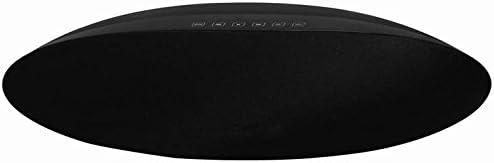
Figure 1: Front view of the AKAI AKBT85SP Bluetooth Speaker and Radio. The speaker features a sleek, oval design with a black fabric grille. A row of control buttons is located on the top surface, providing access to various functions.
The AKAI AKBT85SP features an intuitive control panel located on the top surface, along with an LED indicator. The rear panel houses the power input, USB ports, and AUX input.
- Control Buttons: (Specific functions like Power, Mode, Play/Pause, Volume Up/Down, Track Skip, Scan for Radio are typically found here. Exact labels are not visible in the image, so refer to the remote control or device for specific button functions.)
- LED Indicator: Displays current mode, pairing status, or charging status.
- USB Port (MP3): For playing audio files from a USB drive.
- USB Port (Charging): For charging external devices like smartphones.
- AUX Input (3.5mm Jack): For connecting external audio sources via cable.
- Power Input: Connects to the AC-DC adapter.
4. Setup
4.1 Power Connection
- Connect the provided AC-DC adapter to the Power Input port on the back of the AKBT85SP speaker.
- Plug the other end of the adapter into a standard wall outlet.
- The LED indicator may light up, indicating the device is receiving power.
5. Operating Instructions
5.1 Power On/Off
Press the Power button on the top panel or the remote control to turn the speaker on or off. The LED indicator will illuminate when the device is powered on.
5.2 Bluetooth Mode
- Turn on the speaker. It will automatically enter Bluetooth pairing mode, or you may need to press the Mode button to select Bluetooth. The LED indicator will flash, indicating it's ready to pair.
- Enable Bluetooth on your smartphone or other audio device.
- Search for "AKAI AKBT85SP" in the list of available devices and select it to pair.
- Once paired, the LED indicator will stop flashing and remain solid. You can now play audio from your device through the speaker.
- Use the speaker's controls or your paired device to adjust volume, play/pause, and skip tracks.
5.3 Radio Mode
- Press the Mode button repeatedly until "FM" or "Radio" is displayed (if applicable) or indicated by the LED.
- Press the Scan or Play/Pause button to automatically scan and save available radio stations.
- Use the Previous/Next Track buttons to navigate through the saved stations.
5.4 USB Playback
- Insert a USB flash drive containing MP3 audio files into the designated USB port for MP3 playback.
- Press the Mode button to select USB mode. The speaker will automatically begin playing the first compatible audio file.
- Use the speaker's controls or the remote control to play/pause, skip tracks, and adjust volume.
5.5 AUX Input
- Connect one end of a 3.5mm audio cable (not included) to the AUX Input port on the speaker.
- Connect the other end of the cable to the headphone jack or audio output of your external audio device.
- Press the Mode button to select AUX mode.
- Control playback and volume from your external audio device.
5.6 USB Charging
Connect your smartphone or other USB-powered device to the USB port designated for charging. The speaker will provide power to charge your device.
5.7 Remote Control
The included remote control provides convenient access to all major functions, including power, mode selection, volume adjustment, play/pause, and track navigation. Ensure the remote control has working batteries and is pointed towards the speaker's sensor.
6. Maintenance
6.1 Cleaning
- Wipe the exterior of the speaker with a soft, dry cloth.
- Do not use abrasive cleaners, waxes, or solvents.
- Avoid spraying liquids directly onto the speaker.
6.2 Storage
When not in use for extended periods, store the speaker in a cool, dry place, away from direct sunlight and extreme temperatures.
7. Troubleshooting
| Problem | Possible Cause | Solution |
|---|---|---|
| No power | Power adapter not connected or faulty outlet. | Ensure the AC-DC adapter is securely connected to both the speaker and a working power outlet. |
| No sound | Volume too low, incorrect mode, or device not paired/connected. | Increase volume on both the speaker and the connected device. Verify the correct input mode is selected. For Bluetooth, ensure successful pairing. For AUX/USB, ensure proper connection. |
| Bluetooth pairing fails | Speaker not in pairing mode, device too far, or interference. | Ensure the speaker is in Bluetooth pairing mode (flashing LED). Move the devices closer. Turn off other Bluetooth devices to reduce interference. |
| Radio reception is poor | Weak signal or interference. | Reposition the speaker to improve reception. Avoid placing near electronic devices that may cause interference. |
| Remote control not working | Dead batteries or obstructed sensor. | Replace the remote control batteries. Ensure there is a clear line of sight between the remote and the speaker's sensor. |
8. Specifications
- Model Number: AKBT85SP
- Brand: Akai Professional
- Connectivity Technology: Bluetooth (V 4.1 EDR), AUX (3.5mm), USB
- Audio Output Mode: Stereo
- Speaker Type: Shelf
- Max Speaker Output Power: 30 Watts (featuring 2 x 5W speakers and 30W total output)
- Special Features: Radio, Remote Control, USB Charging Port
- Power Source: Corded (AC-DC Adapter)
- Product Dimensions: 20 x 17 x 44 cm (L x W x H)
- Item Weight: 2 kg
- Color: Silver (Note: Product image shows black, but specification lists silver. Please refer to your specific product color.)
- Waterproof: No
9. Warranty and Support
This product comes with a Limited Warranty. For detailed information regarding warranty terms, returns, or technical support, please refer to the official Akai Professional website or contact their customer service.
For returns within 30 days of receipt due to a change of mind, or for defective/damaged products, please consult the retailer's return policy or relevant help pages. For purchases made on a marketplace, consult their specific help pages.
Manufacturer: Akai
First Available: July 5, 2018


