Download PDFFree PDF. The Save button below keeps a bookmark and private notes in your account.
Digital LCD Stroboscope Instruction Manual
Model: DT-2350PA
1. Introduction
The MeterTo DT-2350PA Digital LCD Stroboscope is an advanced instrument designed for observing and analyzing the motion of rapidly moving or vibrating objects. It provides the capability to generate a "stillness image" of single, two, or multiple instances of a vibrating or rapidly rolling object, allowing for detailed observation of movement tracks and patterns that are otherwise imperceptible to the human eye. This stroboscope is an essential tool for industrial inspection, quality control, and research applications where precise motion analysis is required.
Figure 1: The DT-2350PA Digital LCD Stroboscope and its separate control unit.
2. Setup
2.1 Unpacking and Inspection
Carefully unpack the stroboscope and its accessories. Verify that all standard accessories listed in Section 7 are present and that there is no visible damage to the unit.
2.2 Power Connection
Connect the stroboscope to a suitable AC power source. The unit supports both AC 220V and AC 110V. Ensure the power supply matches the unit's requirements to prevent damage.
2.3 Initial Power On
Locate the power switch on the unit. Turn the switch to the 'ON' position. The LCD display should illuminate, indicating the device is ready for operation.
3. Operating Instructions
3.1 Control Panel Overview
Figure 2: Detailed view of the stroboscope's control panel.
LCD Display: Shows the current Flash Per Minute (FPM) reading.
FINE Knob: Used for fine adjustment of the FPM.
COARSE Knob: Used for coarse adjustment of the FPM.
x2 Button: Doubles the current FPM value.
÷2 Button: Halves the current FPM value.
TRIG INT/EXT Button: Toggles between internal and external triggering modes.
RANGE H/L Button: Switches between High and Low FPM ranges. The flashing light is brighter in the Low Range.
EXT Port: External trigger input.
3.2 Internal Triggering Mode
In internal triggering mode, the stroboscope flashes at a rate set by the user using the FINE and COARSE adjustment knobs. This mode is suitable for general observation and for determining the rotational speed of objects by adjusting the flash rate until the object appears stationary.
Ensure the TRIG INT/EXT button is set to internal mode (usually indicated on the display or by a light).
Point the stroboscope at the rotating or vibrating object.
Adjust the COARSE knob to get close to the estimated FPM.
Use the FINE knob for precise adjustment until the object appears to be stationary.
Read the FPM value from the LCD display.
3.3 External Triggering Mode
In external triggering mode, the stroboscope's flash rate is synchronized with an external signal connected to the EXT port. This is useful for precise synchronization with machinery or processes that provide a trigger signal.
Connect the external trigger signal (3~24 V) to the EXT port.
Press the TRIG INT/EXT button to switch to external mode.
The stroboscope will now flash in sync with the external signal.
The LCD display will show the frequency of the external trigger signal.
3.4 Range Selection (H/L)
The RANGE H/L button allows switching between high and low FPM ranges. The low range provides a brighter flash, which can be beneficial for observing objects in dimly lit environments or for objects with low reflectivity. Use the x2 and ÷2 buttons for quick adjustments across the range.
4. Maintenance
4.1 General Care
Keep the stroboscope clean and free from dust and debris. Use a soft, dry cloth for cleaning. Avoid using abrasive cleaners or solvents that could damage the casing or display.
4.2 Operating Environment
To ensure optimal performance and longevity, operate the stroboscope within the specified environmental conditions:
Temperature: 0~40°C (32~104°F)
Humidity: <85% RH (non-condensing)
Avoid exposing the unit to extreme temperatures, high humidity, or direct sunlight for prolonged periods.
4.3 Flash Tube Life
The flash tube has a life expectancy of 100 million flashes. While designed for durability, continuous high-frequency operation over extended periods may reduce its lifespan. Replacement of the flash tube should only be performed by qualified service personnel.
5. Troubleshooting
5.1 No Display / No Power
Check if the power cable is securely connected to both the stroboscope and the power outlet.
Verify that the power outlet is functional.
Ensure the power switch is in the 'ON' position.
5.2 Inconsistent Flashing
In internal mode, ensure the FINE and COARSE knobs are not being inadvertently touched.
In external mode, check the stability and voltage of the external trigger signal. Ensure it is within the 3~24V range.
Verify that the TRIG INT/EXT button is set to the correct mode.
5.3 Object Not Appearing Stationary
Adjust the FPM more precisely using the FINE knob.
Ensure the stroboscope is pointed directly at the object.
Consider ambient lighting conditions; excessive light can make observation difficult.
If the object's speed is very high or very low, adjust the RANGE H/L setting.
5.4 Dim Flash Light
Ensure the unit is not in the High Range if a brighter flash is desired; switch to Low Range using the RANGE H/L button.
Check the operating temperature and humidity; extreme conditions can affect performance.
If the flash tube has reached its end of life (100 million flashes), it may need replacement. Contact service personnel.
6. Specifications
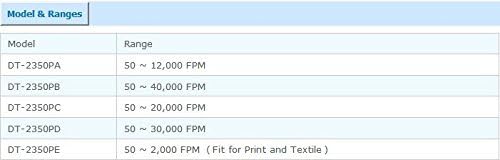
Figure 3: Model and Range comparison for DT-2350 series stroboscopes.
Flashing Light is much Brighter at Low Range than at High Range With x2, ÷2 for Fast Check
Flash Tube Life
100 Million Times
Operating Conditions (Temperature)
0~40°C
Operating Conditions (Humidity)
<85%RH
Power Supply
AC 220V or AC 110V
Power Consumption
About 50W
Dimensions
215x85x180 mm
Weight
About 1000 g
7. Standard Accessories
The DT-2350PA Digital LCD Stroboscope comes with the following standard accessories:
Main Unit (DT-2350PA Stroboscope)
Operation Manual (This document)
Ask a question about this manual
Ask about setup, troubleshooting, compatibility, parts, safety, or missing instructions. Manuals+ will review the question and use this page’s manual context to help answer it.