
Introduction
This manual provides essential information for the installation, operation, and maintenance of your Swann SWDVK-845804V-US 8 Channel 4 Camera 1080p Full HD DVR Security System. This system is designed to provide reliable surveillance for your home or business, featuring 1080p Full HD video, a pre-installed 1TB HDD, and advanced heat and motion detection capabilities. Please read this manual thoroughly before use to ensure proper setup and functionality.

Image: The Swann 4 Camera 8 Channel 1080p Full HD DVR Security System components.
What's in the Box
Your Swann Security System package includes the following items:
- 8 Channel Digital Video Recorder (DVR) with pre-installed 1TB HDD
- 4 x PRO-1080MSB 1080P PIR Cameras
- Cables (Power adapters, HDMI cable, Ethernet cable, Extension cables)
- Mouse
- Mounting Screws & Plugs
- Quick Start Guide
- Theft Deterrent Stickers
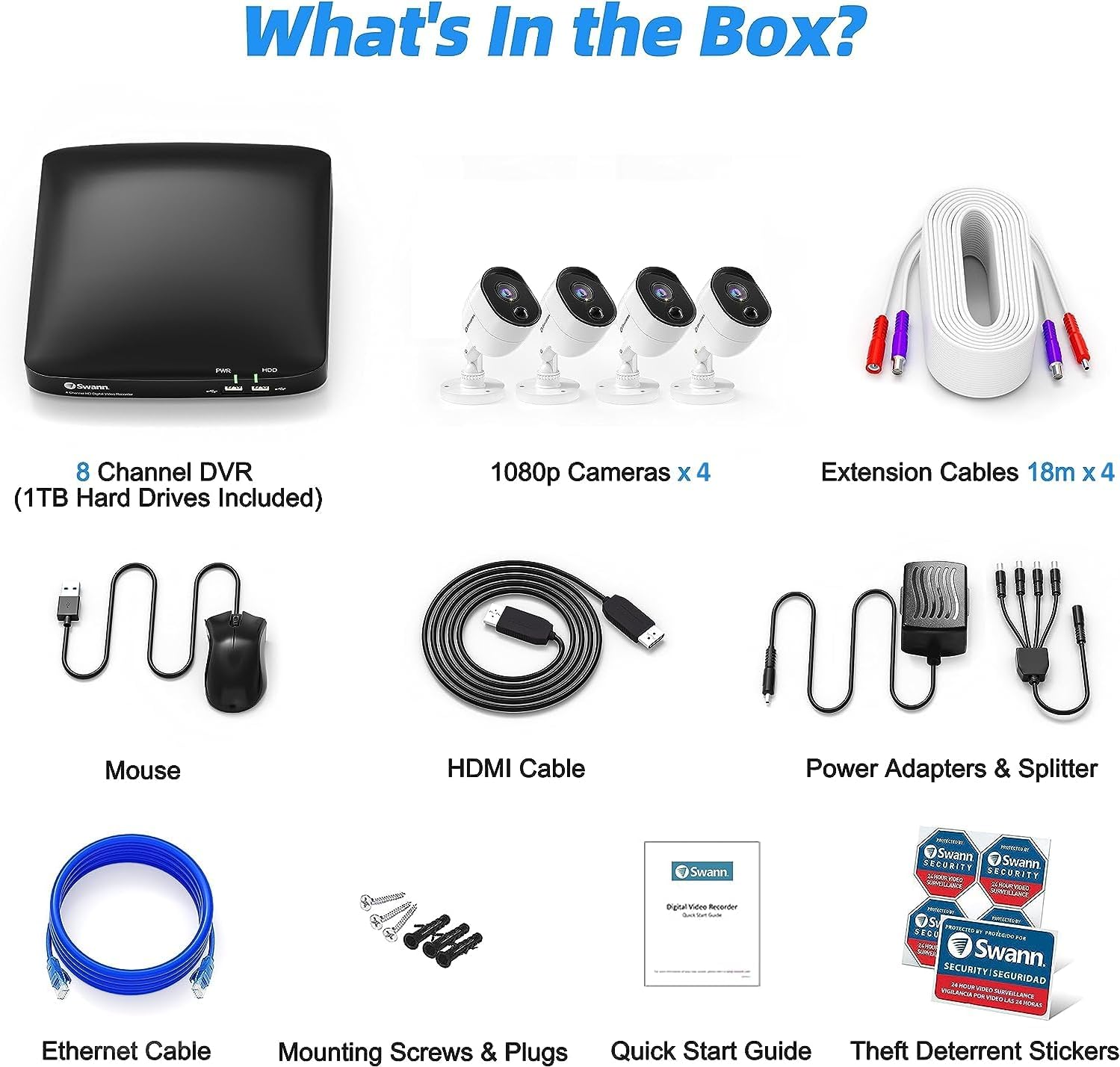
Image: All components included in the Swann Security System package.
Key Features
- 1080p Full HD Video: Experience clear and detailed surveillance footage.
- 8 Channel DVR with 1TB HDD: Record and store footage from up to 8 cameras with ample storage.
- 4 PRO-1080MSB PIR Cameras: Cameras with a 102-degree viewing angle and PIR (Passive Infrared) sensors for accurate heat and motion detection.
- Night Vision: See in black & white up to 50ft (15m) in total darkness.
- True Detect Heat & Motion Detection: Reduces false alarms by detecting heat signatures of people and large objects.
- Weatherproof Design: Cameras are built to withstand various weather conditions for indoor or outdoor use.
- Smart Home Integration: Compatible with Google Assistant and Alexa for voice control.
- Mobile Access: View live and recorded footage, and receive alerts via the Swann Security App on iOS and Android devices.

Image: Multi-camera view on a monitor, highlighting 24/7 protection and storage options.

Image: Split view demonstrating 90-degree wide-angle and 130ft night vision capabilities.

Image: Illustration of infrared night vision range up to 100ft in total darkness.

Image: Explaining Swann's True Detect technology for motion and heat-triggered recording.
Official Product Videos
Video: An overview of the Swann Home DVR Security Camera System, highlighting its features and benefits. This video is 44 seconds long.
Video: Demonstrates the functionality and interface of the Swann Security App for remote monitoring and control. This video is 1 minute long.
Video: A demonstration of the 4580 camera's capabilities, focusing on its performance without a warning light. This video is 30 seconds long.
Setup
- Unpack and Identify Components: Carefully remove all items from the box and verify against the 'What's in the Box' section.
- Connect Cameras to DVR: Connect each camera's BNC cable to an available 'VIDEO INPUT' port on the back of the DVR. Ensure connections are secure.
- Connect DVR to Monitor/TV: Use the provided HDMI cable to connect the DVR's HDMI output to an HDMI input on your TV or monitor.
- Connect Power: Connect the camera power adapters to the cameras and then to a power outlet. Connect the DVR power adapter to the DVR and then to a power outlet. The DVR will power on automatically.
- Network Connection: For remote viewing and smart features, connect the DVR to your router using the Ethernet cable.
- Initial Setup Wizard: Follow the on-screen instructions to configure basic settings such as language, time zone, and password.
- Download Swann Security App: Download the 'Swann Security' app from the App Store (iOS) or Google Play Store (Android) to your mobile device. Follow the in-app instructions to pair your DVR system.

Image: Diagram illustrating the connection of cameras, DVR, and network for setup.
Operating Instructions
Live Viewing
Once the system is set up, you can view live camera feeds on your connected monitor or through the Swann Security App. Use the included mouse to navigate the DVR's on-screen interface.
Recording Modes
- Continuous Recording: The DVR records 24/7 to the 1TB hard drive.
- Motion-Triggered Recording: Utilizing True Detect technology, recording starts only when heat and motion are detected, saving hard drive space and reducing irrelevant footage.
- Scheduled Recording: Set specific times for recording based on your needs.
Playback
Access recorded footage via the DVR interface or the mobile app. You can search by date, time, and event type (e.g., motion detection) to quickly find specific incidents.
Mobile App Features
The Swann Security App allows you to:
- View live streams from all connected cameras.
- Playback recorded video.
- Receive push notifications for motion and heat detection alerts.
- Configure system settings remotely.

Image: Screenshots of the Swann Security App on a mobile device and PC, showing remote access capabilities.
Maintenance
- Hard Drive Management: The 1TB HDD will automatically overwrite the oldest footage when full. You can configure recording settings to optimize storage usage.
- Cleaning Cameras: Periodically clean the camera lenses with a soft, damp cloth to ensure clear image quality. Avoid abrasive cleaners.
- Firmware Updates: Check the Swann support website regularly for firmware updates for your DVR. Updates can improve performance and add new features.
- Cable Inspection: Periodically inspect all cables for wear or damage, especially for outdoor installations.
Troubleshooting
- No Video Display:
- Ensure all power adapters are securely connected and receiving power. Check HDMI/VGA cable connections between the DVR and monitor. Verify the monitor input source is correctly selected.
- No Remote Access via App:
- Confirm the DVR is connected to your router via Ethernet. Check your router's internet connection. Ensure the Swann Security App is updated to the latest version and the DVR is correctly paired.
- False Motion Alerts:
- Adjust the motion detection sensitivity settings in the DVR or app. Ensure cameras are positioned to minimize detection of irrelevant movement (e.g., tree branches, small animals). Utilize the True Detect feature to filter out non-heat-generating movements.
- Poor Night Vision:
- Ensure the camera lens is clean and free from obstructions. Check for strong light sources near the camera that might interfere with infrared illumination.
Specifications
| Feature | Detail |
|---|---|
| Brand | Swann |
| Model Number | SWDVK-845804V-US |
| Connectivity Technology | Wired |
| Video Capture Resolution | 1080p Full HD |
| Special Features | Motion Sensor, Night Vision, Heat Detection |
| Number of Channels | 8 |
| Memory Storage Capacity | 1 TB (pre-installed HDD) |
| Night Vision Range | Up to 50 Feet |
| Operating System Compatibility | Android, iOS |
| Recommended Uses | Indoor, Outdoor |
| Item Dimensions (L x W x H) | 8.3 x 9.1 x 1.8 inches |
| Item Weight | 2.75 pounds |
Warranty and Support
Swann provides a 1-year limited warranty against factory defects for this product. For technical assistance, troubleshooting, or warranty claims, please contact Swann customer service. You can find detailed support resources, FAQs, and contact information on the official Swann website: www.swann.com/us/support.
Important Safety Information
- Ensure all power connections are secure and use only the provided power adapters.
- Do not expose the DVR or cameras to extreme temperatures, humidity, or direct water (unless specified for outdoor use).
- Avoid placing the DVR in enclosed spaces without adequate ventilation.
- Do not attempt to open or repair the device yourself. Refer all servicing to qualified personnel.
- Keep cables organized and out of pathways to prevent tripping hazards.


