Introduction

Figure 1: Mobiclinic Augusto 4-Wheel Lightweight Aluminum Rollator.
This manual provides essential information for the safe and effective use of your Mobiclinic Augusto 4-Wheel Lightweight Aluminum Rollator. Please read these instructions carefully before assembly and first use. Keep this manual for future reference.
The Mobiclinic Augusto rollator is designed to provide mobility assistance and stability for individuals requiring walking support. It features a lightweight aluminum frame, a comfortable seat with a backrest, a storage basket, and adjustable handles for personalized comfort. Its foldable design allows for easy transport and storage.
Safety Information
Always prioritize safety when using the rollator. Failure to follow these guidelines may result in injury.
- Ensure all parts are securely assembled and locked before each use.
- Always engage the parking brakes when sitting on the rollator or when it is stationary.
- Do not exceed the maximum weight capacity of 136 kg (299 lbs).
- Use the rollator on flat, stable surfaces. Avoid uneven terrain, stairs, or escalators.
- Regularly check the brakes, wheels, and frame for any signs of wear or damage.
- Do not use the rollator as a wheelchair or for transporting other people.
- Consult a healthcare professional for proper guidance on using a rollator if you have specific medical conditions.
Setup and Assembly
Your Mobiclinic Augusto rollator comes partially assembled. Follow these steps to prepare it for use:
- Unfolding the Rollator:
Carefully remove the rollator from its packaging. Place it on a flat surface. Pull the side frames outwards until the rollator is fully open and the locking mechanism engages. Ensure the seat is flat and secure.
- Adjusting Handle Height:
Press the adjustment buttons on the side of the handle tubes. Raise or lower the handles to a comfortable height. The handles should be at wrist level when standing upright with arms relaxed. Release the buttons to lock the handles in place. Ensure both handles are at the same height.

Figure 2: Adjusting handle height and using the seat. The image shows a person sitting on the rollator's seat, with insets illustrating the adjustable height features of the handles and wheels.
- Attaching the Storage Basket:
The rollator includes a removable storage basket. Attach it securely under the seat using the provided hooks or clips. Ensure it is stable and does not interfere with the folding mechanism.

Figure 3: Storage basket and cane/umbrella holder. The image highlights the mesh storage basket located under the seat and a dedicated holder for a cane or umbrella.
Operating Instructions
Walking with the Rollator
To walk with the rollator, stand behind it, grasp both handles firmly, and push it forward slightly. Maintain a comfortable distance from the rollator, ensuring your back is straight and you are not leaning too far forward. Walk at a steady pace, allowing the rollator to move with you.
Braking System
The Mobiclinic Augusto rollator is equipped with two braking systems for safety:
- Operating Brakes: To slow down or stop, gently squeeze the brake levers located on the handles upwards. Release the levers to disengage the brakes.
- Parking Brakes: To lock the wheels for sitting or when the rollator is stationary, push the brake levers downwards until they click into place. This engages the parking brake, preventing the rollator from moving. To release, pull the levers back up.

Figure 4: Brake system operation. The image shows how to engage the operating brakes (pull up) and parking brakes (push down) for maximum safety and comfort.
Using the Seat
When you need to rest, ensure the rollator is on a flat surface. Engage both parking brakes by pushing the levers downwards. Turn around and sit gently on the seat. Use the backrest for support. Always ensure the brakes are locked before sitting.
Folding for Storage and Transport
The rollator can be easily folded for compact storage or transport:
- Remove any items from the storage basket.
- Lift the seat upwards by pulling the strap or handle located in the center of the seat.
- Push the side frames inwards until the rollator is fully folded.
- Secure the folded rollator with any integrated locking mechanisms if available.

Figure 5: Folded rollator in car trunk. This image demonstrates how the rollator can be compactly folded and easily transported in a vehicle's trunk.
Maintenance and Care
- Cleaning: Wipe the frame with a damp cloth and mild detergent. Do not use abrasive cleaners. The seat and backrest can be cleaned with a suitable fabric cleaner.
- Wheels: Regularly check the wheels for debris and ensure they rotate freely. The solid PVC wheels are designed for durability.
- Brakes: Periodically test the brakes to ensure they are functioning correctly. If the brakes feel loose or ineffective, they may require adjustment by a qualified technician.
- Storage: Store the rollator in a dry place, away from direct sunlight and extreme temperatures.
Troubleshooting
| Problem | Possible Cause | Solution |
|---|---|---|
| Rollator does not fold easily. | Obstruction or seat not fully lifted. | Ensure the seat strap is fully pulled up and there are no items in the basket. Check for any debris obstructing the folding mechanism. |
| Brakes feel loose or ineffective. | Brake cable tension is too low. | Brakes may need adjustment. Consult a qualified technician or refer to specific brake adjustment instructions (if available, not detailed in current data). |
| Rollator is unstable during use. | Handles not adjusted to correct height; uneven surface; loose components. | Ensure handles are at the correct height and locked. Use on flat surfaces. Check all screws and fasteners for tightness. |
Specifications

Figure 6: Technical Specifications Overview. This image provides a visual summary of the rollator's key features and dimensions.
| Feature | Detail |
|---|---|
| Model Number | QA-00380/29 |
| Brand | Mobiclinic |
| Material | Aluminum |
| Color | Blue |
| Total Width (wheels included) | 65 cm (25.6 inches) |
| Front Width | 65 cm (25.6 inches) |
| Rear Width | 57 cm (22.4 inches) |
| Seat Width | 37 cm (14.6 inches) |
| Seat Depth | 24.5 cm (9.6 inches) |
| Folded Width | 24.5 cm (9.6 inches) |
| Wheel Diameter (front and rear) | 15 cm (5.9 inches) |
| Rollator Height (adjustable) | 80.5 ~ 98 cm (31.7 ~ 38.6 inches) |
| Rollator Length | 79 cm (31.1 inches) |
| Backrest Height (from seat) | 23 cm (9.1 inches) |
| Seat Height (adjustable) | 50.5 ~ 57 cm (19.9 ~ 22.4 inches) |
| Maximum User Weight | 136 kg (299 lbs) |
| Rollator Weight | 6.4 kg (14.1 lbs) |

Figure 7: Rollator dimensions. This image provides a visual representation of the rollator's key measurements when unfolded and folded, including height, length, and width.
Additional Features
- Indoor and Outdoor Use: The rollator is designed for versatile use in both indoor and outdoor environments.
- Solid Wheels: Equipped with solid PVC wheels for durability and low maintenance.
- Cane/Umbrella Holder: Includes a convenient holder for a cane or umbrella.
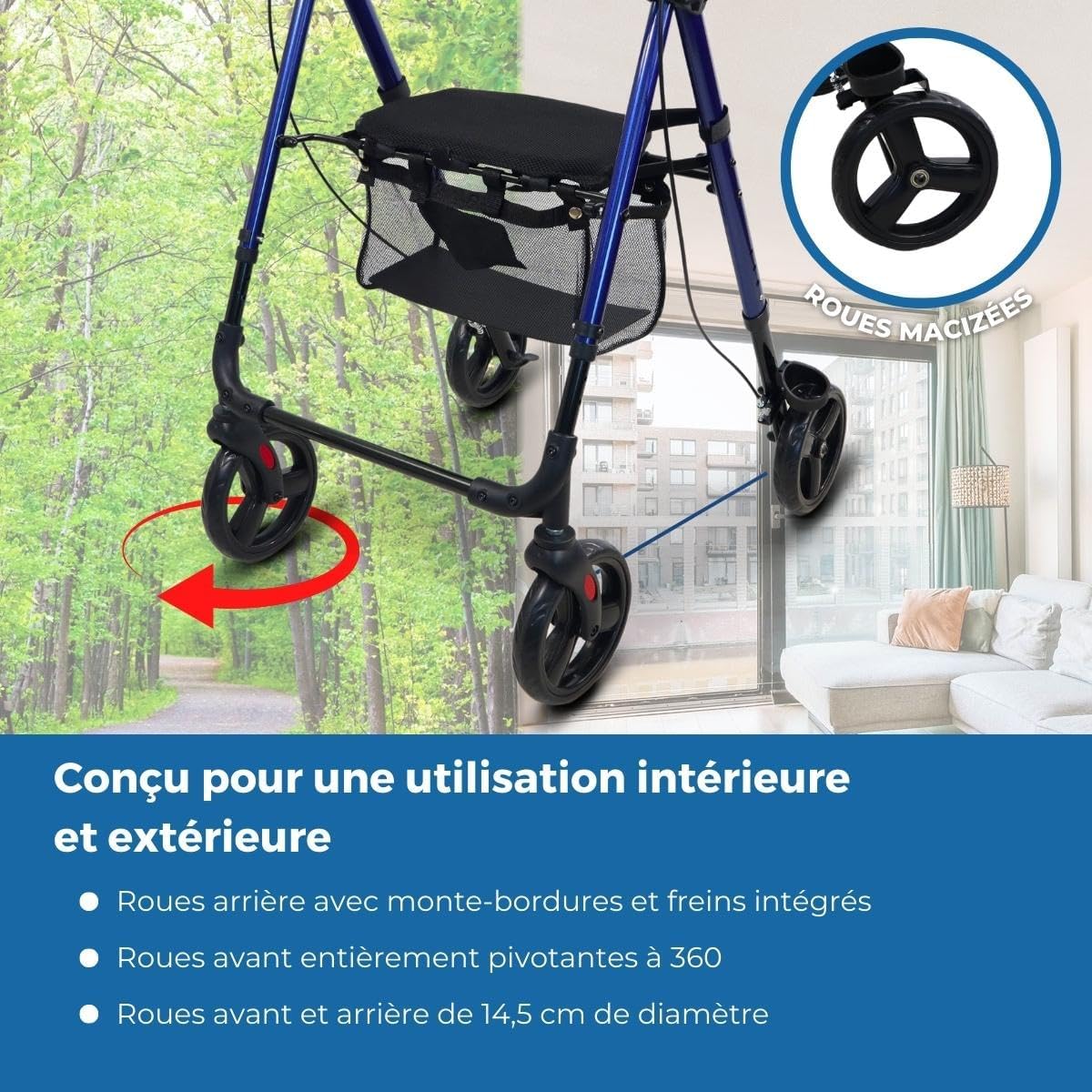
Figure 8: Indoor and Outdoor Use. The image highlights the robust wheels, suitable for various terrains, and indicates the rollator's design for both indoor and outdoor environments.
Warranty and Support
Specific warranty information is not provided in the product details. For warranty claims, technical support, or replacement parts, please contact Mobiclinic customer service directly or refer to the retailer's return policy.
You can visit the Mobiclinic brand store for more information: Mobiclinic Brand Store


