Introduction
This manual provides comprehensive instructions for the Audio-Technica ATW-1701/L System 10 Camera-Mount Digital Wireless System. This system is designed for high-quality audio capture in video production, DSLR, mirrorless camera, and ENG applications. It includes the ATW-R1700 camera-mount receiver, ATW-T1001 bodypack transmitter, and MT830CW omnidirectional lavalier microphone. Please read this manual thoroughly before operating the system to ensure proper setup and optimal performance.
Key Features:
- MT830cW Omnidirectional Lavalier Mic for clear audio capture.
- Immune to TV and Digital TV Interference, ensuring reliable operation.
- Independent Headphone Monitor Output on the receiver for real-time audio monitoring.
- Includes a robust Bodypack Transmitter for discreet placement.
- Hot- or Cold-Shoe Mountable Receiver for versatile camera attachment.
System Components
The Audio-Technica ATW-1701/L System 10 includes the following main components:
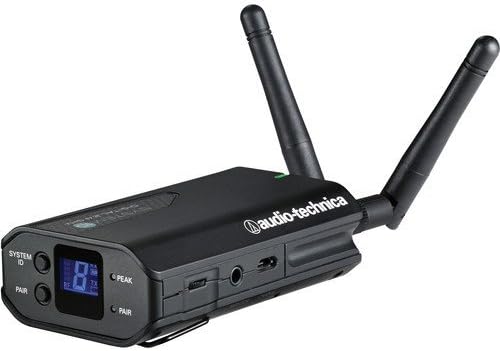
- ATW-R1700 Camera-Mount Wireless 2.4 GHz Receiver: The central unit for receiving audio signals from the transmitter.
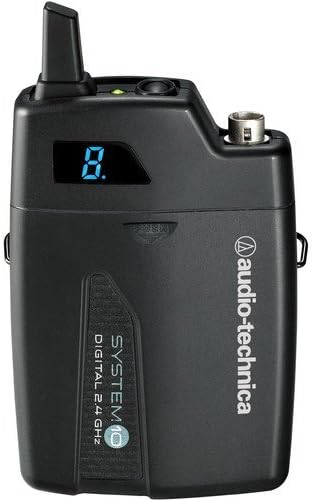
- ATW-T1001 System 10 Digital UniPak Transmitter: A bodypack transmitter that connects to the lavalier microphone.
- MT830CW Omni-Directional Lavalier Condenser Microphone: A small, clip-on microphone for vocal capture.
- Hot- or Cold-Shoe Adapter: For mounting the receiver to a camera.
- 1/8 to 1/8" Mini-Jack Output Cable: For connecting the receiver to a camera's audio input.
Additionally, this kit includes:
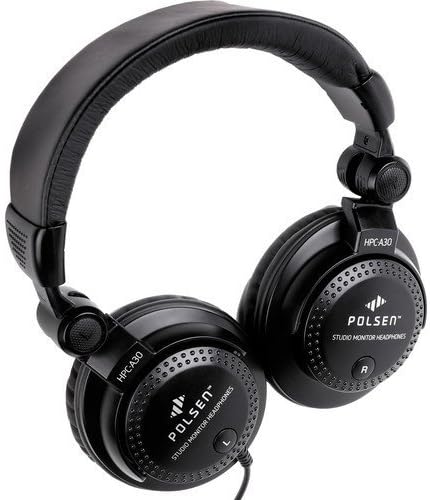
- Polsen HPC-A30 Closed-Back Studio Monitor Headphones: For accurate audio monitoring.
- Watson 4-Hour Rapid Charger with 4 AA NiMH Rechargeable Batteries: For powering the transmitter and other AA-powered devices.


Setup Instructions
- Receiver Battery Installation: The ATW-R1700 receiver is powered by an internal rechargeable Li-Ion battery. Ensure it is fully charged before use. Connect the appropriate charging cable (not specified in product details, assume standard USB or proprietary) to the receiver's charging port and a power source. The battery life indicator on the receiver will show charging status.
- Transmitter Battery Installation: The ATW-T1001 bodypack transmitter requires two 1.5V AA batteries (included with the Watson charger).
- Open the battery compartment on the transmitter.
- Insert two AA batteries, observing correct polarity (+/-).
- Close the battery compartment securely.
- Mounting the Receiver: Attach the ATW-R1700 receiver to your camera's hot shoe or cold shoe using the provided adapter. Secure it firmly.
- Connecting the Lavalier Microphone: Connect the MT830CW omnidirectional lavalier microphone to the input jack on the ATW-T1001 bodypack transmitter. Ensure the connection is secure. Clip the microphone to the user's clothing, approximately 6-8 inches from the mouth, for optimal sound capture.
- Connecting to Camera/Audio Device: Use the supplied 1/8 to 1/8" mini-jack output cable to connect the ATW-R1700 receiver's audio output to your camera's microphone input or other audio recording device.
- Power On and Pairing:
- Power on both the ATW-R1700 receiver and the ATW-T1001 transmitter.
- The System 10 operates in the 2.4 GHz range and automatically selects the clearest available frequency.
- Refer to the receiver's display for channel information and pairing status. The system should automatically pair. If manual pairing is required, consult the specific pairing instructions in the full product manual (not provided here, but a general instruction).
Operating Instructions
- Power On/Off: Press and hold the power button on both the receiver and transmitter to turn them on or off.
- Monitoring Audio: Connect the Polsen HPC-A30 headphones to the independent headphone monitor output on the ATW-R1700 receiver. Adjust the headphone volume to a comfortable listening level to monitor the audio signal in real-time.
- Volume Control: Adjust the output level on the ATW-R1700 receiver to match the input sensitivity of your camera or recording device. Avoid setting the level too high, which can cause distortion, or too low, which can result in a noisy signal. The transmitter typically has a fixed gain or limited adjustment.
- Range Considerations: The effective operating range is approximately 100 feet (30 meters) under optimal conditions. Obstacles, Wi-Fi interference, and other 2.4 GHz devices can reduce this range. Maintain a clear line of sight between the transmitter and receiver whenever possible.
- Battery Life Monitoring: Both the receiver and bodypack transmitter battery life indicators are displayed on the ATW-R1700 receiver. Monitor these indicators to ensure sufficient power for your recording session.
Maintenance
- Battery Care:
- Receiver: Recharge the internal Li-Ion battery regularly. Avoid fully discharging the battery frequently to prolong its lifespan.
- Transmitter: Use the provided Watson 4-Hour Rapid Charger to recharge the AA NiMH batteries. Remove AA batteries from the transmitter if the system will not be used for an extended period to prevent leakage.
- Cleaning: Use a soft, dry cloth to clean the exterior of the receiver, transmitter, and microphone. Do not use liquid cleaners or solvents.
- Storage: Store the system in a cool, dry place away from direct sunlight and extreme temperatures. When transporting, use a protective case to prevent damage.
Troubleshooting
| Problem | Possible Cause | Solution |
|---|---|---|
| No audio output from receiver. |
|
|
| Intermittent audio or static. |
|
|
| Short operating range. |
|
|
Specifications
| Model Number | ATW 1701 |
| Power Source | Battery Powered (Receiver: Internal Li-Ion; Transmitter: 2x AA 1.5V) |
| Frequency Response | 22 KHz (System) / 18Hz to 22kHz (Polsen Headphones) |
| Connectivity Technology | Auxiliary (3.5 mm Jack) |
| Connector Type | 3.5 mm Jack |
| Special Features | 3.5mm jack, Rechargeable, Wireless |
| Compatible Devices | Camera, Headphone |
| Polar Pattern (Lavalier Mic) | Omnidirectional |
| Microphone Form Factor | Microphone System (Lavalier) |
| Item Weight | 1.65 pounds (total package) |
| Product Dimensions | 15.6 x 10.6 x 5.5 inches (package) |
| ASIN | B07FNQYW9M |
| UPC | 686924573235 |
Warranty Information
The Audio-Technica ATW-1701/L System 10 Camera-Mount Digital Wireless System components are covered by the following limited warranties:
- Audio-Technica ATW-1701/L System: Limited 2-Year Warranty.
- Polsen HPC-A30 Closed-Back Studio Monitor Headphones: Limited 1-Year Warranty.
- Watson 4-Hour Rapid Charger with 4 AA NiMH Rechargeable Batteries: Limited 1-Year Warranty.
Please retain your proof of purchase for warranty claims. For detailed terms and conditions, refer to the warranty card included with your product or visit the respective manufacturer's website.
Customer Support
For technical assistance, troubleshooting beyond this manual, or warranty service, please contact the manufacturer's customer support:
- Audio-Technica: Visit the official Audio-Technica website for support resources, FAQs, and contact information.
- Polsen: Refer to Polsen's official website for headphone support.
- Watson: Consult Watson's official website for charger and battery support.
Always provide your product model number (ATW 1701) and purchase date when contacting support.


