
1. Introduction
The Logitech MX Vertical is an advanced ergonomic mouse designed to reduce muscle strain and wrist pressure. Its unique 57-degree vertical angle promotes a natural handshake position, enhancing comfort during extended use. This mouse offers versatile connectivity options including RF Wireless, Bluetooth, and USB-C wired connection, along with multi-device support.

Figure 1: Hand holding the Logitech MX Vertical mouse, demonstrating the natural handshake position designed to reduce muscle strain.

Figure 2: Diagram highlighting the 57-degree vertical angle of the mouse, which is engineered for optimal wrist and forearm posture.
2. Setup
2.1 What's in the Box

Figure 3: The retail packaging for the Logitech MX Vertical mouse, showing the mouse, USB-C charging cable, and the Logitech Unifying receiver.
2.2 Connectivity Options
The MX Vertical mouse offers three ways to connect to your devices:
- Logitech Unifying Receiver: Plug the included USB receiver into your computer's USB port.
- Bluetooth: Pair the mouse directly with your Bluetooth-enabled device.
- USB-C Cable: Connect the mouse directly to your computer using the provided USB-C to USB-A charging cable. The mouse can be used while charging.

Figure 4: The Logitech MX Vertical mouse alongside its compact USB Unifying receiver, ready for wireless connection.
2.3 Easy-Switch Feature
The mouse can be paired with up to three different devices and allows for seamless switching between them. Use the Easy-Switch button located on the bottom of the mouse to cycle through connected devices.

Figure 5: Illustration of the Easy-Switch feature, enabling the mouse to connect and switch between up to three different computers or devices.
Video 1: Demonstration of connecting the Logitech MX Vertical mouse to multiple computers using the Easy-Switch feature.
2.4 Logi Options+ Software
For advanced customization of buttons, pointer speed, and other settings, download and install the Logi Options+ software from the official Logitech website. This software allows you to tailor the mouse's functionality to your specific workflow.
3. Operating the Mouse
3.1 Button Functions

Figure 6: Detailed diagram labeling the various buttons and features of the Logitech MX Vertical mouse for easy identification and use.
- Premium Scroll Wheel: Provides precise scrolling for documents and web pages.
- Island Keys (Left/Right Click): Standard mouse click functionality.
- Cursor Speed Switch (DPI Button): Located on the top, this button allows you to instantly adjust the pointer speed (DPI) to match your preference or task.
- Customizable Shortcuts (Side Buttons): Two buttons located on the side, accessible by your thumb. These can be programmed via Logi Options+ for various functions like forward/back in web browsers or application-specific shortcuts.
- Natural Grip & Textured Thumb Area: Designed for comfort and control, ensuring a secure hold.
3.2 Ergonomic Benefits
The MX Vertical's design is certified ergonomic, promoting a natural wrist and forearm posture. This reduces muscle activity by 10% compared to a traditional non-vertical mouse, minimizing fatigue and discomfort.

Figure 7: The Logitech MX Vertical mouse, highlighting its certification as user-tested and ergonomist-approved for comfort and health.

Figure 8: Visual representation indicating that the ergonomic design of the MX Vertical mouse leads to 4 times less hand movement, reducing muscle fatigue.
4. Battery and Charging
The Logitech MX Vertical mouse is equipped with a rechargeable Lithium Polymer battery. It features a USB-C port for fast charging, located at the front of the mouse. A full charge can last up to four months, depending on usage. The mouse can be used normally while it is charging.
5. Specifications
| Feature | Detail |
|---|---|
| Brand | Logitech |
| Model Number | 910-005448 |
| Operating System Compatibility | Windows, macOS |
| Item Weight | 4.8 ounces |
| Product Dimensions (LxWxH) | 4.72 x 3.11 x 3.09 inches |
| Power Source | Battery Powered (1 Lithium Polymer battery included) |
| Connectivity Technology | Bluetooth, Radio Frequency (USB Unifying Receiver), USB-C |
| Special Feature | Ergonomic Design |
| Movement Detection Technology | Optical |
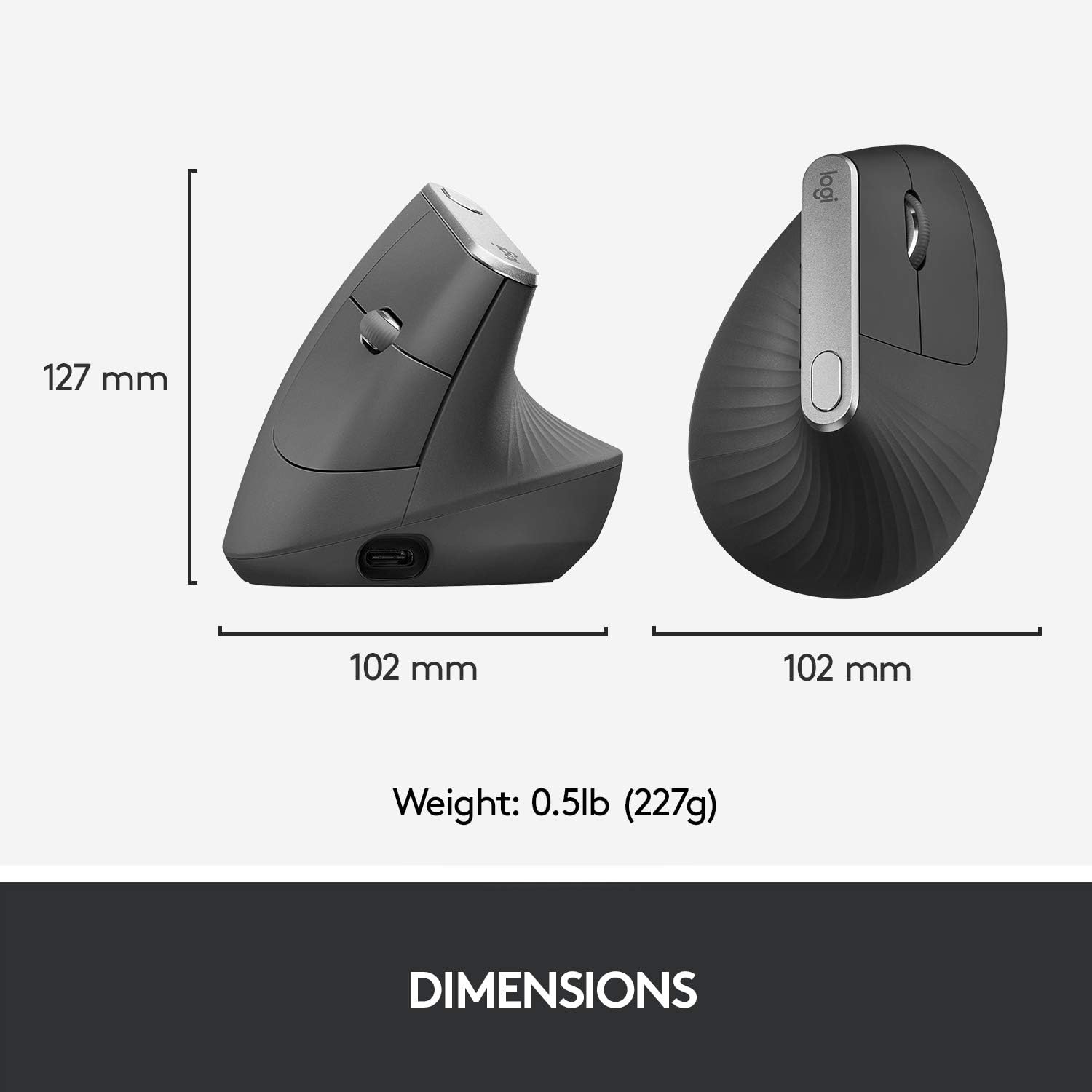
Figure 9: Physical dimensions and weight of the Logitech MX Vertical mouse.
6. Maintenance
To ensure optimal performance and longevity of your Logitech MX Vertical mouse, keep it clean and free from dust and debris. Use a soft, dry cloth for cleaning. Avoid using harsh chemicals or abrasive materials.
7. Troubleshooting
If you encounter any issues with your mouse, try the following basic troubleshooting steps:
- Ensure the mouse is powered on using the switch on the bottom.
- Check battery level and recharge if necessary.
- Verify the correct device channel is selected using the Easy-Switch button.
- For Unifying Receiver connection, ensure the receiver is securely plugged into a USB port.
- For Bluetooth connection, ensure Bluetooth is enabled on your device and the mouse is properly paired.
- Restart your computer or device.
- If issues persist, refer to the Logitech support website for detailed troubleshooting guides or contact customer support.
8. Warranty and Support
The Logitech MX Vertical mouse is covered by a manufacturer's warranty. For specific warranty terms, registration, and support resources, please visit the official Logitech website or consult the warranty card included with your product. Technical support and driver downloads are also available on the Logitech support portal.
9. Additional Information
9.1 Product Comparison
Video 2: A comparison between the Logitech MX Vertical and Logi Lift mice, discussing differences in size, features, and suitability for various hand sizes.
9.2 General Product Overview
Video 3: An overview of the Logitech MX Vertical mouse, covering its ergonomic design, features, and benefits for users.


