
1. Product Overview
The JOINUS JS-82MS-A is a multi-function scientific calculator designed for various mathematical, trigonometric, and statistical calculations. It features a 2-line display and 240 built-in functions, making it suitable for high school and college-level academic use. The calculator is powered by an AAA battery and comes with a protective slide-on hard case.
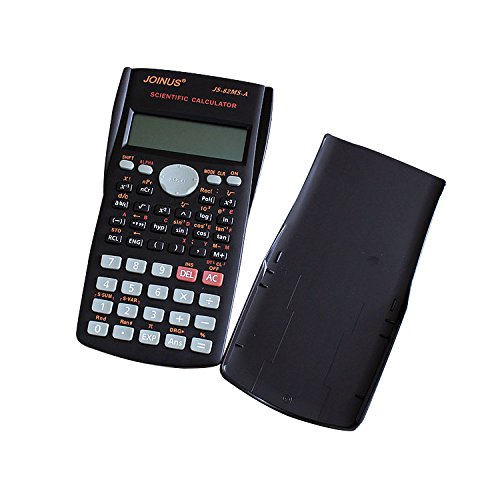
Image 1.1: The JOINUS JS-82MS-A Scientific Calculator with its protective hard case. The calculator features a black body, a multi-line LCD display, and a comprehensive keypad with various function buttons.
2. Setup
2.1 Battery Installation
The JOINUS JS-82MS-A calculator requires one AAA size battery for operation. Ensure the battery is inserted correctly to prevent damage.
- Locate the battery compartment cover on the back of the calculator.
- Slide the cover off in the direction indicated by the arrow (if present).
- Insert one AAA battery, ensuring the positive (+) and negative (-) terminals align with the markings inside the compartment.
- Replace the battery compartment cover by sliding it back into place until it clicks securely.
2.2 Powering On/Off
- To turn the calculator ON, press the AC/ON button.
- To turn the calculator OFF, press the SHIFT button followed by the AC/ON button (which often doubles as the OFF function when SHIFT is pressed).
3. Operating Instructions
The JS-82MS-A calculator offers 240 functions and a 2-line display for clear input and result viewing. Familiarize yourself with the key layout and function modes for efficient use.

Image 3.1: Front view of the JOINUS JS-82MS-A Scientific Calculator, highlighting the 2-line LCD display and the arrangement of function keys. The display shows 'COMP SD REG' indicating different calculation modes.
3.1 Basic Calculations
- Enter numbers using the numeric keypad.
- Use the +, -, ×, ÷ buttons for arithmetic operations.
- Press = to display the result.
- The AC button clears all entries and calculations. The DEL button deletes the last entered digit.
3.2 Function Modes
Press the MODE button to cycle through different calculation modes:
- COMP (Compute): Standard arithmetic and function calculations.
- SD (Standard Deviation): Statistical calculations.
- REG (Regression): Regression calculations.
3.3 Scientific Functions
Many keys have secondary functions, accessed by pressing the SHIFT button (indicated by yellow text above keys) or ALPHA button (indicated by red text above keys) before the desired function key.
- Trigonometry: sin, cos, tan and their inverse functions (sin-1, cos-1, tan-1 via SHIFT).
- Logarithms: log (base 10), ln (natural logarithm).
- Powers and Roots: x2, √ (square root via SHIFT), xy, y√x (y-th root via SHIFT).
- Factorial: x! (via SHIFT).
- Constants: π (Pi), e (Euler's number via SHIFT).
3.4 Memory Functions
The calculator includes nine variable memories (A, B, C, D, E, F, X, Y, M) for storing values.
- Store: To store a value, enter the value, press SHIFT, then STO, and finally the variable key (e.g., A).
- Recall: To recall a stored value, press RCL, then the variable key (e.g., A).
- Memory Plus/Minus: Use M+ to add the displayed value to memory M, and SHIFT then M- to subtract.
4. Maintenance
4.1 Cleaning
To maintain the calculator's performance and appearance:
- Wipe the exterior with a soft, dry cloth.
- For stubborn dirt, slightly dampen the cloth with water or a mild, non-abrasive cleaner. Do not use strong solvents.
- Avoid getting moisture into the display or key areas.
4.2 Protection
The calculator comes with a sturdy slide-on hard case. Always use this case when transporting or storing the calculator to protect it from impacts, scratches, and dust.

Image 4.1: Multi-view of the JOINUS JS-82MS-A, illustrating its front, back, the protective slide-on hard case, and an angled perspective. This demonstrates the calculator's design and protective accessory.
5. Troubleshooting
If you encounter issues with your JOINUS JS-82MS-A calculator, refer to the following common problems and solutions:
- Calculator does not turn on:
- Check if the AAA battery is inserted correctly with the correct polarity.
- Replace the AAA battery with a new one.
- Display is dim or blank:
- The battery may be low. Replace the AAA battery.
- Ensure the calculator is not exposed to extreme temperatures.
- Incorrect calculation results:
- Verify that you are in the correct calculation mode (COMP, SD, REG). Press MODE to change.
- Ensure all previous calculations are cleared by pressing AC.
- Check if any memory functions are inadvertently affecting your calculations. Clear memory if necessary.
- Keys are unresponsive:
- Clean around the keys to remove any debris.
- Ensure the calculator has not been exposed to liquids.
6. Specifications
| Feature | Description |
|---|---|
| Brand | JOINUS |
| Model Name | JS-82MS-A |
| Display Type | 2-Line LCD |
| Number of Functions | 240 |
| Power Source | Battery Powered |
| Battery Type | 1 x AAA (Alkaline recommended) |
| Material | Plastic |
| Item Weight | 132 g |
| Dimensions (Approx.) | 15.49 cm (Height) x 8.38 cm (Width) |

Image 6.1: The JOINUS JS-82MS-A Scientific Calculator displaying its approximate dimensions: 15.49 cm in height and 8.38 cm in width.
7. Warranty and Support
Information regarding product warranty and customer support is not provided within this instruction manual. For details on warranty coverage, service, or additional support, please refer to the documentation included with your purchase or contact JOINUS customer service directly.


