
ANNKE 5823837432
Contents
ANNKE 1080p Security Camera Instruction Manual
Model: 5823837432
Brand: ANNKE
Introduction
Thank you for choosing the ANNKE 1080p Security Camera. This wired bullet camera is designed for reliable indoor and outdoor surveillance, offering crystal clear 1080p footage and advanced night vision capabilities. This manual will guide you through the installation, operation, and maintenance of your new security camera to ensure optimal performance.
Important Note: This camera does NOT include a power adapter and requires connection to a Digital Video Recorder (DVR) system to function. It cannot be used as a standalone device.
What's in the Box
Please verify that all items listed below are included in your package:
- 1X Security Camera (No Adapter Included)
- 1X 1.97ft/60cm BNC Cable for Test
- 1X Mounting Screws Bag
- 1X User Manual
- 1X Drill Template

Figure 1: Package Contents
Product Overview
Familiarize yourself with the main components of your ANNKE security camera:
- 3-Axis Mounting Bracket: Allows for flexible positioning and angle adjustment.
- IP66 Waterproof Housing: Ensures durability and protection against harsh weather conditions.
- 12 IR LEDs: Provide powerful infrared illumination for clear night vision.
- 3.6 mm HD Lens: Captures wide-angle, high-definition video.
- Smart IR-CUT: Automatically switches between day and night modes for optimal image quality.
- Mode Switch: A joystick-style switch on the cable for changing video output modes (AHD/TVI/CVI/CVBS).
- Power Port: Connects to a 12V DC power source (adapter not included).
- Video Output: BNC connector for video signal transmission to a DVR.

Figure 2: Camera Components
Setup
1. Initial Setup & Power Requirements
Before installation, ensure you have a compatible DVR system and a 12V DC power adapter (not included). This camera requires a constant power supply and a DVR for recording and viewing footage.
2. Video Mode Switching (4-in-1 Compatibility)
The camera supports AHD, TVI, CVI, and CVBS video outputs. The default mode is AHD. To switch between modes, use the joystick switch located on the camera's cable. Press and hold the joystick in the desired direction for approximately 5 seconds until the mode changes.
- Up: CVBS
- Left: AHD
- Right: TVI
- Down: CVI

Figure 3: Video Signal Switching
3. Connecting to a DVR System
Follow these steps to connect your camera to your DVR:
- Connect the camera's BNC video output to an available BNC input port on your DVR using a coaxial cable (not included).
- Connect the camera's power port to a 12V DC power adapter (not included).
- Ensure your DVR is connected to a monitor and powered on.

Figure 4: How to Connect to DVR
4. Mounting the Camera
The camera features an adjustable 3-axis stand for versatile mounting options (wall or ceiling). Use the included drill template and mounting screws to secure the camera in your desired location. Adjust the camera head to achieve the optimal viewing angle.
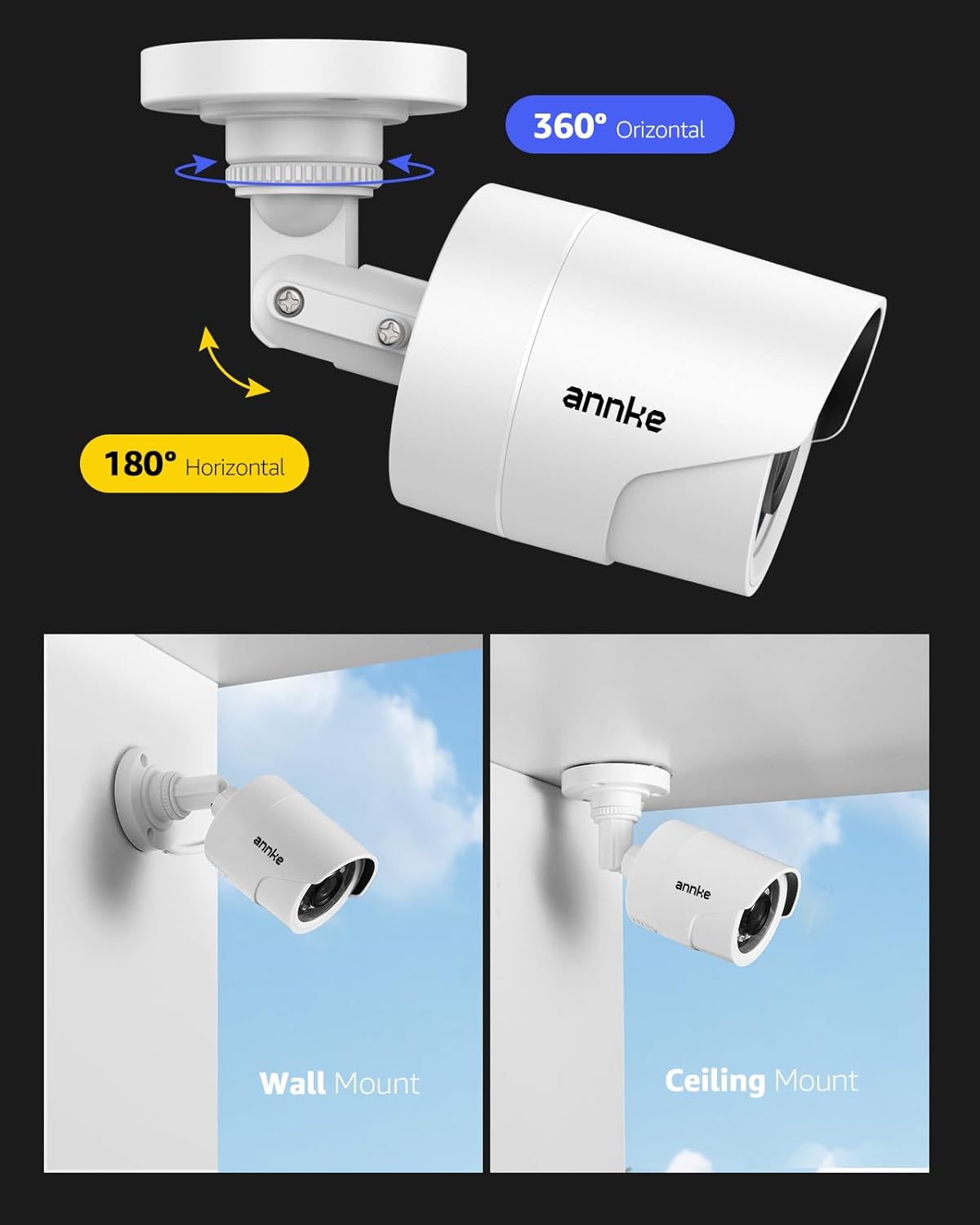
Figure 5: Mounting Options and Adjustment
Operating
1. Crystal Clear 1080p Footage
The 2MP sensor delivers sharp 1080p HD video, allowing you to clearly identify important details in your surveillance footage.
2. 100ft IR Night Vision
Equipped with premium IR LEDs, the camera automatically activates in low-light conditions, providing clear black and white vision up to 100 feet. This ensures continuous surveillance even in complete darkness.

Figure 6: Day and Night Vision Comparison

Figure 7: Smart IR Functionality
3. IP66 Weatherproof Design
The camera's IP66-rated housing is built to withstand various weather conditions, including dust, rain, and extreme temperatures ranging from -4°F to 122°F (-20°C to 50°C). This makes it suitable for reliable outdoor use.

Figure 8: Weatherproof Durability
4. Official Product Video
Video 1: ANNKE 2MP Hybrid 4-in-1 Wired Security Camera. This video provides a visual overview of the camera's features and capabilities.
Maintenance
Regular maintenance helps ensure the longevity and optimal performance of your security camera:
- Cleaning: Gently wipe the camera lens and housing with a soft, damp cloth. Avoid using harsh chemicals or abrasive materials that could scratch the lens.
- Cable Inspection: Periodically check all cables and connections for any signs of wear, damage, or corrosion. Ensure connections are secure.
- Firmware Updates: Check the ANNKE official website for any available firmware updates for your DVR system, as these may improve camera compatibility and performance.
Troubleshooting
If you encounter issues with your camera, refer to the following common troubleshooting steps:
- No Image/Signal:
- Ensure the camera is properly powered and the power adapter is functioning.
- Check the BNC cable connection between the camera and the DVR. Try a different cable if possible.
- Verify the camera's video output mode (AHD/TVI/CVI/CVBS) matches your DVR's input settings. Use the joystick switch to cycle through modes.
- Confirm the DVR channel is correctly configured for the camera's input.
- Blurry/Distorted Image:
- Clean the camera lens.
- Check the BNC cable for damage or poor connections.
- Ensure the camera is securely mounted and not vibrating.
- Night Vision Issues:
- Ensure there are no obstructions blocking the IR LEDs.
- Verify the camera is receiving sufficient power.
If problems persist, please contact ANNKE customer support for further assistance.
Specifications
| Feature | Detail |
|---|---|
| Model Number | 5823837432 |
| Video Capture Resolution | 1080p |
| Connectivity Technology | Wired |
| Video Capture Format | AHD (default), TVI, CVI, CVBS |
| Night Vision Range | 100 Feet |
| Weather Resistance Level | IP66 (Waterproof) |
| Operating Temperature | -4°F to 122°F (-20°C to 50°C) |
| Power Source | Corded Electric (12 Volts DC) |
| Mounting Type | Wall Mount |
| Item Dimensions (L x W x H) | 6.2 x 2.7 x 2.7 inches |
| Item Weight | 7.7 ounces |
| Material | Acrylonitrile Butadiene Styrene (ABS) |
Warranty and Support
For warranty information, technical support, or any inquiries not covered in this manual, please visit the official ANNKE website or contact their customer service directly. Keep your purchase receipt for warranty claims.
ANNKE is committed to providing top-notch surveillance solutions and customer satisfaction.
Ask a question about this manual
Ask about setup, troubleshooting, compatibility, parts, safety, or missing instructions. Manuals+ will review the question and use this page’s manual context to help answer it.