
1. Introduction
The Roland AE-05 Aerophone GO is a compact digital wind instrument designed for a wide range of players. It features 11 high-quality onboard tones, a built-in speaker, headphone connectivity, and Bluetooth capabilities for expanded functionality. This manual provides essential information for setting up, operating, maintaining, and troubleshooting your Aerophone GO.
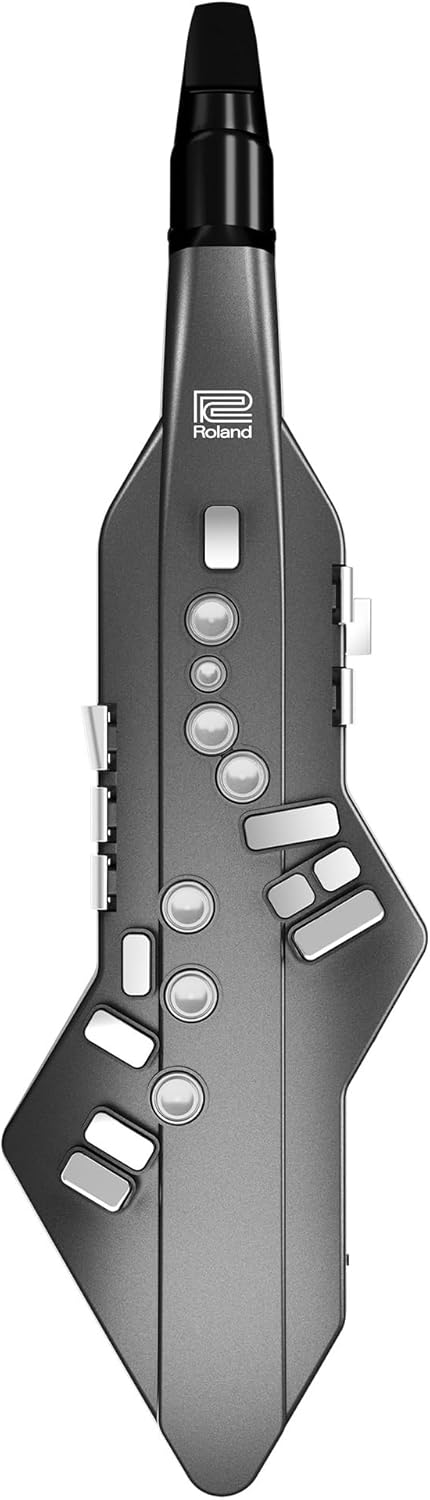
Figure 1.1: Front view of the Roland AE-05 Aerophone GO.

Figure 1.2: The Aerophone GO in use, demonstrating its compact design and key features.
2. Setup
2.1 Unpacking and Inspection
Carefully remove all components from the packaging. Verify that all items listed in the 'What's in the Box' section are present and undamaged. Retain the packaging for future transport or storage.
2.2 Powering the Instrument
The Aerophone GO can be powered using either AA batteries or an AC adapter (sold separately).
- Battery Installation: Open the battery compartment on the rear of the instrument. Insert 6 AA batteries, ensuring correct polarity.
- AC Adapter: Connect a compatible AC adapter to the DC IN jack on the instrument and plug it into a power outlet.
2.3 Attaching the Mouthpiece
Gently attach the mouthpiece to the instrument. Ensure it is securely fitted but do not force it. The mouthpiece is designed with a reed structure for authentic playing feel.
2.4 Initial Power On
Press the power button to turn on the instrument. The display will illuminate, indicating the device is ready for use.
3. Operating Instructions
3.1 Fingering
The Aerophone GO supports traditional saxophone fingering. It also includes two octave keys for extended range and pinky keys for additional flexibility. Familiarize yourself with the key layout.

Figure 3.1: Detail of the control buttons on the Aerophone GO.
3.2 Breath Sensor and Bite Control
The instrument features a sensitive breath sensor for dynamic control and a bite control function for pitch bending and vibrato. The bite control switch can be toggled on or off. Adjusting the sensitivity of the bite control may be necessary for optimal performance, which can be done via the Aerophone GO Plus app.
3.3 Sound Selection
The Aerophone GO includes 11 onboard instrument sounds, such as various saxophones, flute, clarinet, violin, muted trumpet, and synth leads. Use the dedicated buttons to cycle through and select your desired tone.
3.4 Volume Control
Adjust the instrument's output volume using the dedicated volume knob or buttons. For silent practice, connect headphones to the headphone jack.
3.5 Transposition
The Aerophone GO allows for instant transposition to any key. This feature is useful for adapting to different musical contexts without changing fingering. Refer to the instrument's display and controls for transposition settings.
4. Features and Connectivity
4.1 Portability and Practice
The Aerophone GO is lightweight (695 g / 1 lb. 9 oz.) and operates on batteries, allowing for playing anywhere. The built-in speaker provides sound for casual use, while headphone connectivity enables private practice.

Figure 4.1: The Aerophone GO supports playing anytime, anywhere with battery operation and headphone use.
4.2 Bluetooth Connectivity
The instrument features Bluetooth for wireless connection to smartphones or tablets. This enables access to additional sounds, play-along features, and customization options through dedicated applications.
4.3 Aerophone GO Plus App
The Aerophone GO Plus app (available for iOS and Android devices) expands the instrument's capabilities. It offers:
- Access to 50 additional sounds.
- Play-along features for learning songs.
- Deep customization of instrument settings, including bite control sensitivity.

Figure 4.2: The Aerophone GO Plus app interface for sound selection and customization.
Note for Android Users:
Some Android devices may experience latency when connecting via Bluetooth to the Aerophone GO Plus app. While a USB cable is provided for direct connection, some Android phones may not detect the instrument via USB, limiting the use of the app's advanced features without latency. Roland may release software updates to address this.
5. Care and Maintenance
5.1 Mouthpiece Cleaning
Regularly clean the mouthpiece to maintain hygiene and optimal performance. Remove the mouthpiece after each use and wipe it with a clean, soft cloth. For deeper cleaning, use mild soap and water, ensuring it is thoroughly dry before reattaching.
5.2 Instrument Body Cleaning
Wipe the instrument body with a soft, dry cloth. Avoid using abrasive cleaners, solvents, or waxes, as these can damage the finish. Keep the instrument away from excessive moisture and direct sunlight.
5.3 Battery Care
If using batteries, remove them if the instrument will not be used for an extended period to prevent leakage. Use high-quality alkaline or rechargeable AA batteries.
6. Troubleshooting
6.1 No Sound Output
- Check the volume level on the instrument and any connected headphones or external speakers.
- Ensure the instrument is powered on and batteries are not depleted.
- If using headphones, ensure they are fully plugged into the headphone jack.
- If connected to an external amplifier, verify the amplifier's power and input settings.
6.2 App Connectivity Issues (Bluetooth/USB)
- Ensure Bluetooth is enabled on your mobile device and the Aerophone GO.
- Restart both the instrument and your mobile device.
- For Android devices experiencing USB connection issues, ensure the correct USB mode is selected on your phone (e.g., MIDI or file transfer, if applicable). Note that some Android devices may not support USB audio/MIDI with the Aerophone GO.
- Update the Aerophone GO firmware and the Aerophone GO Plus app to the latest versions.
6.3 Poor Sound Quality from Built-in Speaker
The built-in speaker is designed for convenience. For optimal sound quality, especially for performance or critical listening, connect the Aerophone GO to headphones or an external amplifier/PA system.
6.4 Fingering or Note Response Issues
- Ensure your fingers are properly covering the keys.
- Check the fingering settings on the instrument or via the Aerophone GO Plus app.
- If experiencing issues with octave transitions, practice smooth transitions between octave keys.
7. Specifications
| Feature | Specification |
|---|---|
| Model Number | AE-05 |
| Item Weight | 695 g (1 lb 9 oz) |
| Product Dimensions | 17.87 x 3.07 x 5.04 inches |
| Body Material | Wood |
| Color | Graphite |
| Connector Type | 3.5mm (Headphone), Bluetooth |
| Batteries Required | 4 AA batteries |
| Battery Type | Alkaline |
| Instrument Key | G |
| First Available | July 21, 2018 |

Figure 7.1: Aerophone GO dimensions and included items.
8. What's in the Box
Upon opening your Roland AE-05 Aerophone GO package, you should find the following items:
- Aerophone GO Instrument
- Mouthpiece Cap
- Neck Strap
- Dedicated Hand Carry Bag
- Moisture Absorption Band
- USB cable (Power (Type A), Data (micro B), Data (Type C))
9. Warranty and Support
For warranty information, please refer to the warranty card included with your product or visit the official Roland website. For technical support, product registration, or service inquiries, please contact Roland customer support directly through their official channels.