
DanForce A1
DanForce Camouflaged Headlamp Ultra Bright USB Rechargeable Headlamp Instruction Manual
Model: A1 (Proxima Variant)
Introduction
Thank you for choosing the DanForce Camouflaged Headlamp. This ultra-bright, USB rechargeable headlamp is designed for durability and versatility, making it ideal for various outdoor and indoor activities. With its powerful LUMINUS 1080 lumens LED, multiple light modes, and comfortable design, it provides reliable illumination for your adventures.
Key Features
- High Quality LED Headlamp: Designed in the US, featuring IPX45 water, dust, and damage resistance.
- Ultra Bright Illumination: 1080 lumens with 4 light modes: high, low, medium, and strobe.
- Red Light Proxima: Includes a red light headlamp for tactical use, hunting, and fishing.
- Adjustable Focus: Zoomable focus for maximum lighting precision, functioning perfectly as a hard hat light.
- Custom Made Comfort: Sweat-resistant headband with adjustable sizing for maximum comfort and temperature control.
- All-Weather Ready: Built to withstand extreme heat and cold, with air-tight rubber sealing protecting the rechargeable battery from dust, ice, and water.
- Rechargeable Battery: Improved 5000 mAh rechargeable battery for extended use.
Setup Guide
1. Battery Installation
The DanForce Headlamp comes with two Lithium Ion batteries. To install them:
- Locate the battery compartment at the back of the headlamp's strap.
- Open the battery compartment cover.
- Insert the two 5000 mAh Lithium Ion batteries, ensuring correct polarity (+/-).
- Securely close the battery compartment cover.

Figure 1: Headlamp with included batteries ready for installation.
2. Charging the Headlamp
Before first use, fully charge the headlamp. A Type-C USB cable is included for charging.
- Locate the USB-C charging port on the battery pack. It is protected by an air-tight rubber sealing.
- Gently lift the rubber flap to expose the port.
- Connect the provided USB-C cable to the headlamp and plug the other end into a compatible USB power source (e.g., wall adapter, computer USB port).
- The blue LED indicator lights on the battery pack will show the charging progress. All four lights will illuminate when fully charged.
- Once charging is complete, securely close the rubber flap to maintain water and dust resistance.

Figure 2: Headlamp battery pack connected for charging.
Operating Instructions
Powering On/Off and Light Modes
The headlamp features a single power button located on the top of the main light unit. Pressing this button cycles through the different light modes:
- First Press: Activates the main (center) LED light on high brightness.
- Second Press: Activates the two side LED lights.
- Third Press: Activates all three LED lights (main and two sides) for maximum brightness (1080 lumens).
- Fourth Press: Activates the strobe mode (all three lights flashing).
- Fifth Press: Turns the headlamp OFF.
To activate the red light mode, press and hold the power button for approximately 3 seconds from any state (on or off). To return to white light modes, press and hold the button again.
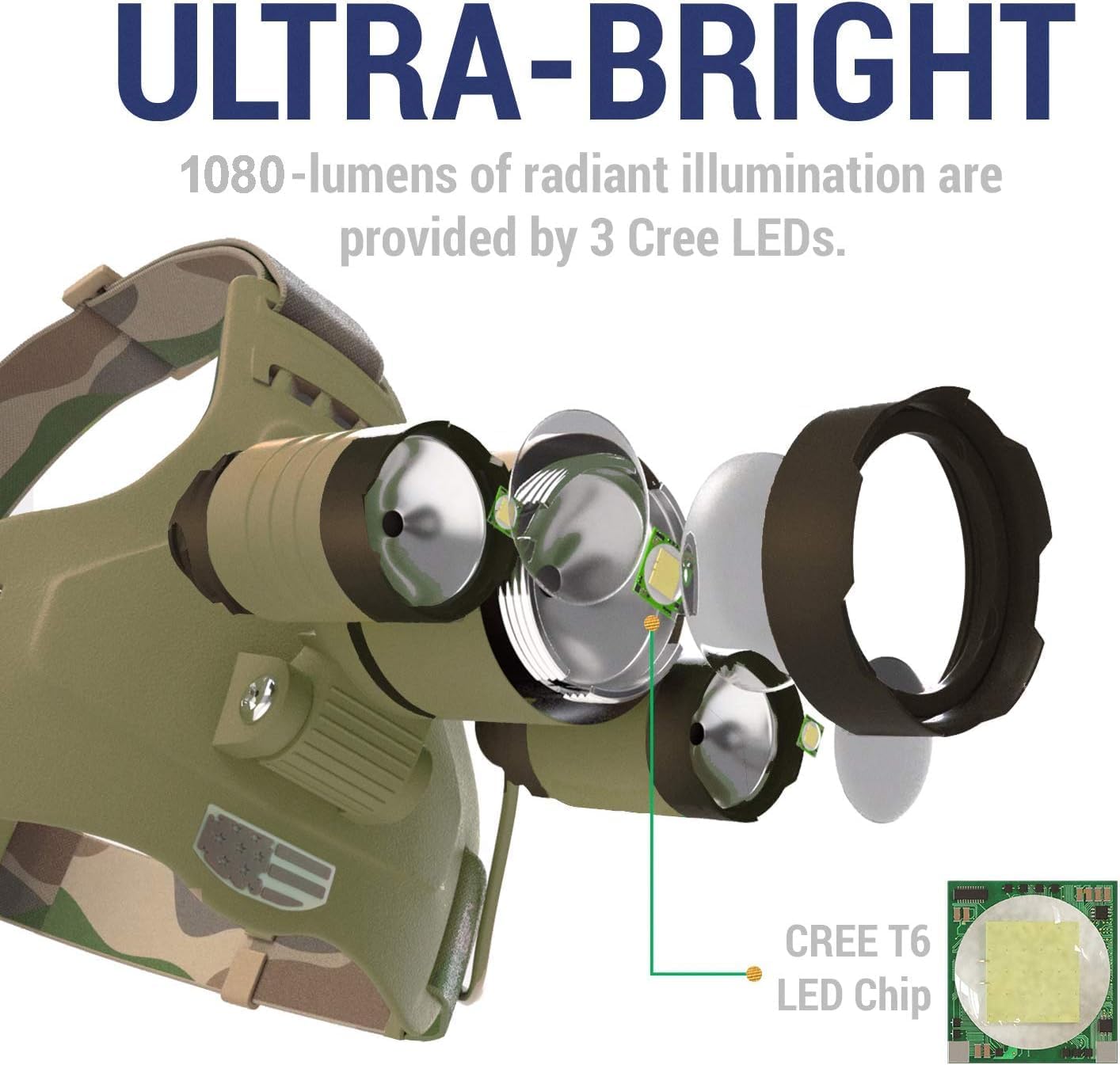
Figure 3: The three LED lights provide ultra-bright illumination.
Adjusting the Light Beam (Focus)
The main LED light features an adjustable focus to suit your needs:
- To narrow the beam for long-distance spotting (spotlight mode), rotate the outer lens dial clockwise.
- To widen the beam for broad area illumination (floodlight mode), rotate the outer lens dial counter-clockwise.

Figure 4: The headlamp's rotatable head allows for precise light direction.
Maintenance
- Cleaning: Wipe the headlamp with a soft, damp cloth. Do not use abrasive cleaners or solvents.
- Storage: Store the headlamp in a cool, dry place away from direct sunlight and extreme temperatures.
- Battery Care: For optimal battery life, charge the headlamp regularly, even if not in frequent use. Avoid fully depleting the battery before recharging.
- Water Resistance: The headlamp is IPX45 rated, meaning it is protected against splashing water from any direction. Ensure the USB-C port cover is securely closed to maintain water resistance. Do not submerge the headlamp in water.
Troubleshooting
If you encounter any issues with your DanForce Headlamp, please try the following:
- Headlamp not turning on: Ensure the batteries are correctly installed and fully charged.
- Dimming light: Recharge the battery. Battery performance may decrease in extremely cold temperatures.
- Light modes not cycling correctly: Ensure the power button is pressed firmly and released. If issues persist, try fully charging the device.
For further assistance, please refer to the support information below.
Specifications
| Feature | Detail |
|---|---|
| Brand | DanForce |
| Model Number | A1 |
| Color | Proxima (Camouflaged) |
| Light Source Type | LED (LUMINUS) |
| Brightness | 1080 Lumens |
| Light Modes | High, Low, Medium, Strobe, Red Light |
| Power Source | Battery Powered (2x Lithium Ion batteries, included) |
| Battery Capacity | Improved 5000 mAh |
| Charging | USB-C Cable (included) |
| Water Resistance Level | IPX45 (Water, Dust, Damage Resistant) |
| Material | Aluminum |
| Item Weight | 0.55 Pounds (8.8 ounces) |
| Included Components | Headlamp, Head Band, 2x Batteries, Type-C cable, Carry bag, Carabiner |
Warranty & Support
Warranty: This DanForce Headlamp comes with a 90-day warranty from the day of purchase.
Support: For any questions, troubleshooting, or warranty claims, please contact DanForce customer support directly. Refer to the product packaging or the official DanForce website for contact details.
Ask a question about this manual
Ask about setup, troubleshooting, compatibility, parts, safety, or missing instructions. Manuals+ will review the question and use this page’s manual context to help answer it.