
1. Introduction
Thank you for choosing the V-Guard DU 1500VA Digital Sine Wave Inverter. This advanced inverter is designed to provide reliable and uninterrupted power backup for your home or workplace. Featuring state-of-the-art technology, it ensures the safety of your electronic devices and offers a seamless power experience. This manual provides essential information for the safe installation, operation, and maintenance of your inverter.
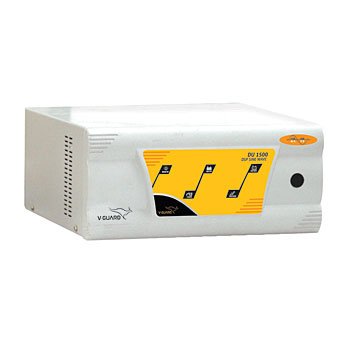
Figure 1: V-Guard DU 1500VA Digital Sine Wave Inverter. This image shows the compact design and front panel of the inverter, highlighting its modern aesthetic.
2. Safety Instructions
Please read and understand all safety instructions before installing or operating the inverter. Failure to follow these instructions may result in electric shock, fire, or serious injury.
- Qualified Personnel: Installation and maintenance should only be performed by qualified personnel.
- Ventilation: Ensure adequate ventilation around the inverter. Do not block ventilation openings.
- Environment: Do not expose the inverter to rain, moisture, direct sunlight, or extreme temperatures. Keep it away from flammable materials.
- Battery Safety: Batteries contain corrosive acid. Wear protective gear (gloves, eye protection) when handling batteries. Ensure proper battery connections to avoid short circuits.
- Grounding: The inverter must be properly grounded to prevent electric shock.
- Overload: Do not overload the inverter beyond its specified capacity. This can damage the unit and connected appliances.
- Children and Pets: Keep the inverter and batteries out of reach of children and pets.
- Emergency: In case of smoke, unusual odors, or abnormal operation, immediately disconnect the inverter from the mains supply and the battery, then contact customer support.
3. Product Overview
3.1 Key Features
The V-Guard DU 1500VA Inverter is equipped with several advanced features to ensure optimal performance and protection:
- Digital Sine Wave Output: Provides clean power suitable for sensitive electronics.
- Intelligent Thermal Management: Prevents overheating for extended lifespan.
- Battery Overcharge & Deep Discharge Protection: Safeguards battery health and longevity.
- Quick Battery Charging Mode: Efficiently recharges batteries.
- Smart Overload and Short Circuit Protection: Protects the inverter and connected appliances from damage.
- Intelligent Audio & Visual Indications: Provides clear status updates and alerts.
- Automatic Switch-on: Seamlessly takes over during power cuts.
- High/Low Voltage Protection: Shields connected devices from voltage fluctuations.
3.2 Package Contents
Upon unpacking, please verify that all components are present and undamaged:
- V-Guard DU 1500VA Digital Sine Wave Inverter Unit
- User Manual (this document)
- Battery Connection Cables (if included with the specific model variant)
Note: The 'Included Components' specification states 'None'. This list assumes standard inclusions for an inverter of this type. Please refer to your specific product packaging for exact contents.
4. Setup
Follow these steps for proper installation of your V-Guard DU 1500VA Inverter:
- Unpacking and Inspection: Carefully remove the inverter from its packaging. Inspect for any physical damage. If damage is found, do not proceed with installation and contact V-Guard customer support.
- Placement:
- Choose a cool, dry, and well-ventilated area.
- Ensure sufficient clearance (at least 15 cm) around all sides for proper airflow.
- Avoid direct sunlight, heat sources, and areas with excessive dust or moisture.
- Place the inverter on a flat, stable, non-flammable surface.
- Battery Connection:
- Ensure the inverter is OFF and disconnected from the mains supply.
- Connect the RED battery cable to the POSITIVE (+) terminal of the battery and the RED (+) terminal of the inverter.
- Connect the BLACK battery cable to the NEGATIVE (-) terminal of the battery and the BLACK (-) terminal of the inverter.
- Ensure all connections are tight and secure. Loose connections can cause sparking and overheating.
- This model is designed for a 2-battery setup. Connect the batteries in series as per the diagram provided in the separate battery connection guide (if applicable) or consult a qualified electrician.
- Mains Power Connection: Plug the inverter's mains power cord into a properly grounded wall outlet.
- Load Connection: Plug your appliances (lights, fans, computers, etc.) into the output sockets provided on the inverter. Ensure the total load does not exceed the inverter's capacity.
5. Operating Instructions
5.1 Powering On/Off
- To Power On: After completing all connections, switch on the main power supply to the inverter. The inverter will automatically detect the mains and begin charging the batteries. Press the 'ON/OFF' button on the inverter's front panel to activate the output.
- To Power Off: Press and hold the 'ON/OFF' button until the inverter shuts down. Disconnect the mains supply if you intend to store the inverter or perform maintenance.
5.2 Indicator Meanings
The inverter features intelligent audio and visual indications to communicate its status. Refer to the display panel and indicator lights for operational information:
- Mains ON/Charging Indicator: Illuminates when mains power is present and batteries are charging.
- Inverter ON/Battery Mode Indicator: Illuminates when the inverter is providing power from batteries (during a power cut).
- Low Battery Indicator: Flashes or illuminates when battery charge is low, accompanied by an audible alarm.
- Overload Indicator: Illuminates and an alarm sounds if the connected load exceeds the inverter's capacity. The inverter may shut down to protect itself.
- Fault Indicator: Illuminates in case of an internal fault or short circuit.
Note: Specific indicator designs and behaviors may vary slightly. Consult the display panel for detailed messages.
6. Maintenance
Regular maintenance ensures the longevity and optimal performance of your V-Guard DU 1500VA Inverter and its batteries.
- Cleaning: Keep the inverter clean and free from dust. Use a dry, soft cloth to wipe the exterior. Do not use liquid cleaners or solvents. Ensure ventilation openings are clear.
- Battery Inspection: Periodically check battery terminals for corrosion. Clean them with a wire brush if necessary and apply petroleum jelly to prevent further corrosion. Ensure battery water levels (for flooded lead-acid batteries) are maintained as per battery manufacturer guidelines.
- Ventilation: Regularly check that the inverter's ventilation fans and vents are not obstructed.
- Load Management: Avoid consistently overloading the inverter. Distribute loads evenly if possible.
- Professional Check: It is recommended to have the inverter and battery system inspected by a qualified technician annually.
7. Troubleshooting
This section addresses common issues you might encounter. If the problem persists, contact V-Guard customer support.
| Problem | Possible Cause | Solution |
|---|---|---|
| Inverter not turning ON / No output |
|
|
| Overload alarm / Inverter shuts down |
|
|
| Battery not charging |
|
|
| Unusual noise or smell |
|
|
8. Specifications
Technical specifications for the V-Guard DU 1500VA Digital Sine Wave Inverter:
- Model Name: DU1500
- Capacity: 1500VA
- Battery Type: Compatible with 2 batteries (typically 12V each, connected in series for 24V system)
- Output Waveform: Digital Sine Wave
- Power Source: Battery Powered (with Mains charging)
- Recommended Use: Home
- Manufacturer: V-GUARD
- Item Model Number: DU1500
- ASIN: B07FL98CMZ
9. Warranty and Support
V-Guard products are built for reliability and performance. For warranty information, terms, and conditions, please refer to the warranty card included with your product or visit the official V-Guard website. In case of any issues, technical assistance, or service requests, please contact V-Guard customer support:
- V-Guard Customer Service: Refer to your product documentation or the V-Guard official website for the latest contact details (phone numbers, email, service center locator).
- Online Resources: www.vguard.in (This is a placeholder link, please verify the official V-Guard website for support).
Please have your model number (DU1500) and purchase details ready when contacting support.