
1. Introduction
The CONTEC08A is a fully automatic digital blood pressure monitor designed for accurate and convenient measurement of blood pressure and pulse rate. It features multiple measurement modes for adult, pediatric, and neonatal use, along with data storage capabilities and PC software for analysis. This manual provides essential information for the safe and effective operation of your device.

Image: The CONTEC08A monitor displaying a blood pressure reading, with an arm cuff visible next to it.
2. Important Safety Information
Please read all instructions carefully before using the CONTEC08A blood pressure monitor. Failure to follow these instructions may result in inaccurate readings or device malfunction.
- This device is intended for non-invasive measurement of arterial blood pressure in adults, children, and neonates.
- Do not use this device on infants or individuals who cannot communicate their discomfort.
- Consult your physician for interpretation of blood pressure measurements. Self-diagnosis and treatment based on measurements can be dangerous.
- Keep the device out of reach of children and pets.
- Avoid using the device in strong electromagnetic fields.
- Do not disassemble or attempt to repair the device yourself.
3. Package Contents
Verify that all items are present in your package:
- CONTEC08A Blood Pressure Monitor unit
- Adult Cuff (9-13 inches)
- Child Cuff (7.1-10.2 inches)
- Infant Cuff (3.9-7.5 inches)
- Small Cuff (2.3-4.3 inches)
- USB Cable
- User Manual
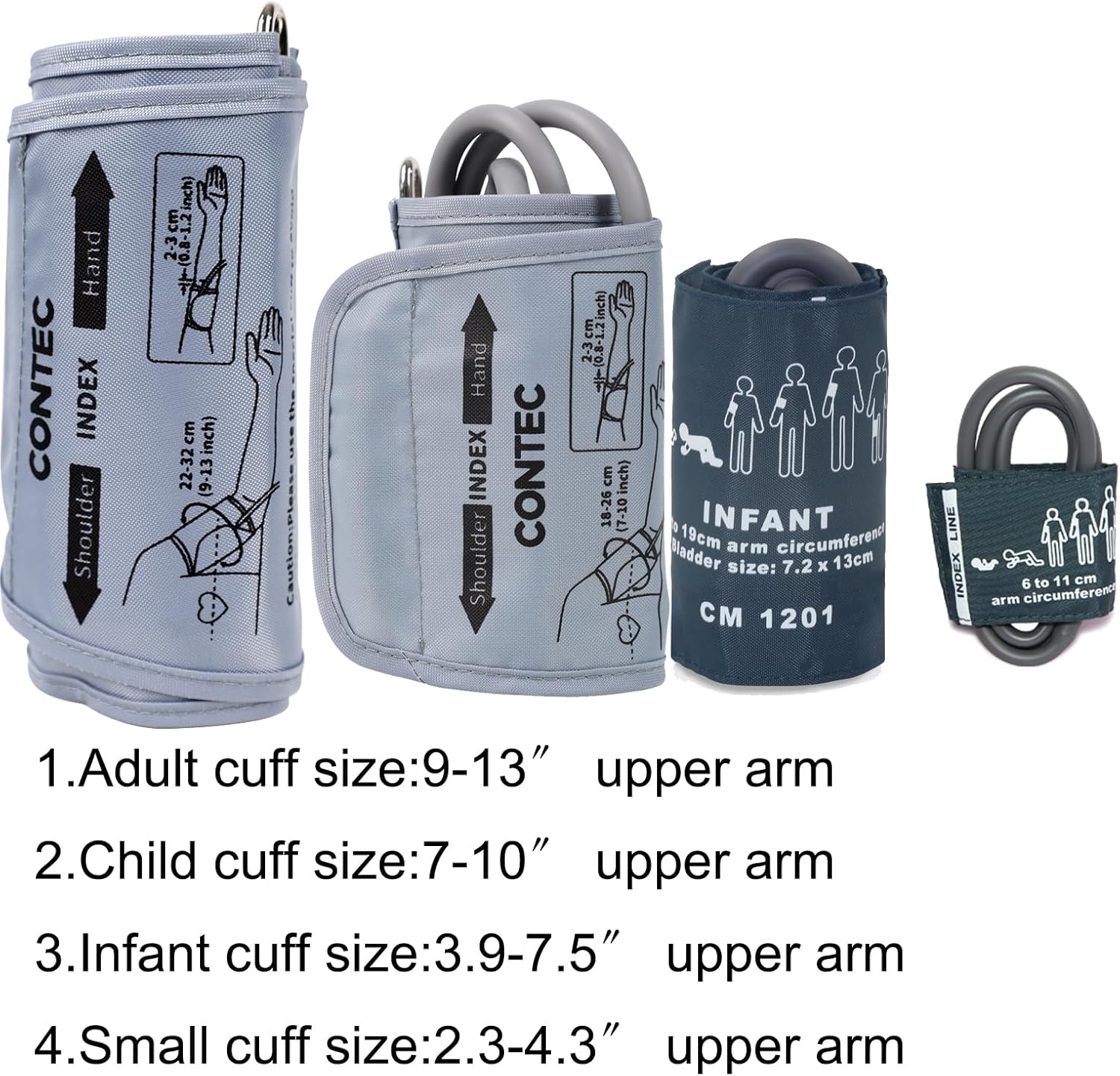
Image: Four different sized blood pressure cuffs, labeled for adult, child, infant, and small arm sizes, indicating their respective measurement ranges.
4. Setup
4.1 Power Supply
The CONTEC08A monitor can be powered by 4 AA batteries or an AC power adapter (not included).
- Battery Installation: Open the battery compartment cover on the back of the device. Insert 4 AA batteries, ensuring correct polarity (+/-). Close the cover securely.
- AC Power Adapter: If using an AC adapter, plug it into the DC 5V port on the side of the monitor.
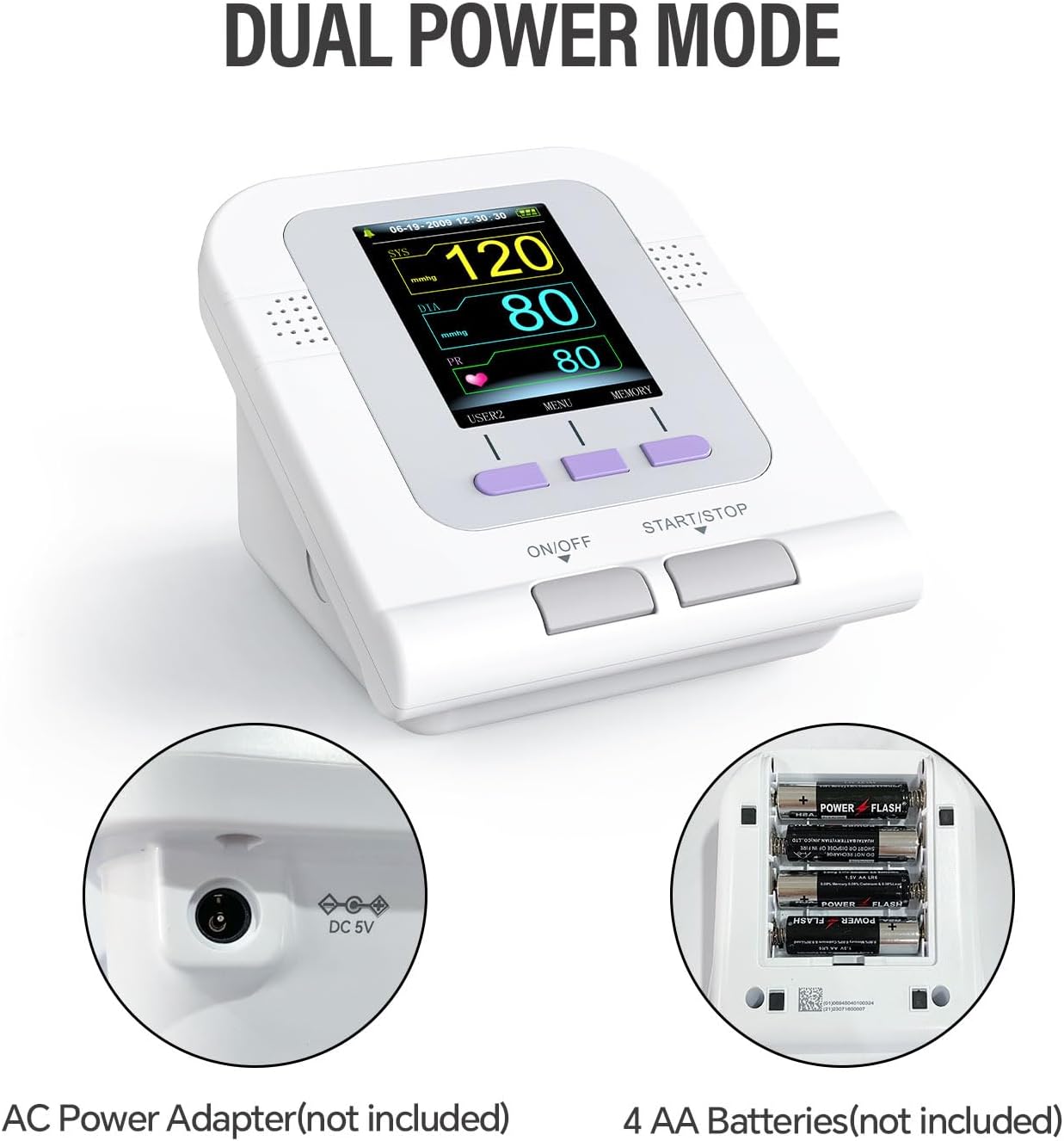
Image: The CONTEC08A blood pressure monitor, illustrating its dual power mode with a close-up of the DC 5V input port and the open battery compartment with four AA batteries.
4.2 Cuff Connection
- Select the appropriate cuff size for the user (Adult, Child, Infant, or Neonatal).
- Insert the air tube connector of the cuff firmly into the air jack on the side of the monitor.
4.3 Choosing the Right Cuff
Using the correct cuff size is crucial for accurate measurements. Refer to the size guidelines below:
- Adult Cuff: 9-13 inches upper arm circumference
- Child Cuff: 7.1-10.2 inches upper arm circumference
- Infant Cuff: 3.9-7.5 inches upper arm circumference
- Small Cuff: 2.3-4.3 inches upper arm circumference
5. Operating Instructions
5.1 Preparation Before Measurement
- Avoid drinking coffee or alcohol, taking a bath, or engaging in physical exercise for at least 30 minutes before measurement.
- Sit straight up in a chair with your feet flat on the ground.
- Relax and remain still during the measurement.
5.2 Applying the Cuff
- Wrap the cuff around your upper arm, ensuring the air tube is positioned correctly.
- Leave approximately a 1-inch (2-finger) space between your arm and the cuff.
- Place your arm on a flat surface with your palm facing upwards.
5.3 Taking a Measurement
- Press the ON/OFF button to power on the device.
- Press the Start/Stop button to begin the measurement. The cuff will inflate automatically.
- Remain still and quiet until the measurement is complete and the results are displayed.
5.4 Understanding Measurement Results
The monitor displays Systolic pressure (SYS), Diastolic pressure (DIA), and Pulse Rate (PR).

Image: A chart outlining blood pressure levels (Normal, Mild Hypertension, Moderate Hypertension, Severe Hypertension) with corresponding systolic and diastolic pressure ranges.
5.5 Measurement Modes and Data Storage
The CONTEC08A offers three measurement modes: Adult, Pediatric, and Neonatal. It automatically stores up to 100 measurements for each of three users, totaling 300 memories.

Image: The CONTEC08A monitor displaying measurement results for three user profiles: Neonatal (NEO), Pediatric (PED), and Adult (ADU), highlighting the multi-user data storage feature.
5.6 PC Software Functionality
The device supports connection to a PC via USB for data management and analysis. The PC software allows for:
- Data viewing and review (data list, trend graph, big font display).
- Result analysis and trend viewing (histogram, pie chart).
- Editing NIBP data and adding information (doctor advice, NIBP condition, medication).
- Printing reports.
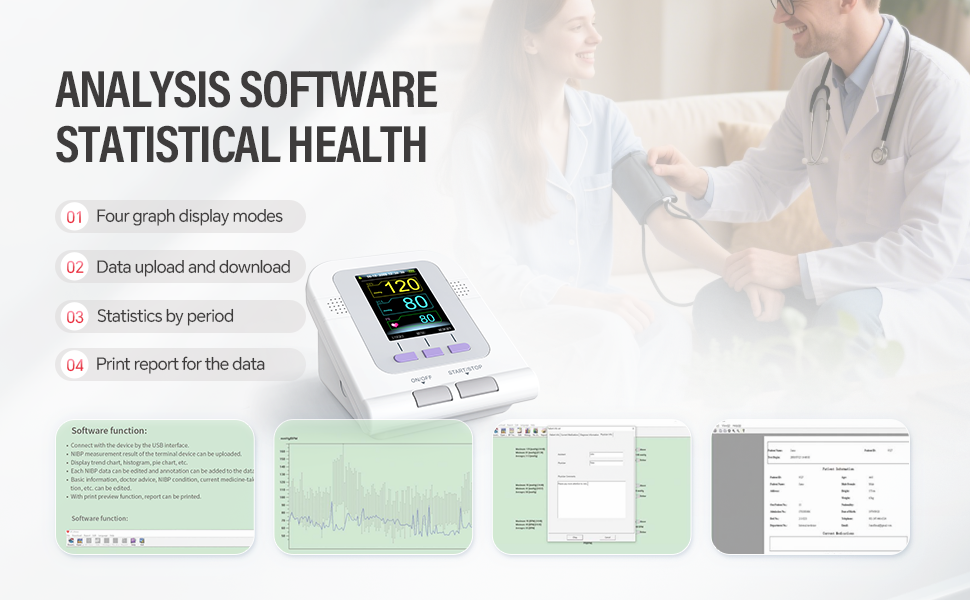
Image: A screenshot of the CONTEC PC software interface, showing various data display modes including graphs, statistics, and report generation for blood pressure measurements.
5.7 Instructional Video
Video: A comprehensive guide demonstrating the setup and measurement process for the CONTEC08A Fully Automatic Blood Pressure Monitor, including battery installation, cuff connection, proper arm positioning, and initiating a measurement.
6. Maintenance
- Cleaning: Wipe the monitor and cuff with a soft, dry cloth. If necessary, use a cloth lightly dampened with water or a mild detergent. Do not use abrasive cleaners or immerse the device in water.
- Storage: Store the device in a clean, dry place away from direct sunlight, extreme temperatures, and humidity.
- Battery Replacement: Replace batteries when the low power prompt appears on the screen. Remove batteries if the device will not be used for an extended period.
- Cuff Care: Do not wash the inner air bladder of the cuff.
7. Troubleshooting
If you encounter issues with your CONTEC08A monitor, refer to the following:
- Error Message Displayed: If the device cannot obtain a measurement result due to factors affecting the measurement, it will display a corresponding error message. Refer to the device's on-screen prompts for specific error codes and solutions.
- No Power: Check battery installation and ensure batteries are not depleted. If using an AC adapter, verify the connection and power source.
- Inaccurate Readings: Ensure the correct cuff size is used, the cuff is applied properly, and the user is relaxed and still during measurement. Avoid talking or moving.
- Low Power Prompt: The screen displays a prompt message when the power is low, and the device gives a low power prompt sound. Replace batteries promptly.
8. Specifications
| Feature | Detail |
|---|---|
| Model Number | CONTEC08A |
| Display Type | Digital |
| Power Source | Battery Powered (4 AA batteries) |
| Included Components | Cuff (multiple sizes) |
| Measurement Modes | Adult, Pediatric, Neonatal |
| Memory Storage | 3 users, 100 items per user (total 300) |
| UPC | 733430164683 |
| Manufacturer | Contec Medical Systems Co.ltd |
| First Available Date | July 13, 2018 |
9. Warranty and Support
For warranty information, technical support, or service inquiries, please refer to the contact details provided with your product packaging or visit the official CONTEC website. Keep your purchase receipt as proof of purchase.


