
1. Introduction
Thank you for choosing the Humantechnik Tiviton BT Wireless Bluetooth TV Headphones. This manual provides detailed instructions for the proper setup, operation, and maintenance of your device. Please read this manual thoroughly before using the product to ensure optimal performance and longevity.
The Tiviton BT system is designed to enhance your TV audio experience, allowing you to listen wirelessly with clear sound. It comprises a Bluetooth transmitter and a comfortable neckband receiver.
2. Product Overview
The Humantechnik Tiviton BT headphones offer a convenient way to enjoy TV audio. The system includes a transmitter that connects to your TV and a lightweight neckband receiver with integrated earbuds.
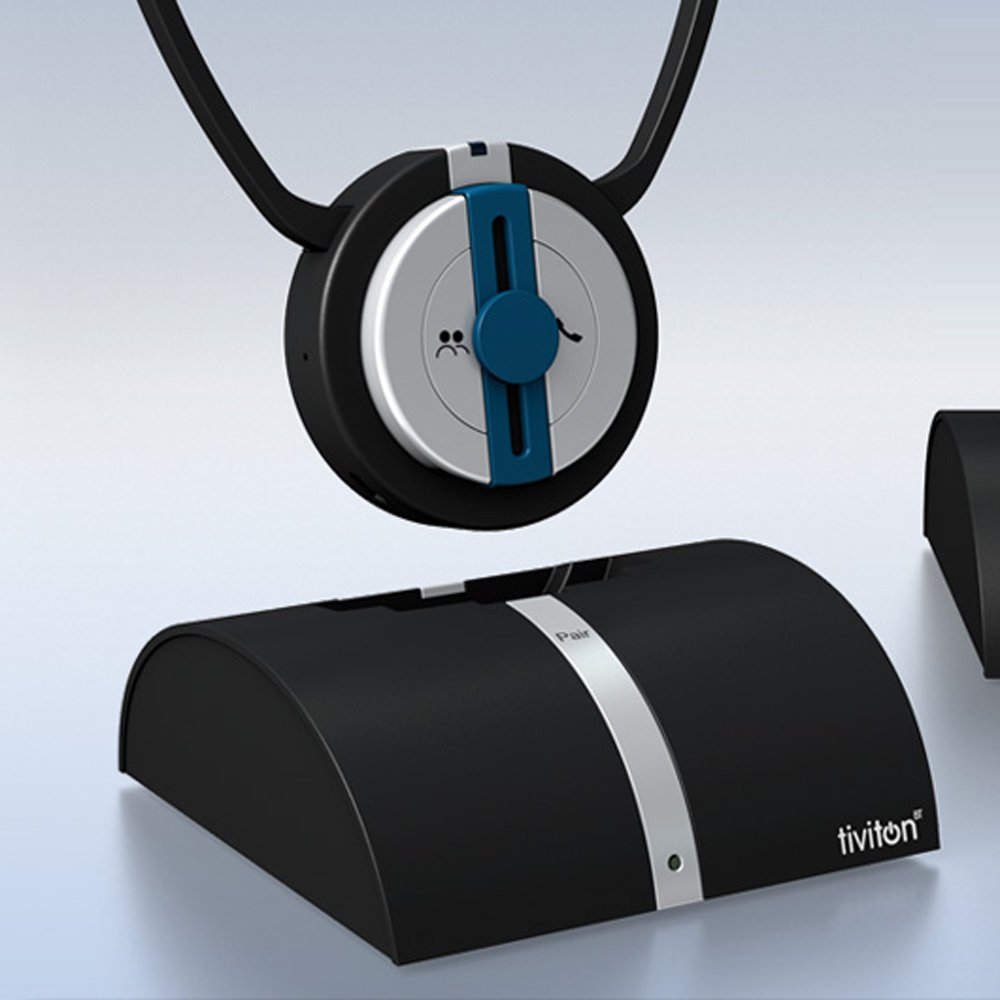
Figure 1: User wearing the Humantechnik Tiviton BT headphones.
This image shows a user wearing the Humantechnik Tiviton BT headphones, which consist of a neckband with integrated earbuds, designed for comfortable TV viewing. The user is smiling, indicating a positive experience while watching a sports event on TV.
Key components include:
- Bluetooth Transmitter: Connects to your TV or other audio sources.
- Neckband Receiver: Worn around the neck, featuring earbuds and control buttons.
3. Setup Instructions
- Connect the Transmitter: Connect the Bluetooth transmitter to your television or desired audio source using the appropriate audio cable (e.g., optical, RCA, 3.5mm audio jack). Ensure the transmitter is powered on.
- Charge the Receiver: Before first use, fully charge the neckband receiver using the provided charging cable. A full charge typically takes a few hours.
- Pairing:
- Place the receiver in pairing mode (refer to the receiver's specific button instructions, usually by holding a power/pairing button).
- Ensure the transmitter is also in pairing mode.
- The transmitter and receiver will automatically connect. A confirmation light or sound will indicate successful pairing.
- Audio Output Configuration: Adjust your TV's audio output settings to ensure sound is directed to the connected transmitter. This may involve selecting an external speaker or digital audio output option in your TV's menu.
4. Operating Instructions
4.1. Listening to TV Audio
- Once paired, the transmitter will wirelessly send audio signals from your TV to the receiver.
- Adjust the volume directly on the neckband receiver to your preferred listening level.
- The TV sound transmission can be individually adjusted for optimal clarity.
4.2. Handling Phone Calls
The Tiviton BT receiver can automatically transfer calls from your phone if it is connected via Bluetooth.
- When a call is received, the audio from the TV will pause or mute.
- Press the designated button on the Tiviton BT receiver (usually the multi-function button) to answer the call.
- The voice volume during calls can be individually adjusted.
- Press the button again to end the call. TV audio will resume.
4.3. Sound Amplification (Communion Function)
The Tiviton BT features an amplifier button, referred to as the "Communion" function, which can enhance sound.
- Press the amplifier button on the receiver to activate the sound amplification feature.
- This function provides amplified sound for both the TV audio and ambient sounds, which can be useful for improving speech clarity or hearing surroundings while wearing the headphones.
- Press the button again to deactivate the amplification.
5. Maintenance
- Cleaning: Use a soft, dry cloth to clean the surfaces of the transmitter and receiver. Do not use liquid cleaners or abrasive materials.
- Storage: When not in use, store the device in a cool, dry place away from direct sunlight and extreme temperatures.
- Battery Care: To prolong battery life, avoid fully discharging the receiver frequently. Charge it regularly, even if not used for extended periods.
- Earbuds: Periodically check the earbuds for wax buildup and clean them gently with a small brush or soft cloth.
6. Troubleshooting
No Sound
- Ensure both the transmitter and receiver are powered on and fully charged.
- Verify that the transmitter is correctly connected to the TV's audio output.
- Check the TV's audio settings to ensure the correct output (e.g., external speakers, digital audio) is selected.
- Confirm that the receiver is paired with the transmitter. If not, re-initiate the pairing process.
- Adjust the volume on both the receiver and the TV.
Poor Sound Quality
- Ensure there are no obstructions between the transmitter and receiver that could interfere with the Bluetooth signal.
- Move closer to the transmitter to improve signal strength.
- Check for other wireless devices that might be causing interference.
- Clean the earbuds if they are obstructed.
Cannot Pair Devices
- Ensure both devices are in pairing mode.
- Turn off and then on both the transmitter and receiver, then attempt pairing again.
- Ensure no other Bluetooth devices are actively trying to pair or are already connected to either the transmitter or receiver.
7. Specifications
| Feature | Detail |
|---|---|
| Item Weight | 107 g |
| Product Dimensions | 10.9 x 10.8 x 4 cm |
| Item Model Number | 10410700 |
| Wireless Communication Technologies | Bluetooth |
| Connectivity Technologies | Bluetooth, Wireless, Wired |
| Special Features | Wireless |
| Other Display Features | Wireless |
| Color | Black |
| Guaranteed Software Updates Until | Unknown |
| ASIN | B07FKJ6S2T |
| Date First Available | January 15, 2020 |
| Manufacturer | Humantechnik |
8. Warranty and Support
For warranty information and technical support, please refer to the documentation included with your purchase or visit the official Humantechnik website. Keep your proof of purchase for any warranty claims.
If you encounter issues not covered in the troubleshooting section, please contact Humantechnik customer service for assistance.

