
Victrola VRS-2800-WLN
Contents
Victrola Willow Retro Wood Bluetooth Radio
Model: VRS-2800-WLN
1. Introduction
Thank you for choosing the Victrola Willow Retro Wood Bluetooth Radio. This manual provides essential information for setting up, operating, and maintaining your new audio device. Designed with a timeless aesthetic, this radio combines classic AM/FM tuning with modern Bluetooth wireless streaming, offering a versatile listening experience.
The Victrola Willow features a compact vintage design, built-in speakers for room-filling sound, and intuitive controls including a rotary AM/FM tuning dial and bass/treble adjustment knobs. Its elegant walnut finish makes it a stylish addition to any space.
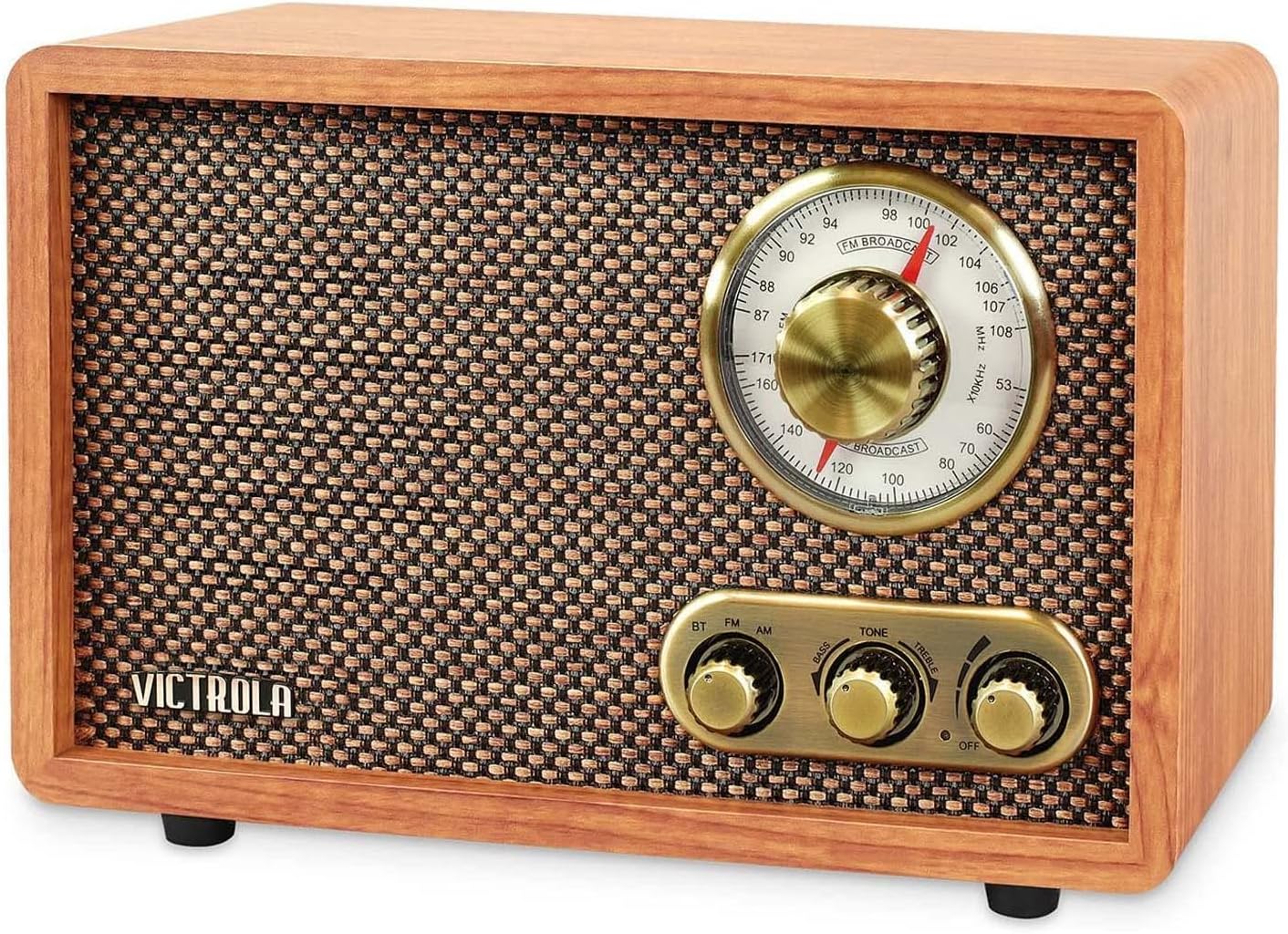
Figure 1: The Victrola Willow Retro Wood Bluetooth Radio, showcasing its classic design with a walnut finish, front speaker grille, and brass-toned control knobs and tuning dial.
2. Setup
2.1 Unpacking
Carefully remove the radio from its packaging. Ensure all components are present and inspect the unit for any signs of damage. Keep the packaging materials for future transport or storage.
2.2 Power Connection
The Victrola Willow is powered by a corded electric connection. Locate the power input on the back of the unit and securely plug in the provided power cord. Connect the other end of the power cord to a standard wall outlet (AC 120V ~ 60Hz).
2.3 Antenna
The radio features a built-in wire antenna that extends directly from the wooden cabinet. For optimal FM reception, fully extend this wire and position it for the best signal. The antenna is not detachable.
2.4 Placement
Place the radio on a stable, flat surface away from direct sunlight, heat sources, and excessive dust or moisture. For best audio performance, ensure the front speaker grille is unobstructed. Positioning the unit near a window may improve radio reception.
3. Operating Instructions
3.1 Power On/Off and Volume Control
The leftmost knob on the front panel serves as both the power switch and volume control. Rotate this knob clockwise to turn the unit on and increase the volume. Rotate it counter-clockwise to decrease the volume and turn the unit off when fully turned down.
3.2 Source Selection (BT/FM/AM)
The leftmost knob also functions as the source selector. Turn this knob to choose between Bluetooth (BT), FM radio, or AM radio modes.
3.3 Bluetooth Operation
- Switch the source knob to 'BT' mode. The radio will enter pairing mode, indicated by a flashing blue light.
- On your Bluetooth-enabled device (smartphone, tablet, laptop), enable Bluetooth and search for available devices.
- Select 'Victrola Willow' from the list. Once connected, the blue light will become solid.
- You can now stream audio wirelessly from your device to the radio.

Figure 2: The Victrola Willow radio demonstrating its Bluetooth connectivity, allowing users to stream music wirelessly from their smartphones and other devices.
3.4 AM/FM Radio Tuning
- Switch the source knob to 'FM' or 'AM' mode.
- Use the large rotary tuning dial to scan for radio stations. The dial features a clear frequency display for precise tuning.
- Adjust the position of the wire antenna for optimal reception.

Figure 3: An illustration of the Victrola Willow radio, highlighting its compact dimensions (9.5" W x 4.9" D x 6.3" H) and key features such as premium bass and treble sound, 33-foot Bluetooth range, and analog tuner.
3.5 Tone Control (Bass/Treble)
The rightmost knob on the front panel allows you to adjust the audio tone. Rotate this knob towards 'Bass' to enhance low frequencies or towards 'Treble' to emphasize high frequencies, customizing the sound to your preference.
4. Maintenance
4.1 Cleaning
To clean the radio, gently wipe the exterior with a soft, dry cloth. Do not use abrasive cleaners, waxes, or solvents as they may damage the finish. For the speaker grille, use a soft brush to remove dust.
4.2 Storage
If the radio will not be used for an extended period, unplug it from the power outlet. Store it in a cool, dry place, ideally in its original packaging, to protect it from dust and damage.
5. Troubleshooting
| Problem | Possible Cause | Solution |
|---|---|---|
| No power | Power cord not securely connected; outlet not active. | Ensure power cord is fully plugged into the radio and a working wall outlet. Check if the volume knob is turned on. |
| No sound | Volume too low; incorrect source selected; device not playing audio. | Increase volume. Verify the correct source (BT, FM, AM) is selected. Ensure your connected Bluetooth device is playing audio. |
| Poor radio reception | Antenna not optimally positioned; interference. | Fully extend and reposition the wire antenna. Try moving the radio to a different location to reduce interference. |
| Bluetooth connection issues | Radio not in BT mode; device not paired; device out of range. | Ensure the radio is set to 'BT' mode. Confirm 'Victrola Willow' is selected on your device's Bluetooth settings. Keep your device within approximately 10 feet (3 meters) of the radio for stable connection. |
6. Specifications
- Brand: Victrola
- Model Number: VRS-2800-WLN
- Product Dimensions: 9.5 x 4.9 x 6.3 inches (24.13 x 12.45 x 16.0 cm)
- Item Weight: 2.83 pounds (1.28 kg)
- Color: Walnut
- Connectivity Technology: Bluetooth
- Tuner Technology: AM/FM (2-Band)
- Power Source: Corded Electric
- Included Components: Bluetooth Stereo Radio Unit
7. Warranty and Support
For detailed warranty information, technical support, or service inquiries, please refer to the official Victrola user manual PDF available online or contact Victrola customer support directly. You can often find support contact details on the manufacturer's website or within the original product packaging.
For additional resources, you may visit the Victrola Store on Amazon.
Ask a question about this manual
Ask about setup, troubleshooting, compatibility, parts, safety, or missing instructions. Manuals+ will review the question and use this page’s manual context to help answer it.