1. Introduction
This manual provides detailed instructions for the safe and efficient use of your ROCKPALS SP003 100W Portable Solar Panel. Please read this manual thoroughly before operating the device and retain it for future reference.
2. Product Overview
2.1 What's Included
- 1 x ROCKPALS 100W Foldable Solar Charger
- 1 x 5.5 * 2.36mm DC Adapter
- 1 x MC4 to 5.5*2.1mm DC Adapter
- 1 x 8mm DC Adapter for Goal Zero 100/150/400/Jackery Explorer 160/240/300/500
- 1 x User Manual (this document)
2.2 Key Features
- High Conversion Efficiency: Up to 23% efficiency with monocrystalline silicon solar cells.
- Wide Compatibility: Includes 10 different DC connectors for various solar generators (e.g., Jackery, EcoFlow, Bluetti, Anker, Goal Zero).
- Smart Charging Technology: Built-in IC chip for optimized charging speed and protection from overcharging and overloading.
- Multiple Outputs: 18W USB QC 3.0, 18W Type-C, and 100W DC output.
- Foldable & Portable Design: Lightweight (5.1 lbs), with a handle and hanging holes for easy transport and setup.
- Durable & Water-Resistant: Made from 1200D Oxford cloth with an IP65 water-resistant rating (junction box is not waterproof).
- Parallel Connection Capability: Connect two SP003 panels for increased power output.
3. Safety Information
Please observe the following safety precautions to prevent injury and damage to the product:
- Do not attempt to modify or disassemble the solar panel.
- Keep the junction box dry. It is not waterproof.
- Avoid exposing the solar panel to extreme heat sources or open flames.
- Do not step on or place heavy objects on the solar panel.
- Ensure proper ventilation around the panel during operation to prevent overheating.
- Handle with care to avoid damage to the solar cells.
4. Setup Instructions
4.1 Unfolding the Solar Panel
Carefully unfold the solar panel from its compact, folded state. Lay it flat or prop it up using its integrated kickstands (if available) or external supports to face the sun.
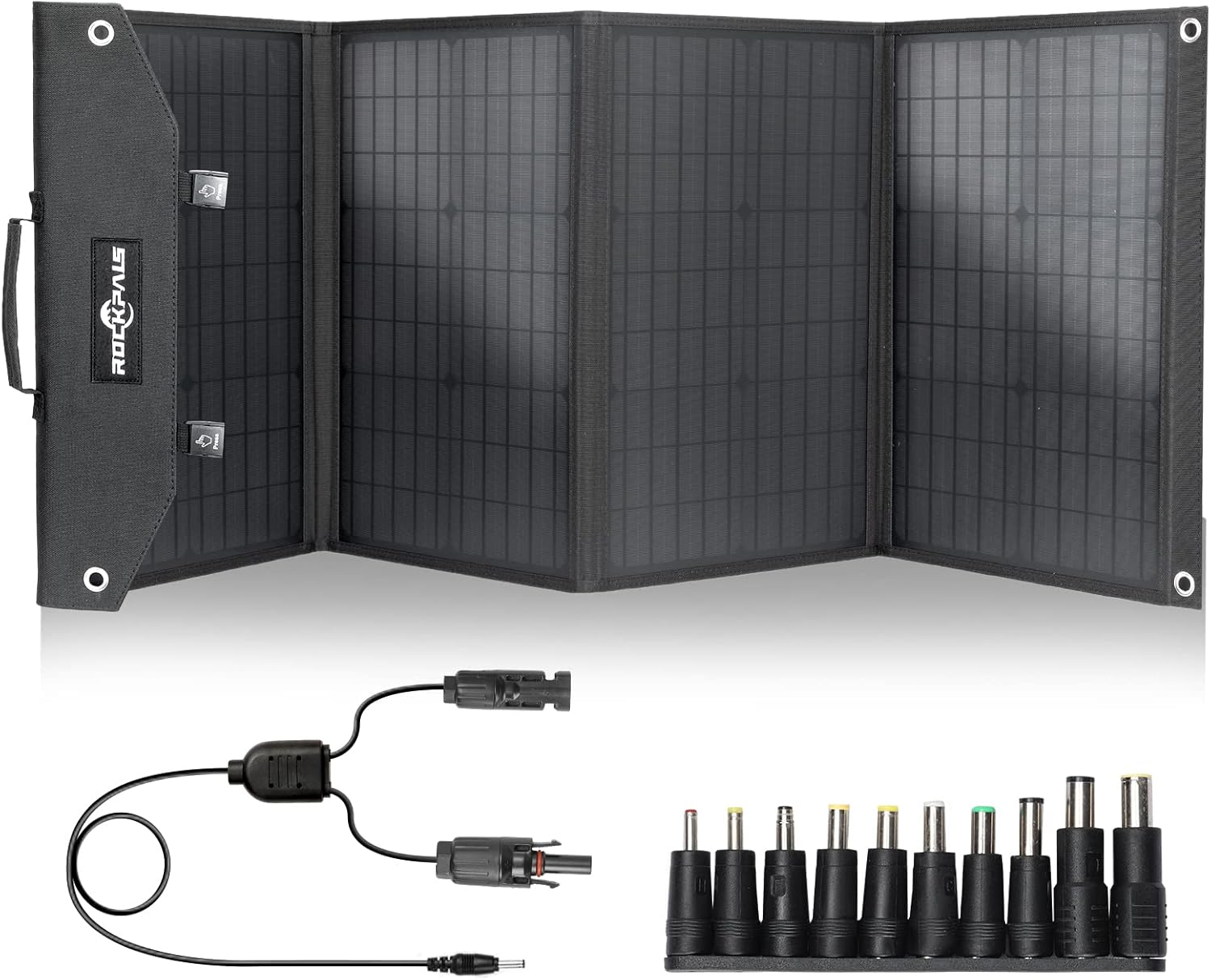
Image: The ROCKPALS SP003 100W Portable Solar Panel unfolded, showing its four segments and the included DC adapters for various devices.
4.2 Positioning for Optimal Sunlight
For maximum power output, position the solar panel directly towards the sun. Adjust the angle periodically as the sun moves across the sky. An angle of approximately 45-50 degrees to the ground is often optimal, depending on your location and time of day.

Image: A person setting up the ROCKPALS SP003 solar panel in an outdoor environment, demonstrating its portable use with a power station.
4.3 Connecting to Devices
Identify the appropriate adapter for your solar generator or USB device. Connect the solar panel's output cable to the chosen adapter, then connect the adapter to your device.
- For Solar Generators: Use the provided DC adapters (8mm, 5.5*2.1mm, etc.) to match your power station's input port.
- For USB Devices: Use the built-in USB QC 3.0 or Type-C ports on the junction box.

Image: A visual guide illustrating the wide range of DC connector types included with the solar panel, ensuring compatibility with various power stations.
4.4 Parallel Connection (Optional)
To increase power output, you can connect two ROCKPALS SP003 100W solar panels in parallel using a professional parallel connector (sold separately). This can provide up to 200W of power for faster charging of high-capacity power stations.

Image: Two ROCKPALS SP003 solar panels set up in parallel, demonstrating how to achieve higher power output for charging devices in an outdoor setting.
5. Operating Instructions
5.1 Charging Devices
Once the solar panel is set up and connected, it will automatically begin charging your connected devices when exposed to sufficient sunlight. The built-in smart IC chip will optimize the charging speed.

Image: A person using the ROCKPALS SP003 solar panel to charge multiple devices simultaneously, highlighting its versatility with various output ports.
5.2 Monitoring Charging Performance
The actual power output depends on sunlight intensity, panel angle, and temperature. For best results, ensure the panel is in direct sunlight and adjust its position throughout the day.

Image: An infographic detailing the construction of the solar panel, showing its 23% high solar conversion rate through layers of PET and Grade A Monocrystalline Cells.
6. Maintenance
6.1 Cleaning
Regularly clean the surface of the solar panel to remove dust, dirt, or debris that may reduce efficiency. Use a soft, damp cloth. Do not use harsh chemicals or abrasive materials.
6.2 Storage
When not in use, fold the solar panel and store it in a dry, cool place away from direct sunlight and moisture. Ensure the panel is clean before storage.

Image: A person carrying the folded ROCKPALS SP003 solar panel by its handle, illustrating its compact and portable design for easy transport.
7. Troubleshooting
7.1 Low Power Output
- Check Sunlight: Ensure the panel is in direct, unobstructed sunlight. Clouds, shade, or dirty surfaces can significantly reduce output.
- Adjust Angle: Reposition the panel to face the sun directly.
- Clean Surface: Wipe the solar panel surface clean of any dust or debris.
- Temperature: High temperatures can slightly reduce efficiency. Ensure adequate airflow around the panel.
7.2 Device Not Charging
- Check Connections: Verify all cables and adapters are securely connected.
- Correct Adapter: Ensure you are using the correct DC adapter for your specific power station.
- Device Compatibility: Confirm your device is compatible with the solar panel's output specifications.
- Junction Box Dry: Ensure the junction box is dry, as it is not waterproof.
8. Specifications
| Brand | ROCKPALS |
| Model | SP003 (PA-SP003) |
| Material | Monocrystalline Silicon |
| Maximum Power | 100 Watts |
| Output Voltage | 18 Volts (DC) |
| Maximum Voltage | 21.6 Volts |
| Efficiency | Up to 23% |
| Product Dimensions (Unfolded) | 64.5"L x 20.5"W x 1.2"H |
| Product Dimensions (Folded) | 17.08"L x 14.43"W x 2.15"H |
| Item Weight | 5.1 Pounds |
| Water Resistance | IP65 (Junction box not waterproof) |
| Included Adapters | 8mm DC, 5.5*2.1mm DC, MC4 to 5.5*2.1mm DC, 5.5*2.36mm DC |
| Output Ports | 1x 18W USB QC 3.0, 1x 18W Type-C, 1x 100W DC |
9. Warranty and Support
ROCKPALS products come with a manufacturer's warranty. For specific warranty details, product support, or service inquiries, please refer to the official ROCKPALS website or contact their customer service directly. Keep your purchase receipt for warranty claims.
For further assistance, you may visit the ROCKPALS Store on Amazon.