Introduction
This manual provides essential instructions for the setup, operation, and maintenance of your LG 43UK6500MLA.AEE 43-inch 4K UHD LED TV. Please read this manual thoroughly before operating your television to ensure safe and correct use. Keep this manual for future reference.
The LG 43UK6500MLA.AEE features a 43-inch 4K Ultra HD LED display, Active HDR for enhanced picture quality, and the intuitive WebOS 4.0 smart TV platform. It includes a QuadCore Processor, TruMotion 100Hz, Wide Color Gamut, and Bluetooth connectivity.
What's in the Box
Carefully unpack the box and ensure all items are present. If any items are missing or damaged, contact your dealer.
- LG 43UK6500MLA.AEE 43-inch 4K UHD LED TV
- Remote Control (Batteries not included)
- Power Cable
- Stand Components (if applicable)
- Documentation (User Manual, Warranty Card)
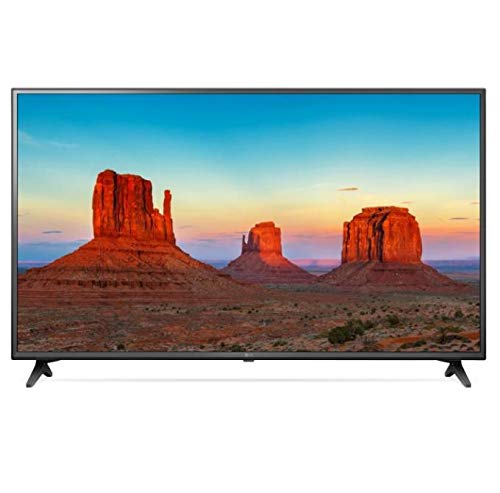
Image: LG 43UK6500MLA.AEE 43-inch 4K UHD LED TV. This image shows the television unit, typically including the screen, bezel, and a stand. A remote control may also be depicted alongside the TV.
Setup
1. Unpacking
Remove the TV and all accessories from the packaging. It is recommended to keep the packaging materials for future transport of the TV.
2. Stand Assembly (Table-top Mounting)
If you are placing the TV on a table, you will need to attach the stand. Follow these steps:
- Place the TV screen-down on a soft, flat surface to prevent scratches.
- Align the stand base with the mounting holes on the bottom of the TV.
- Secure the stand using the provided screws. Ensure all screws are tightened firmly.
Note: The TV supports table mounting. For wall mounting, a separate VESA-compatible wall mount kit (not included) is required. Refer to the wall mount kit's instructions for installation.
3. Connecting Peripherals
- Power: Connect the power cable to the TV's power input and then to a wall outlet.
- HDMI Devices: Connect external devices like Blu-ray players, game consoles, or set-top boxes to the HDMI ports on the back of the TV using HDMI cables.
- Antenna/Cable: Connect an antenna or cable TV feed to the ANTENNA/CABLE input.
- Network: For internet access, connect an Ethernet cable to the LAN port or connect wirelessly via Wi-Fi during the initial setup.
- USB Devices: Connect USB storage devices to the USB port for media playback.
4. Initial Setup Wizard
After connecting the power and turning on the TV for the first time, an on-screen setup wizard will guide you through essential settings:
- Language Selection: Choose your preferred language.
- Country Selection: Select your country for correct channel tuning.
- Network Connection: Configure your Wi-Fi connection or confirm the wired connection.
- Channel Tuning: Scan for available broadcast channels.
- Time and Date: Set the correct time and date.
- Terms and Conditions: Review and accept the user agreements.
Operating Instructions
1. Remote Control Overview
The remote control allows you to access all functions of your TV. Insert two AAA batteries (not included) into the remote control, ensuring correct polarity.
- Power Button: Turns the TV on or off.
- Number Buttons: Select channels directly.
- Volume Up/Down: Adjust the sound level.
- Channel Up/Down: Change channels sequentially.
- Home Button: Access the WebOS Smart TV launcher.
- Input Button: Select input sources (HDMI, USB, TV).
- Navigation Buttons (Up/Down/Left/Right) and OK: Navigate menus and confirm selections.
- Back Button: Return to the previous screen.
- Settings Button: Access picture, sound, and general settings.
2. WebOS 4.0 Smart TV Navigation
Press the Home button on your remote to open the WebOS launcher bar at the bottom of the screen. Use the navigation buttons to scroll through apps, input sources, and other features. Select an item by pressing OK.
3. Picture and Sound Settings
To adjust picture or sound settings:
- Press the Settings button on the remote control.
- Navigate to Picture or Sound.
- Select desired options such as Picture Mode (Vivid, Standard, Cinema), Brightness, Contrast, or Sound Mode (Standard, Cinema, Music).
4. Bluetooth Connectivity
Your TV supports Bluetooth for connecting compatible audio devices like headphones or soundbars.
- Go to Settings > Sound > Sound Out.
- Select LG Sound Sync (Wireless) or Bluetooth.
- Put your Bluetooth device into pairing mode.
- Select your device from the list on the TV screen to connect.
Maintenance
1. Cleaning the TV
- Always unplug the TV before cleaning.
- Use a soft, dry cloth to wipe the screen and cabinet.
- For stubborn marks, lightly dampen the cloth with water or a mild, non-abrasive screen cleaner. Never spray cleaner directly onto the screen.
- Avoid using alcohol, benzene, thinners, or other volatile substances, as they may damage the TV.
2. Software Updates
To ensure optimal performance and access to the latest features, regularly check for software updates:
- Ensure your TV is connected to the internet.
- Go to Settings > General > About This TV > Check for Updates.
- Follow the on-screen prompts to download and install any available updates.
Troubleshooting
Before contacting service, try the following solutions for common issues:
| Problem | Possible Cause / Solution |
|---|---|
| No power / TV does not turn on. |
|
| No picture or sound from an external device. |
|
| No channels found during tuning. |
|
| Remote control not working. |
|
| Wi-Fi connection issues. |
|
Specifications
| Feature | Detail |
|---|---|
| Brand | LG Electronics |
| Model Number | 43UK6500MLA.AEE |
| Model Name | 43UK6500MLA |
| Model Year | 2018 |
| Display Technology | LED |
| Screen Size | 43 Inch (109 cm) |
| Resolution | 4K UHD (3840 x 2160) |
| Aspect Ratio | 16:9 |
| Refresh Rate | TruMotion 100Hz |
| Processor | QuadCore Processor |
| HDR Support | Active HDR |
| Color Gamut | Wide Color Gamut |
| Operating System | WebOS 4.0 |
| Connectivity | Wi-Fi, Bluetooth |
| Hardware Interface | Bluetooth |
| USB Ports | 1 |
| Audio Output Mode | Stereo |
| Speaker Configuration | 2-channel |
| Special Features | Electronic Program Guide (EPG) |
| Mounting Type | Table Mount |
| Product Dimensions (WxHxD) | 105.2 x 66 x 15.2 cm (with stand) |
| Weight | 10.92 kg |
Warranty and Support
For warranty information, please refer to the warranty card included with your product or visit the official LG website. For technical support, product registration, or service inquiries, please contact LG Customer Service through their official channels.
You can typically find contact information and support resources on the LG official website: www.lg.com/support