Introduction
The Victron Energy Blue Smart IP65 24V 8A Battery Charger is a professional, waterproof battery charger designed for a wide range of vehicles and devices. It features built-in Bluetooth for wireless monitoring and control via the Victron Connect app, high efficiency, and advanced charging algorithms including desulfation. This manual provides essential information for safe and effective use of your charger.
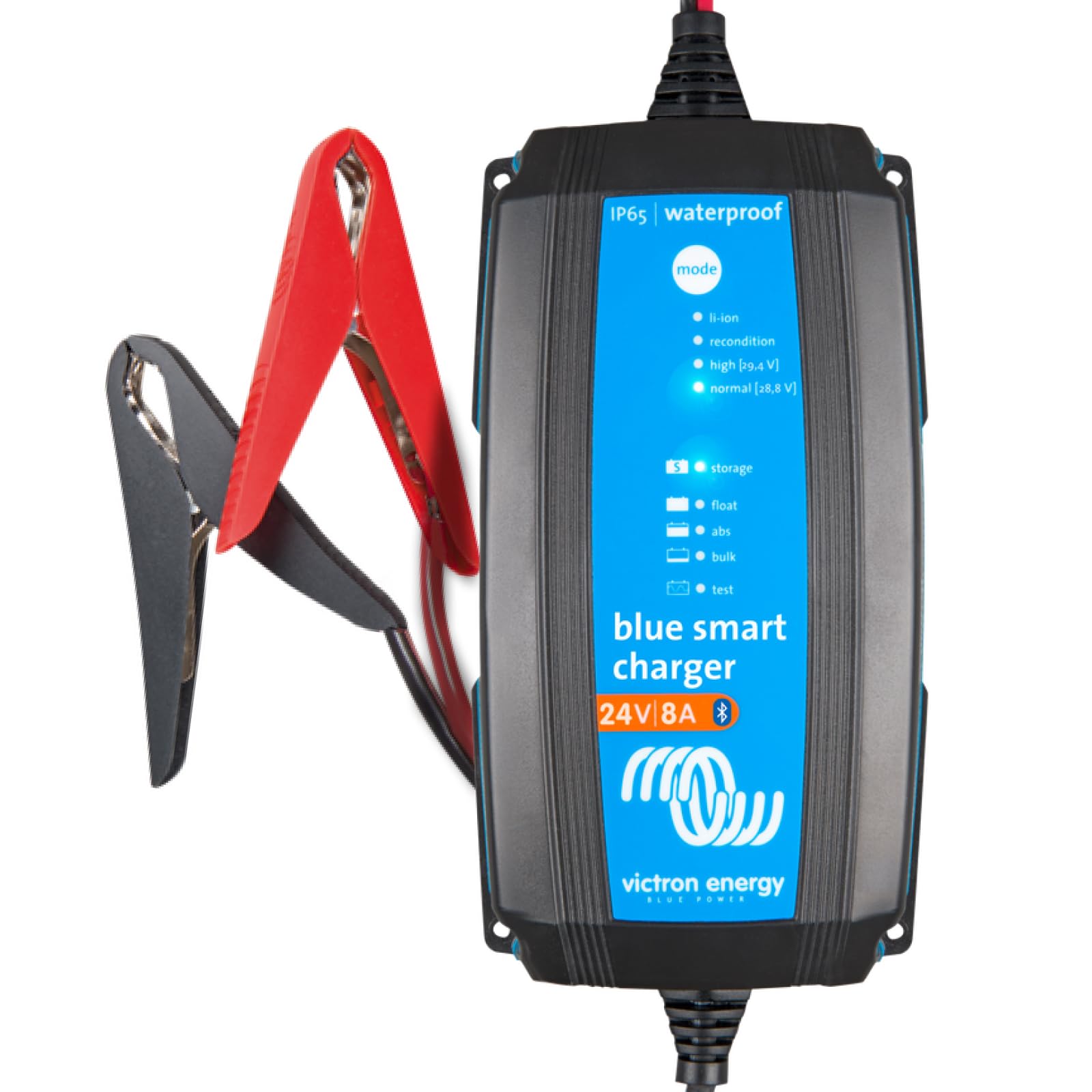
Image: Victron Energy Blue Smart IP65 24V 8A Battery Charger connected to a battery, with a smartphone displaying the Victron Connect app interface showing charging status.
What's in the Box
Upon unpacking your Victron Energy Blue Smart IP65 Charger, ensure all components are present:
- Victron Energy Blue Smart IP65 24-Volt 8 amp Battery Charger (Bluetooth)
- Easy-to-use alligator clips
- M8 eyelets for permanent connection
- Power cable with NEMA 1-15 Plug

Image: A visual representation of the items included in the product packaging, such as the charger, clamps, M8 eyelets, and power cable.
Setup
Follow these steps to set up your Victron Energy Blue Smart IP65 Charger:
- Connect to Battery: Choose between the supplied alligator clips for temporary connections or the M8 eyelets for a permanent setup. Ensure correct polarity: red to positive (+), black to negative (-).
- Connect to AC Power: Plug the charger's AC power cable into a suitable wall outlet (120VAC).
- Bluetooth Connection (Victron Connect App):
- Download the Victron Connect app from your device's app store.
- Open the app and allow it to scan for nearby Victron devices.
- Select your Blue Smart Charger from the device list. The app will connect via Bluetooth, allowing you to monitor and configure settings.
- Select Battery Type: The charger supports various battery types including Li-ion, flooded, GEL, AGM, and deep cycle batteries. Select the appropriate charging preset via the Victron Connect app or the mode button on the charger.

Image: The Victron Energy Blue Smart IP65 charger connected to a smartphone, illustrating the Bluetooth connectivity and app interface for monitoring.
Video: An official video from Victron Energy demonstrating the features and professional use of the Blue Smart IP65 Charger, including its connectivity and charging capabilities.
Operating Instructions
The Blue Smart IP65 Charger offers various operating modes and features for optimal battery care:
- Charging Modes: The charger features an intelligent 7-step charge algorithm. Use the 'mode' button on the charger or the Victron Connect app to select the appropriate preset for your battery type: Li-ion, Recondition, High (for specific flooded lead batteries), or Normal (for GEL and AGM batteries).
- Monitoring with Victron Connect App: The app provides real-time data on voltage, current, and charge status (Bulk, Absorption, Float, Storage). You can also view historical data of past charge cycles.
- Power Supply Mode: The charger can function as a power supply to power DC loads without a battery. This mode can be activated and configured via the Victron Connect app.
- Advanced Settings: For users with specific battery requirements, the Victron Connect app offers an 'Expert mode' to fine-tune settings such as absorption voltage, float voltage, storage voltage, recondition voltage, and temperature compensation.

Image: A close-up of the Blue Smart IP65 charger showing the 'mode' button and LED indicators for Li-ion, Recondition, High, Normal, Storage, Float, Abs, Bulk, and Test modes.
Video: An official Victron Energy video detailing the history and settings available for Blue Smart Chargers within the Victron Connect app, including new features for monitoring and configuration.
Maintenance
To ensure the longevity and optimal performance of your Victron Energy Blue Smart IP65 Charger, consider the following maintenance guidelines:
- Environmental Protection: The IP65 rating means the charger is splash-resistant, making it suitable for use in workshops, motor, and marine vehicles. However, avoid prolonged submersion or exposure to extreme conditions beyond its rating.
- BatterySafe Feature: This feature prevents excessive gassing by automatically limiting the rate of voltage increase, contributing to battery health.
- Temperature Compensation: The charger includes temperature compensation to ensure optimal charging voltage across varying temperatures, protecting your battery.
- Regular Checks: Periodically check the charger and battery connections for any signs of wear or corrosion. Use the Victron Connect app to monitor battery health and charging history.

Image: The Blue Smart IP65 charger is shown being splashed with water, emphasizing its IP65 rating for water, dust, and chemical resistance.
Troubleshooting
If you encounter issues with your Victron Energy Blue Smart IP65 Charger, consider the following:
- No Power: Ensure the AC power cable is securely plugged into a live outlet. Check for tripped circuit breakers.
- Not Charging: Verify that the battery connections (alligator clips or M8 eyelets) are secure and correctly polarized. Check the selected charging mode in the Victron Connect app to ensure it matches your battery type.
- Bluetooth Connectivity Issues: Ensure Bluetooth is enabled on your smartphone and that you are within range of the charger. Restart the Victron Connect app or your phone if necessary.
- Battery Health Concerns: Use the 'History' tab in the Victron Connect app to review past charge cycles and identify any interruptions or unusual patterns. The charger's desulfation feature can help recover deeply discharged batteries.
- Overheating: While designed for high efficiency, ensure the charger has adequate ventilation, especially during prolonged high-current charging.
Video: An official Victron Energy video introducing the VRM (Victron Remote Management) portal, which allows for remote monitoring and management of Victron systems, including alerts and alarms for troubleshooting.
Specifications
| Feature | Detail |
|---|---|
| Brand | Victron Energy |
| Model Name | Victron Energy Blue Smart IP65 24-Volt 8 amp Battery Charger (Bluetooth) |
| Part Number | BPC240831104R |
| Output Voltage | 24V |
| Charge Current | 8A |
| Efficiency | Up to 94% |
| Protection Rating | IP65 (Splash-resistant, dust-resistant, chemical-resistant) |
| Connectivity | Built-in Bluetooth (Victron Connect App) |
| Battery Types Supported | Li-ion, Flooded, GEL, AGM, Deep Cycle |
| Special Features | Float & Trickle Charging, Desulfation, Power Supply Mode, BatterySafe |
| Item Dimensions (LxWxH) | 7.5 x 4.1 x 2.3 inches |
| Item Weight | 1.98 Pounds |
Warranty
The Victron Energy Blue Smart IP65 Charger comes with a manufacturer's warranty. Please refer to the warranty documentation included with your product for specific terms and conditions.
Support
For further assistance or technical support, please utilize the following resources:
- Victron Connect App: Access detailed product information, settings, and troubleshooting guides directly through the app.
- Victron Remote Management (VRM) Portal: For advanced monitoring and management of your Victron system, visit the VRM portal online.
- Victron Energy Website: Visit the official Victron Energy website for comprehensive documentation, FAQs, and contact information for customer support.