
Introduction
This instruction manual provides comprehensive guidance for the safe and effective use of your KYODOLED Locking Cash Box. Please read this manual thoroughly before operating the product and retain it for future reference.
Safety Information
- Keep keys in a secure location, separate from the cash box, to prevent unauthorized access.
- Do not force the lock mechanism. If the key does not turn smoothly, ensure it is fully inserted and aligned.
- This cash box is designed for organizing and securing small amounts of cash, coins, and documents. It is not intended for high-security storage of extremely valuable items.
- Avoid exposing the cash box to extreme temperatures or moisture, as this may damage the materials and internal components.
- Keep out of reach of children to prevent accidental injury or misuse.
Package Contents
Verify that all items are present in the package:
- KYODOLED Locking Cash Box (Model GT-CBKC-XL-BLACK)
- Keys (2 included)

Image: The KYODOLED Locking Cash Box, open with money and coins in the tray, and keys in the lock.
Setup
- Unpacking: Carefully remove the cash box and all accessories from its packaging.
- Key Identification: Locate the two keys provided. It is recommended to keep one key in a safe, separate location as a spare.
- Initial Opening: Insert one of the keys into the lock on the front of the cash box. Turn the key clockwise to unlock and lift the lid.
- Tray Inspection: The cantilever money tray will automatically lift when the lid is opened. Inspect the coin compartments and bill clips for any shipping damage.

Image: The KYODOLED cash box closed, with the two keys next to the lock.
Operating Instructions
1. Opening and Closing the Cash Box
- To Open: Insert the key into the lock and turn it clockwise. Lift the lid. The cantilever tray will automatically rise.
- To Close: Gently push the cantilever tray down until it rests flat. Close the lid firmly. Insert the key and turn it counter-clockwise to lock. Remove the key.
2. Organizing Cash and Coins
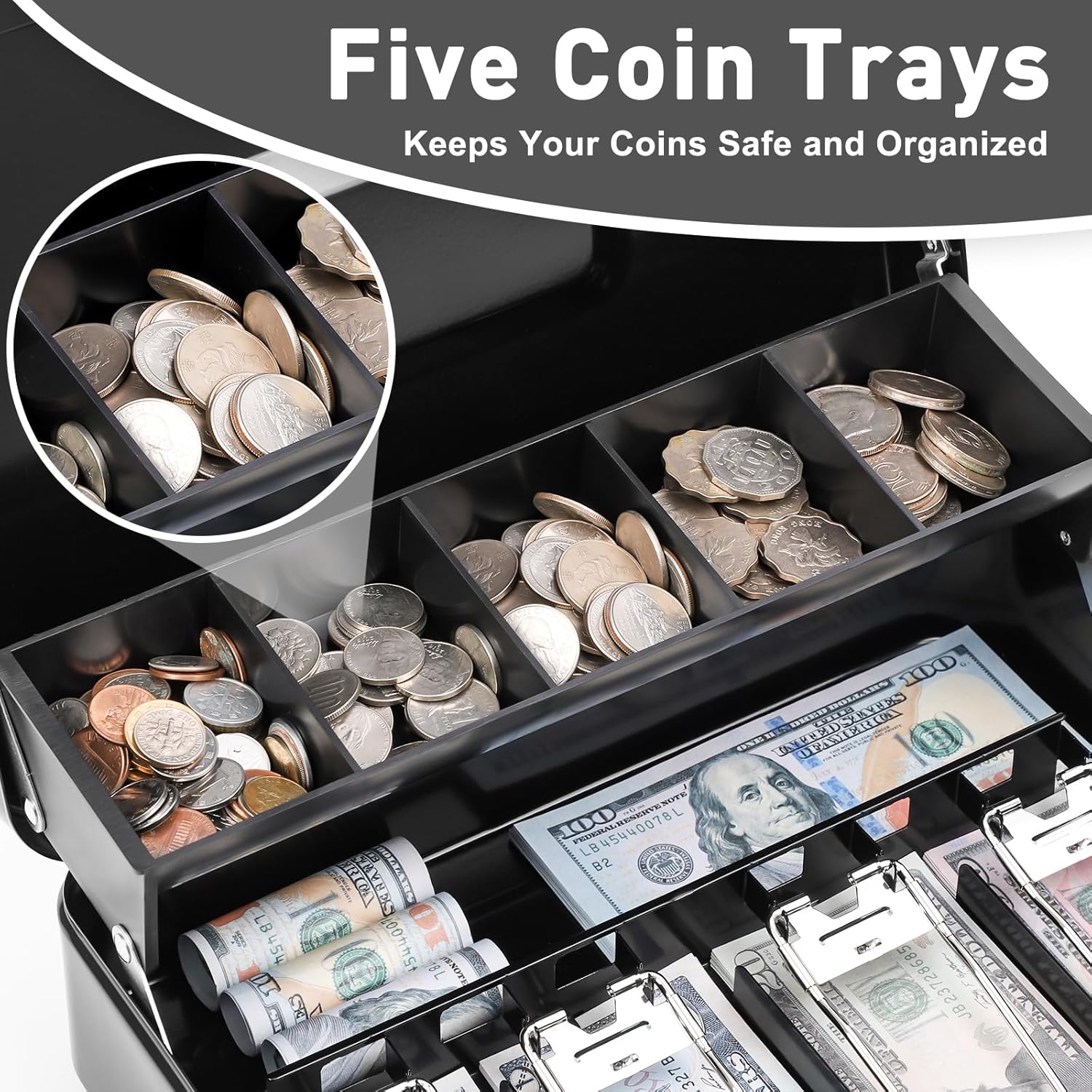
Image: Close-up of the KYODOLED cash box showing the five coin trays filled with various coins.
- Coin Tray: The top cantilever tray features five compartments designed to organize various coin denominations.
- Bill Compartments: Below the coin tray, there are four compartments with spring clips for securing paper bills. Lift the spring clip, insert the bills, and release the clip to hold them in place.
- Additional Storage: A small compartment underneath the cantilever tray provides space for additional bills, notes, receipts, or other small items.

Image: Close-up of the KYODOLED cash box showing a hand operating one of the four spring-loaded clips designed to hold paper bills securely.
3. Portability
- The cash box is equipped with a sturdy steel handle for easy and secure transportation. Ensure the box is securely locked before carrying.

Image: A person carrying the KYODOLED cash box by its sturdy steel handle, demonstrating its portability.
Maintenance
- Cleaning: Wipe the exterior of the cash box with a soft, damp cloth. Avoid abrasive cleaners or solvents that could damage the finish.
- Lock Care: Periodically, a small amount of graphite lubricant can be applied to the keyhole to ensure smooth operation of the lock. Do not use oil-based lubricants.
- Storage: When not in use, store the cash box in a dry, temperate environment.
Troubleshooting
| Problem | Possible Cause | Solution |
|---|---|---|
| Key does not turn in lock. | Key not fully inserted or misaligned; lock mechanism obstructed. | Ensure the key is fully inserted and wiggle it gently. Do not force. If necessary, apply a small amount of graphite lubricant to the keyhole. |
| Lid does not close properly. | Cantilever tray not fully lowered; items obstructing closure. | Ensure the cantilever tray is fully pushed down. Check for any items protruding from the box that prevent the lid from closing flush. |
| Spring clips do not hold bills securely. | Clips are bent or worn. | Gently adjust the clips if they appear bent. If clips are worn, consider replacing the cash box or using an alternative method for securing bills. |
Specifications
| Feature | Detail |
|---|---|
| Brand | KYODOLED |
| Model Number | GT-CBKC-XL-BLACK |
| Product Dimensions (D x W x H) | 9.45" x 11.81" x 3.54" |
| Lock Type | Key |
| Color | Black |
| Material | Alloy Steel |
| Special Feature | Portable |
| Item Weight | 3.78 Pounds |
| Included Components | Keys |
| UPC | 658392792500 |
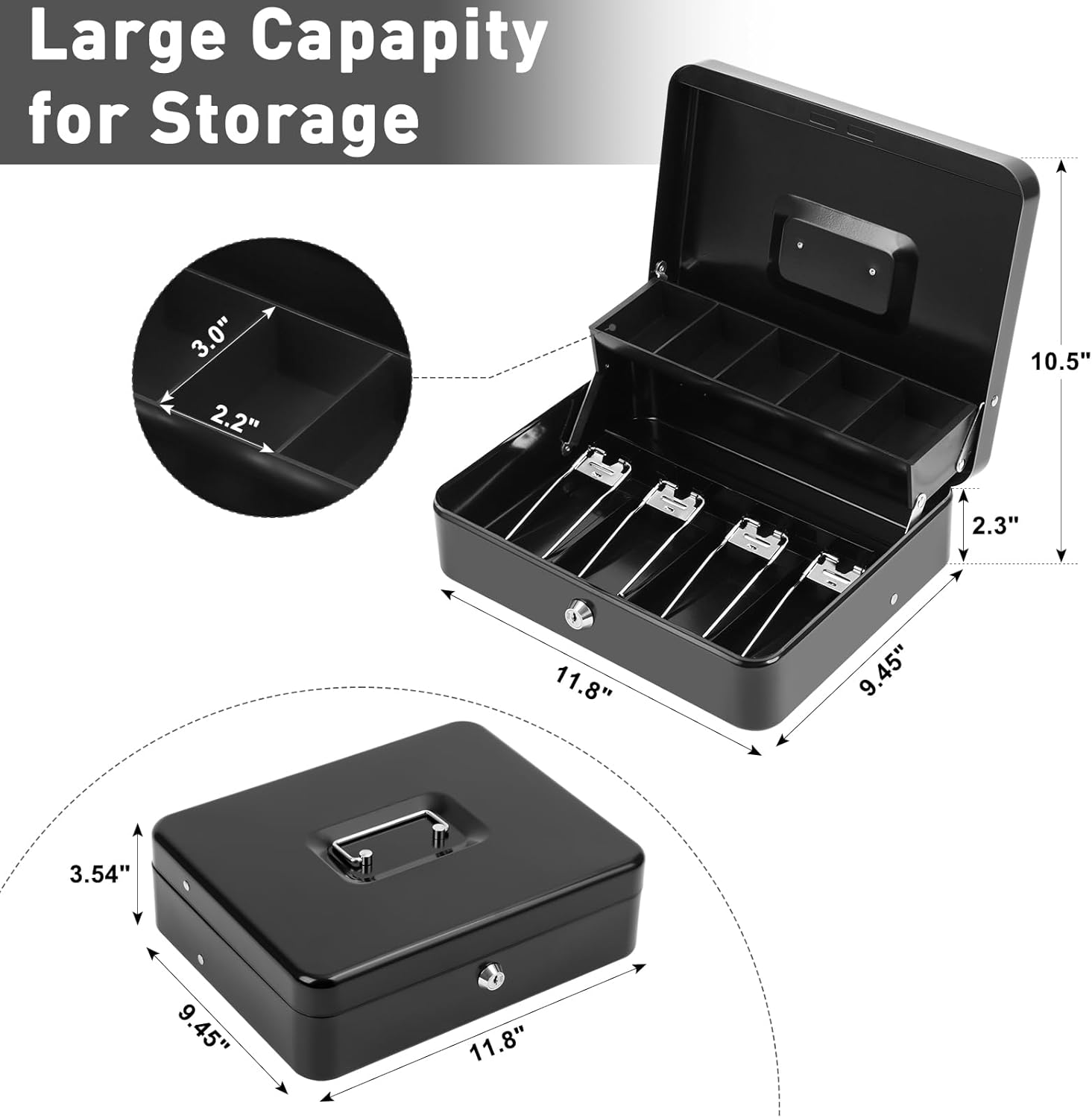
Image: A diagram illustrating the dimensions of the KYODOLED cash box, including length, width, and height, and internal tray measurements.
Warranty and Support
For warranty information or technical support, please refer to the contact information provided with your purchase or visit the official KYODOLED website. Keep your purchase receipt as proof of purchase.
Manufacturer: GTlight
Additional Resources
For more information about KYODOLED products, visit the KYODOLED Store on Amazon.