
1. Introduction
This manual provides instructions for the ECONTROLLY RM-ADP069 replacement remote control. This remote is designed to function as a direct replacement for the original Sony RM-ADP069 remote, compatible with various Sony AV (Audio/Video) systems. No programming is required; simply install batteries to begin operation.
Compatible Sony AV System Models include:
- BDV-N890W/Z, BDV-T57, BDV-F7, HBD-F7, BDV-E280, HBD-T58, BDV-T58, BDV-E580, BDV-E380, HBD-E280
- BDV-N790, BDVN790W, BDV-N790W, BDVT39, BDV-T39, BDVT79, BDV-T79
- HBDE190, HBD-E190, HBDE385, HBD-E385, HBDE390, HBD-E390, HBDN790W, HBD-N790W, HBDT39, HBD-T39, HBDT79
- BDV-T28, BDV-N790W, BDV-N890W, BDV-N990W, BDV-T57, BDV-T58
- HBDE280, HBD-E280, HBD-E3100, HB-DE3100, HBDE580, HBD-E580, HBD-F7, HBDT79, HBD-T79
- BDVE190, BDV-E190, BDVE385, BDV-E385, BDVE390, BDV-E390, BDVE490, BDV-E490, BDVN790
2. Setup and Battery Installation
The RM-ADP069 remote control requires two AAA alkaline batteries (not included). Follow these steps to install the batteries:
- Locate the battery compartment on the back of the remote control.
- Press down on the tab and slide the battery cover downwards to open it.
- Insert two new AAA alkaline batteries, ensuring the positive (+) and negative (-) terminals match the diagrams inside the compartment.
- Slide the battery cover back into place until it clicks securely.
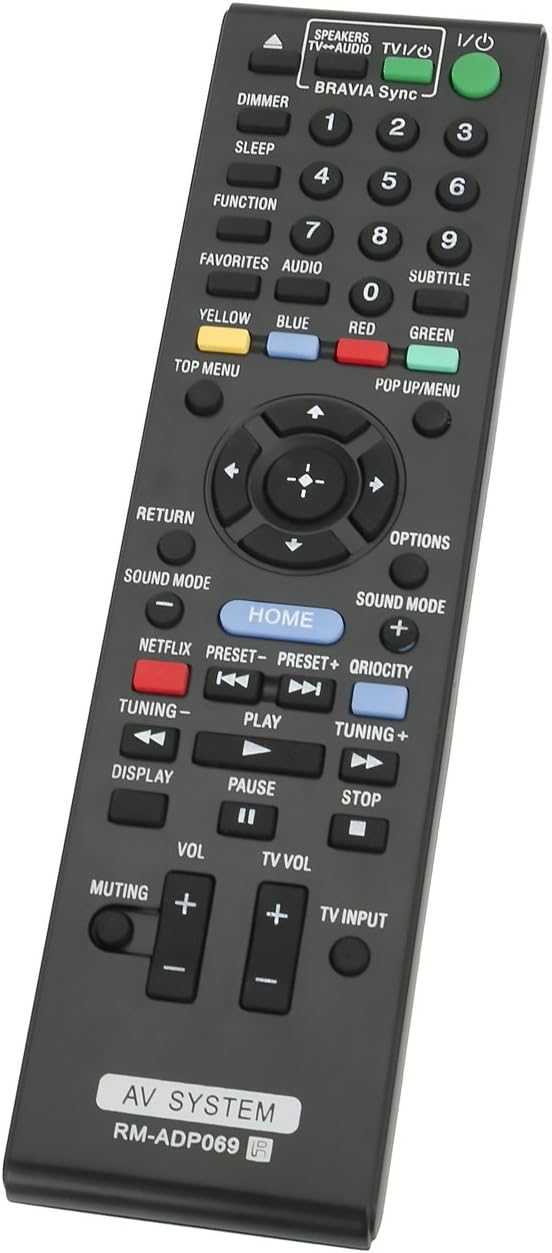
Image: Back of the remote control with the battery compartment open, illustrating correct battery placement.
Once batteries are installed, the remote is ready for immediate use with your compatible Sony AV system. No additional programming or setup is required.
3. Operating Instructions
Point the remote control directly at your Sony AV system's infrared receiver. Ensure there are no obstructions between the remote and the system. The remote operates using infrared technology with a maximum range of 33 feet (10 meters).

Image: Front view of the RM-ADP069 remote control, displaying all functional buttons.
The remote features standard controls for your AV system. Refer to the image above for button layout. Key functions include:
- Power (I/O): Turns the AV system on or off.
- Number Buttons (0-9): For direct input or channel selection.
- Navigation Pad (Up, Down, Left, Right, Enter): For menu navigation and selection.
- Volume (+/-): Adjusts the master volume.
- TV Vol (+/-): Adjusts the television volume (if connected and supported).
- Muting: Mutes or unmutes audio.
- Play, Pause, Stop, Fast Forward, Rewind: Media playback controls.
- Home: Accesses the main menu of the AV system.
- Netflix, Qriocity: Dedicated buttons for streaming services (functionality depends on AV system model).
- Sound Mode: Cycles through available sound modes.
- Display: Shows on-screen information.
- Return: Goes back to the previous screen or menu.
- Options: Accesses context-sensitive options.
- Color Buttons (Yellow, Blue, Red, Green): For specific functions within menus or applications.
- Top Menu / Pop Up/Menu: Accesses disc menus.
- TV Input: Changes the input source on the television.
4. Maintenance
To ensure the longevity and proper functioning of your remote control, follow these maintenance guidelines:
- Battery Replacement: Replace batteries when the remote's response becomes sluggish or stops working. Always use new AAA alkaline batteries. Do not mix old and new batteries, or different types of batteries.
- Cleaning: Wipe the remote control with a soft, dry cloth. For stubborn dirt, lightly dampen the cloth with water or a mild cleaning solution, then wipe dry immediately. Do not use abrasive cleaners, alcohol, or solvents.
- Storage: Store the remote in a cool, dry place away from direct sunlight and extreme temperatures. If the remote will not be used for an extended period, remove the batteries to prevent leakage.
- Avoid Damage: Do not drop the remote, expose it to water, or place heavy objects on it.
5. Troubleshooting
If you experience issues with your RM-ADP069 remote control, refer to the following common problems and solutions:
| Problem | Solution |
|---|---|
| Remote is not responding. |
|
| Some buttons are not working. |
|
| Remote has a short operating range. |
|
6. Specifications
| Feature | Detail |
|---|---|
| Brand | ECONTROLLY |
| Model Name | RM-ADP069 |
| Connectivity Technology | Infrared |
| Compatible Devices | Sony DVD/Blu-ray Player AV Systems (specific models listed in Introduction) |
| Battery Type | AAA Alkaline |
| Number of Batteries Required | 2 |
| Maximum Range | 33 Feet (approx. 10 meters) |
| Button Quantity | 20 |
| Color | Black |
| Material | ABS Environmental protection material |
| Item Weight | 1 Ounce (approx. 28 grams) |
| Item Dimensions (L x W x H) | 5"L x 1"W x 0.25"H (approx. 12.7cm x 2.54cm x 0.64cm) |
7. Warranty and Support
For warranty information or technical support regarding your ECONTROLLY RM-ADP069 remote control, please refer to the documentation provided at the time of purchase or contact the seller directly. Specific warranty terms and support channels may vary depending on your region and point of purchase.
