
Introduction
This document serves as an instruction manual for the Easytry123 Model Easytry1648 replacement remote control. It is designed to operate specific Mitsubishi air conditioner units. Please note that as a replacement unit, some advanced functions present on the original remote may not be available or fully functional.
Compatibility:
This remote control is compatible with Mitsubishi air conditioner models including, but not limited to: KM05C, KM05D, KM05E, MSZ-CGE42VA-E1, KM07M, KM05F, KM05G, KM06B, KM07K, KM09C, MUY-D36NA, MSZ-A17NA, MSZ-A24NA, MSZ-A15NA-1, MFZ-KA50VA, MLZ-KA25VA. Verify your air conditioner model number against this list for proper functionality.
Setup
Battery Installation
The remote control requires two (2) AAA batteries (not included).
- Locate the battery compartment on the back of the remote control.
- Slide the battery compartment cover downwards or outwards to open.
- Insert two AAA batteries, ensuring the positive (+) and negative (-) terminals align correctly with the markings inside the compartment.
- Close the battery compartment cover by sliding it back into place until it clicks securely.
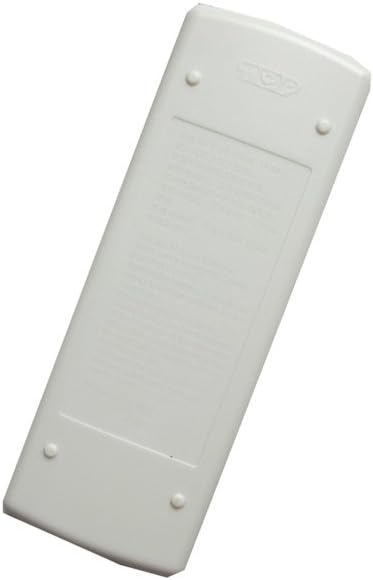
Image Description: A view of the back of the Easytry123 remote control, showing the smooth white casing and the battery compartment cover, typically located at the bottom half of the remote.
Operating Instructions
Basic Functions
Point the remote control directly at the indoor unit of your Mitsubishi air conditioner.
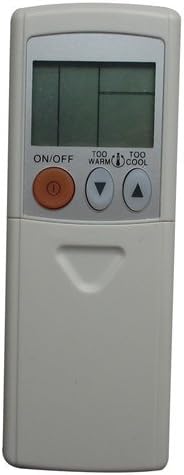
Image Description: A front view of the Easytry123 remote control, displaying a small LCD screen at the top and several buttons below it. Prominent buttons include a large orange ON/OFF button, and "TOO WARM" (down arrow) and "TOO COOL" (up arrow) buttons for temperature adjustment.
Power On/Off
Press the large orange ON/OFF button to turn the air conditioner unit on or off.
Temperature Adjustment
Use the TOO WARM (down arrow) button to decrease the temperature setting.
Use the TOO COOL (up arrow) button to increase the temperature setting.
Mode Selection

Image Description: An angled view of the Easytry123 remote control, revealing more of its buttons. In addition to the ON/OFF and temperature buttons, other visible buttons include MODE, ECONO COOL, SLEEP, FAN, VANE, TIME, and small STOP/START buttons.
The remote may feature additional buttons for mode selection (e.g., MODE, FAN, SLEEP, ECONO COOL, VANE, TIME). Press the MODE button repeatedly to cycle through available operating modes (e.g., Cool, Heat, Fan, Dry, Auto).
Fan Speed Adjustment
Press the FAN button to cycle through available fan speed settings (e.g., Auto, Low, Medium, High).
Other Functions
Depending on your specific air conditioner model and the remote's capabilities, other buttons like SLEEP, ECONO COOL, VANE, and TIME may be present. Refer to your air conditioner's original manual for detailed explanations of these functions if they are not immediately intuitive.
Maintenance
Cleaning
Wipe the remote control with a soft, dry cloth. Do not use liquid cleaners or abrasive materials, as they may damage the remote's surface or internal components.
Battery Replacement
Replace batteries when the remote's range decreases or the display becomes dim. Follow the battery installation steps outlined in the "Setup" section. Always replace both batteries at the same time with new AAA batteries.
Remove batteries if the remote control will not be used for an extended period to prevent leakage and damage.
Troubleshooting
Common Issues
- Remote not responding:
- Check battery orientation and ensure they are fresh.
- Ensure there are no obstructions between the remote and the air conditioner unit.
- Confirm the remote is pointed directly at the air conditioner's receiver.
- Limited functionality:
- As a replacement remote, some advanced features of your original air conditioner remote may not be supported. This is normal for universal or replacement remotes.
- Ensure your air conditioner model is listed in the compatibility section.
- Display is dim or blank:
- Replace the batteries.
If issues persist after troubleshooting, contact the seller or refer to your air conditioner's original manual.
Specifications
Product Specifications
- Brand: Easytry123
- Model Number: Easytry1648
- Compatible Devices: Mitsubishi Air Conditioners (specific models listed in Introduction)
- Power Source: 2 x AAA Batteries (not included)
- Special Feature: Ergonomic design
- Color: Grey
Warranty and Support
Warranty Information
This product is a replacement remote control. For specific warranty details, please refer to the purchase documentation or contact the seller directly.
Customer Support
For further assistance or inquiries, please contact your retailer or the Easytry123 customer support channel provided at the time of purchase.