
Product Overview
The SKIL Corded Multi-Function Detail Sander is designed for fine finishing on various surface contours. Its powerful 1.2 amp motor delivers 13,500 orbits per minute, ensuring smooth performance across diverse sanding applications. This 4-in-1 sander includes a micro-filtration dust box for mess reduction and features easy-to-change attachments for enhanced versatility.

Image: SKIL Multi-Function Detail Sander with included attachments.
Important Safety Instructions
Always read and understand all safety warnings and instructions before operating this power tool. Failure to follow the warnings and instructions may result in electric shock, fire, and/or serious injury.
- Wear appropriate personal protective equipment, including safety glasses, dust mask, and hearing protection.
- Ensure the work area is clean and well-lit. Cluttered or dark areas invite accidents.
- Do not operate power tools in explosive atmospheres, such as in the presence of flammable liquids, gases, or dust.
- Keep children and bystanders away while operating a power tool. Distractions can cause you to lose control.
- Always unplug the sander from the power source before making any adjustments, changing accessories, or storing the tool.
Components and Features
The SKIL Multi-Function Detail Sander comes equipped with several features designed for user convenience and effective sanding:
- 4-in-1 Versatility: Includes a standard sanding pad and three additional detail attachments (thin profile triangular pad, finger extension, flexible pad) for various surfaces and contours.
- Micro-Filtration Dust Box: Collects dust efficiently to minimize mess and maintain a cleaner work environment.
- Low Vibration Design: Ergonomic design with a soft rubber grip and counterweight balance reduces hand fatigue, allowing for longer work periods.
- Easy Sanding Sheet Change: Hook and loop system enables simple and quick changes of sanding sheets.
- Dust Sealed On/Off Switch: Ensures durability and hassle-free operation.

Image: Top view of the sander showcasing its various attachments.

Image: The sander in operation, demonstrating the micro-filtration dust collection system.
Setup and Assembly
Attaching Sanding Sheets
The sander utilizes a hook and loop system for quick sanding sheet changes. Simply align the holes on the sanding sheet with the holes on the sanding pad and press firmly to secure.
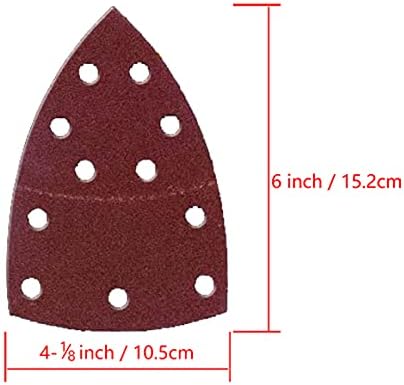
Image: Detail of a sanding pad, showing its dimensions and hole pattern.
Changing Detail Attachments
To change the sanding pad or attach a different detail accessory, locate the release mechanism on the sander's base. Press the release button/lever and slide off the current attachment. Align the new attachment with the base and slide it on until it clicks securely into place. No tools are required for this process.
Attaching the Dust Box
The micro-filtration dust box easily attaches to the dust port at the rear of the sander. Push it firmly until it is seated correctly. Ensure it is securely attached before operation to maximize dust collection efficiency.
Operating Your Sander
Once assembled, plug the sander into a standard 120V power outlet. The dust-sealed on/off switch is conveniently located for easy access during operation.
General Sanding
Hold the sander firmly with both hands. Place the sanding pad flat against the workpiece before turning the tool on. Move the sander in smooth, overlapping strokes, applying even pressure. Avoid pressing down too hard, as this can reduce efficiency and damage the workpiece or sander.
Using Detail Attachments
Utilize the specialized attachments for specific tasks:
- Triangular Pad: Ideal for reaching into corners and tight spaces.
- Finger Extension: Perfect for narrow surfaces and intricate details.
- Flexible Pad: Conforms to curved surfaces, providing a smooth finish.

Image: The 4-in-1 detail sander being used on a chair leg, demonstrating its versatility.

Image: The sander in use on a chair seat, illustrating its low vibration feature for comfortable operation.
Product Overview Video
Video: A comprehensive overview of the SKIL Multi-Function Detail Sander, demonstrating its features and capabilities.
Maintenance and Care
Emptying the Dust Box
Regularly empty the micro-filtration dust box to maintain optimal dust collection performance. To empty, detach the dust box from the sander and discard the collected sawdust. Reattach firmly before next use.
Replacing Sanding Sheets
When sanding sheets become worn or lose their abrasive quality, replace them with new ones. Simply peel off the old sheet from the hook and loop pad and apply a new one, ensuring proper alignment of the holes.
General Cleaning
Keep the sander's ventilation openings clean and free of debris to prevent overheating. Use a soft, damp cloth to clean the exterior of the tool. Do not use harsh chemicals or abrasive cleaners.
Troubleshooting
If you encounter issues with your sander, consider the following common solutions:
- Sander Not Starting: Ensure the power cord is securely plugged into a working outlet. Check the on/off switch for proper engagement.
- Poor Dust Collection: Empty the dust box if it's full. Ensure the dust box is securely attached to the sander.
- Ineffective Sanding: Replace worn sanding sheets. Ensure the correct grit sandpaper is being used for the material and desired finish.
- Excessive Vibration: Check that the sanding pad and any attachments are securely fastened. Ensure the sanding sheet is properly aligned.
For more complex issues, refer to the official user manual PDF or contact SKIL customer support.
Technical Specifications
| Specification | Value |
|---|---|
| Brand | Skil |
| Model Number | SR232301 |
| Power Source | Corded Electric |
| Voltage | 120 Volts |
| AC Adapter Current | 1.2 Amps |
| Maximum Rotational Speed | 14500 RPM |
| Product Dimensions | 7.87"L x 3.98"W x 5.63"H |
| Item Weight | 2.6 Pounds |
| Included Components | 1.2A Multi Sander, 12pcs Sanding Paper, Dust Box, 3pcs Attachment |
Warranty and Support
The SKIL Multi-Function Detail Sander (Model SR232301) comes with a 1-year limited warranty from the manufacturer. Please retain your proof of purchase for warranty claims.
For detailed warranty information, troubleshooting guides, or to contact customer support, please refer to the official user manual: